Controlling the Printer via the integrated Website (WebPanel) 59
________________________________________________________________________________________________
_______________________________________________________________________________________________
MICROPLEX Operator’s Manual logiJET T4-2 /T6-2 /RFID Edition 2.2
7.3.2. Configuration Page
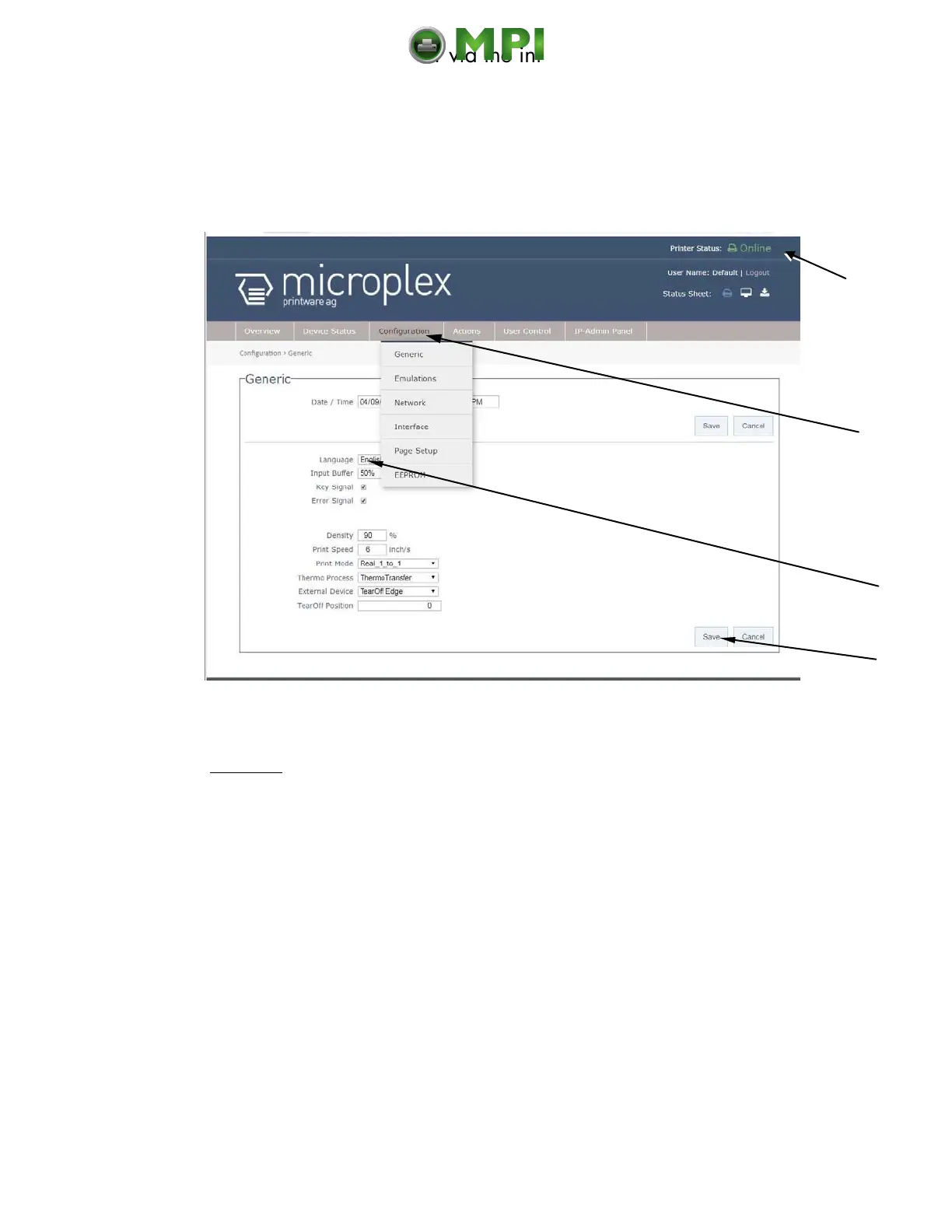
On the Configuration page a number of print system configuration parameters can
be changed.
Fig. 7.3.2.a logiJET T4-2 /T6-2: Configuration Generic page of the MICROPLEX WebPanel
Abstract:
Please „click“ on the parameter you wish to change:
Click on the „online“ status message to turn the printer offline.
(Clicking on the „offline“ message turns the printer online again).
Click on „Configuration“ and select the menu item „Generic“, to get to the
Configuration page, that is shown above.
(or click on the button „Configuration Generic“ on the Overview page of the MICROPLEX
WebPanel, compare Fig. 7.2.a)
Click the input field for the Language to change the language of the display
messages, the status sheet...
Complete the input of the function value with the Save key.
Calls up the
Configuration
pages
Mantenimiento Periféricos Informáticos C/Canteras, 15 28860 Paracuellos de Jarama (Madrid) Tel: 00 34 917481604 Web: https://mpi.com.es/



 To Next Page