Computer Connection to Device
145
OM-296747A | 4/15/24
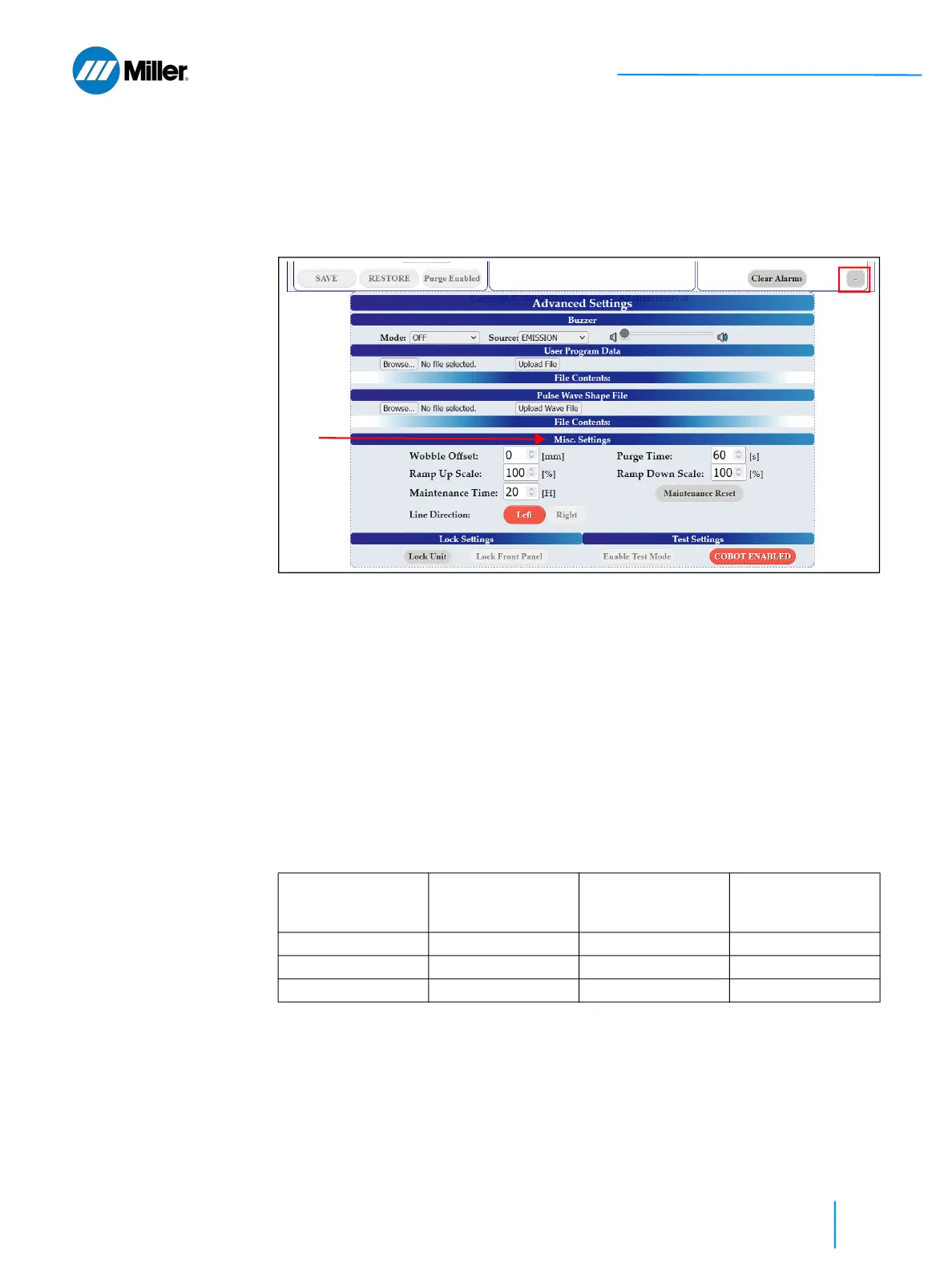
9.10 Configure Misc. Settings - Advanced
Settings
For instructions on accessing the device webpage refer to section 9.3 [▶131].
1. Click the + button on the bottom right of the main user webpage to expand
the Advanced Settings section of the webpage.
2. Go to Misc. Settings section under Advanced Settings, set the Wobble Offset.
➤ The wobble offset is along the same axis as the beam wobble and is used
to center the beam when using the wire feeder.
➤ Wobble offset must be a value within the limit of +/- 3 mm. Default value
is 0 mm (no offset).
3. Go to Misc. Settings section under Advanced Settings, set the Ramp Up Scale.
Then set the Ramp Down Scale. Refer to Table 34 [▶145].
➤ This sets global scale factors that will be applied to all user and preset
program ramp up time and ramp down time settings. This only applies to
programs that are configured to use either CW or STITCH laser mode.
➤ Scale values must be within limit of 10-200%. Default value is 100%. Refer
to table below that illustrates how the ramp scale will be applied. These
examples assume the program ramp time being scaled is 1000 ms.
4. Go to Misc. Settings section under Advanced Settings, set the Purge Time.
➤ Purge gas will turn on after user finishes welding, and only stay on for a
set time (it will also turn on for the set time once after power up). In earlier
firmware releases the purge gas was always on or always off. To prevent
excess gas usage, this purge time setting was implemented.
▼Table 34. Effects of Ramp Up Scale and Ramp Down Scale
Program Ramp Time Ramp Up Scale /
Ramp Down Scale
Scale Factor Applied
to Set Ramp Time
Actual Ramp Up
Time / Ramp Down
Time
1000 ms 10% 0.1 x 100 ms
1000 ms 100% (Default) 1 x 1000 ms
1000 ms 200% 2 x 2000 ms















 To Next Page