Maintenance
161
OM-296747A | 4/15/24
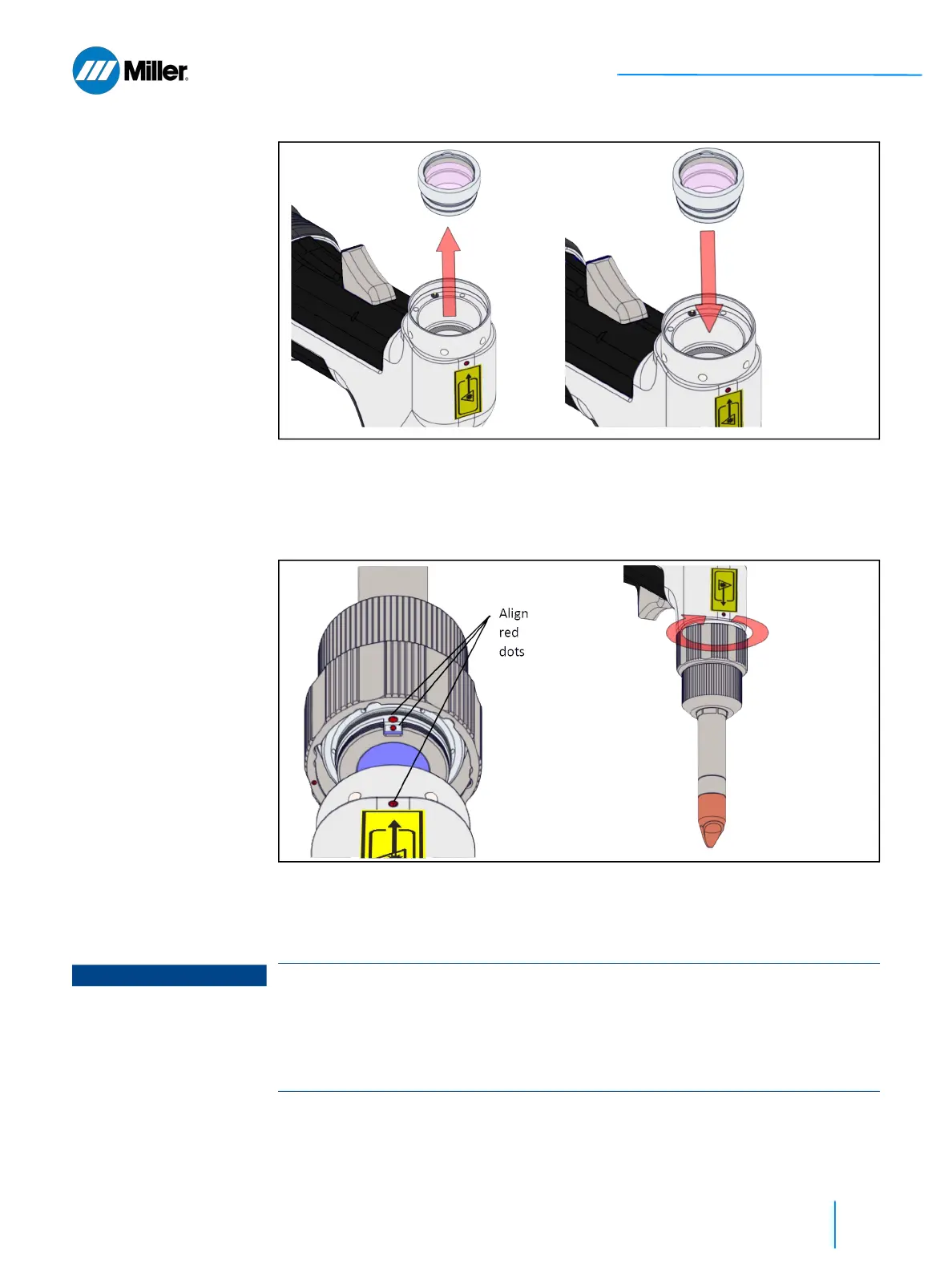
▼Figure 64. Lens Cell Replacement - Pull out damaged Lens Cell and Replace
5. Align the red dots on the nozzle assembly with the red dot on the head. See
Figure 65 [▶ 161].
6. Push the nozzle assembly over the ball bearings and twist to lock in place. See
Figure 65 [▶ 161].
▼Figure 65. Lens Cell Replacement - Align the Red Dots and Twist to Lock
End of Procedure
A.1.3 Wearing of Safety-Related Components
③ ④
⑤ ⑥
NOTICE
Replacement of safety-related components
An n
op
value is provided for wearing safety-related components (median value of
annual component actuations as per EN ISO 13849-1). If the actual median value
of annual component actuations exceeds this value, the time T
10d
must be
ascertained as per EN ISO 13849-1. Dependent on this, the safety-relevant
component must be prematurely replaced.















 To Next Page