Laser Welder Device Description
67
OM-296747A | 4/15/24
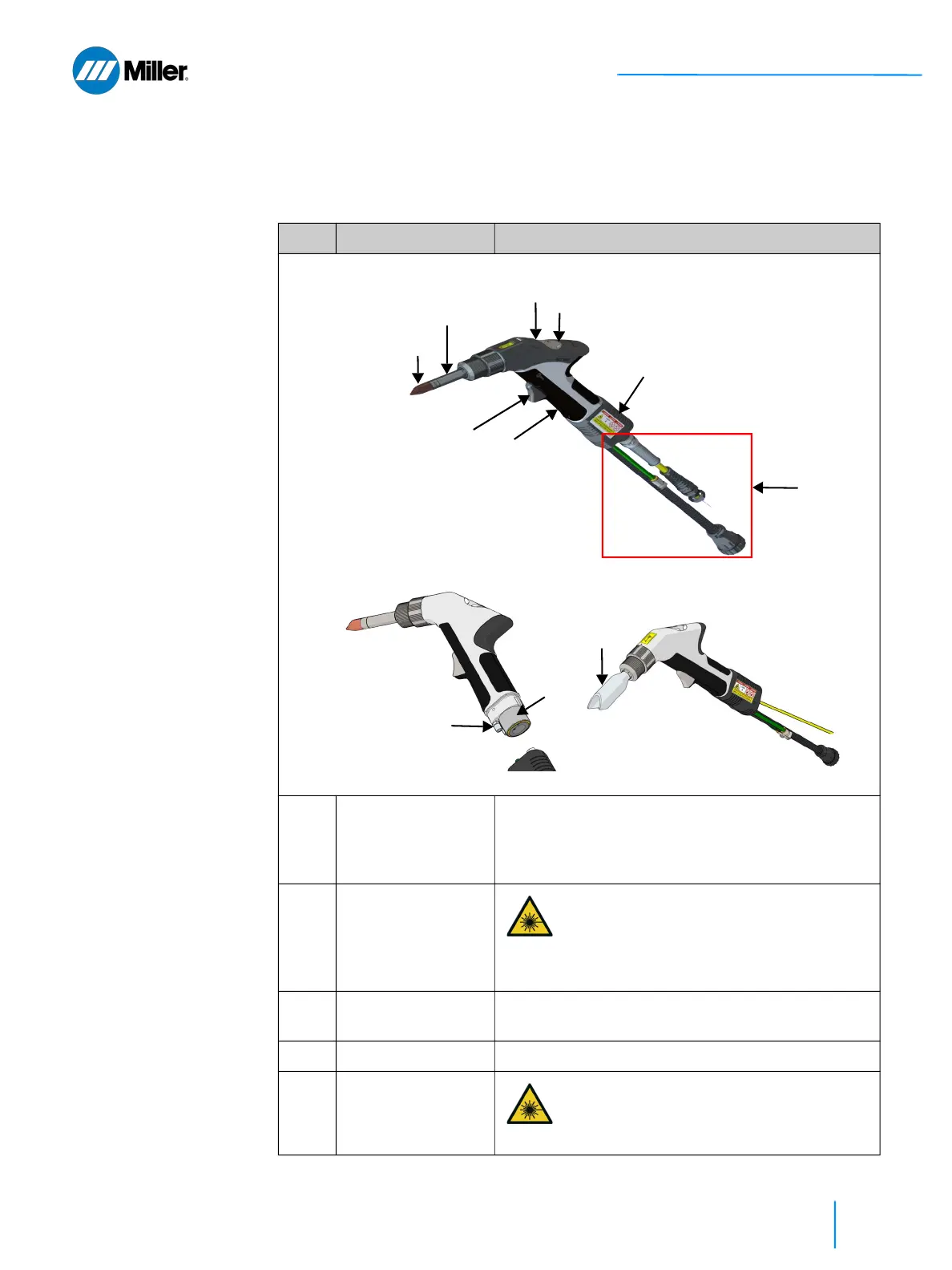
3.4 Hand Laser Torch
Refer to Table 17 [▶67] for a description of the torch features and connections.
▼Table 17. Torch Feature Descriptions
Item Feature Description
1 Trigger 1 - Start Gas
Flow
Press and hold Trigger 1 to begin shielding gas flow.
This must remain pressed throughout the welding
process. Trigger 1 should only be released once
Trigger 2 is no longer being pressed.
2 Trigger 2 - Start
Laser Emission
This switch acts as a start button for the
laser. When this is pressed, the laser will
fire provided the safety conditions are
satisfied and shield gas has been
detected for at least 1.5 second prior.
3 Nozzle Tip Five copper nozzle tips come with the system. Refer
to Table 26 [▶108] for the nozzle selection chart.
4 Extension Tube Nozzle tips are threaded onto this tube.
5 Red Emission ON
Status Indicator
This will be lit red while laser emission is
turned ON.
④
⑤
⑦
①
③
②
⑥
⑨
⑧
⑪
⑩















 To Next Page