Maintenance
166
OM-296747A | 4/15/24
A.2.3 Connecting Fiber Cable to Torch
1. Remove power from the device.
2. Before reconnecting the fiber to the torch, the technician must first perform
the cleaning procedure (section A.3 [▶167]) on the fiber output quartz block.
3. Remove storage sleeve from fiber bayonet. Leave protective cap on quartz
block.
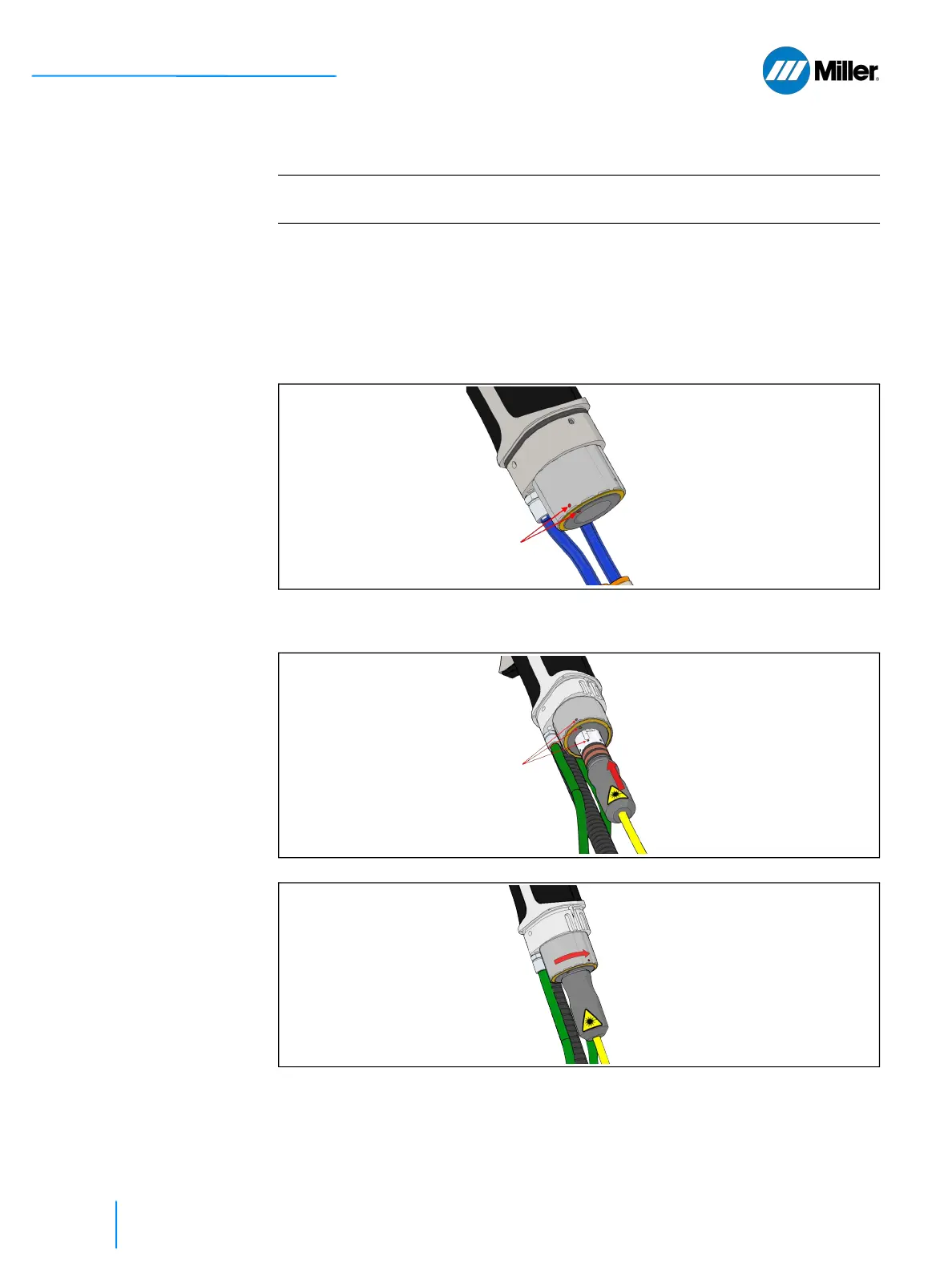
4. To reconnect the fiber output connector, please ensure the red dots on the
receiver nut are aligned as shown.
5. Insert the fiber by aligning the red dot on the fiber output connector with the
red dots on the receiver as shown. Insert the fiber output connector as far as
it will go but do not force it.
6. Rotate receiver nut as shown to lock fiber connector in place.
7. Reinstall and secure the torch boot. Do not operate the torch with the boot
not secured in place (see pictures in section A.2.2 [▶164]).
End of Procedure
IMPORTANT
Must read and follow precautions in section A.2.1 [▶163] before beginning this
procedure.















 To Next Page