Operating Front Panel Controls
97
OM-296747A | 4/15/24
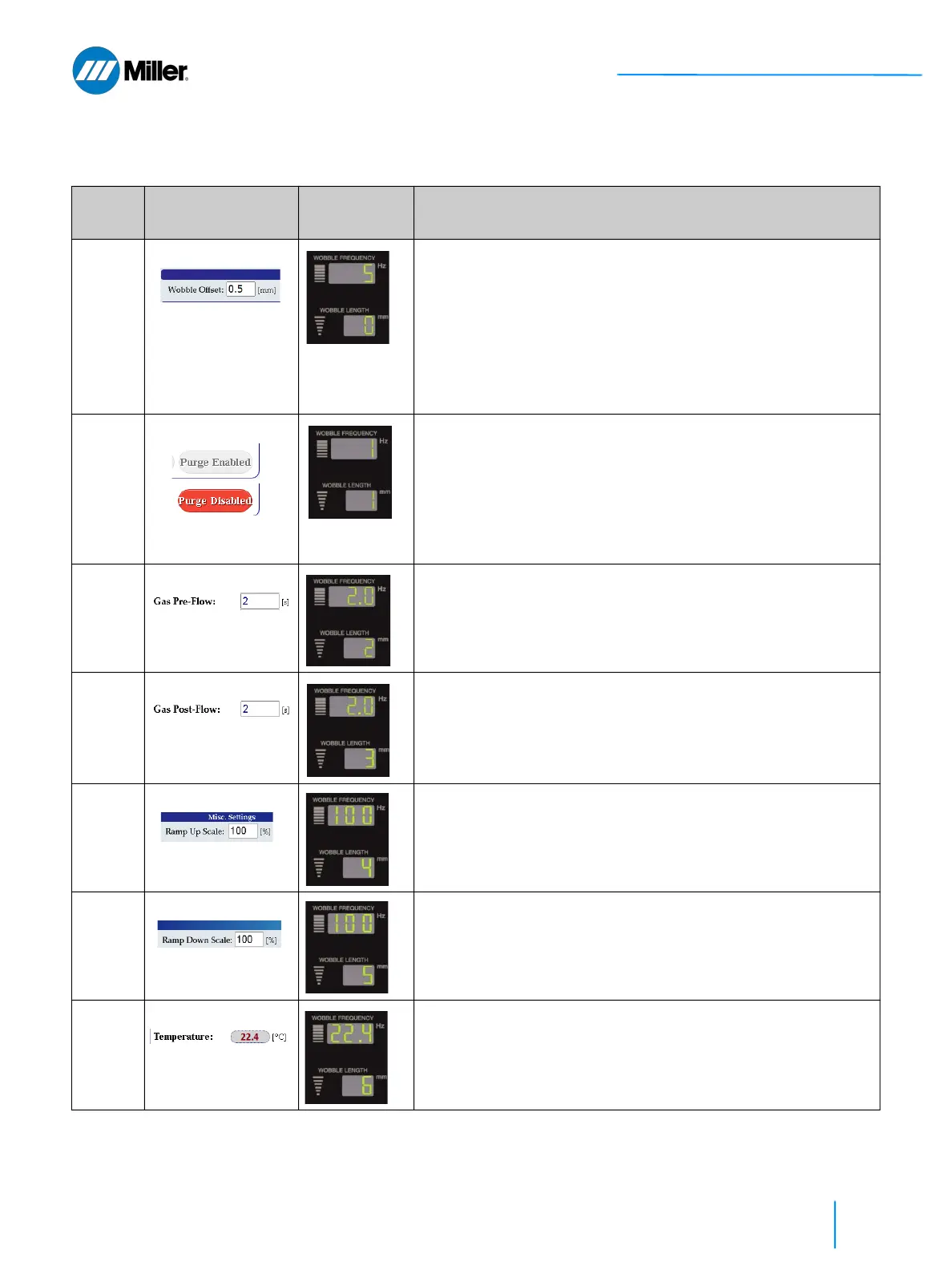
▼Table 25. Y0 Setup State Program Mode
Code # Parameter Front Panel
Displays
Explanation
User Must First Set Program Mode to Y0
0 Wobble Offset
Refer to section
9.10 [▶145].
Sets wobble offset (to center output beam when using wire
feeder).
1. Turn Wobble Length knob to Code 0.
2. Turn Wobble Frequency knob to set offset +/- 3 mm.
The value displayed is the offset multiplied by 10. Setting 5 is 0.5
mm offset. Setting 10 is equivalent to 1.0 mm offset. Setting -5
is equivalent to -0.5 mm.
3. Press and hold both the Mode Up and Down buttons simultane-
ously for 3 seconds to save setting.
1 Purge
Refer to section 9.4
[▶132].
Sets gas purge enabled/disabled.
1. Turn Wobble Length knob to Code 1.
2. Turn Wobble Frequency knob to enable/disable.
0= Purge Disabled and 1= Purge Enabled
3. Press and hold both the Mode Up and Down buttons simultane-
ously for 3 seconds to save setting.
2 Pre-Flow Gas Time
Refer to section 9.4
[▶132].
Sets pre-flow gas time (in s).
1. Turn Wobble Length knob to Code 2.
2. Turn Wobble Frequency knob to set time 0.1 - 10 s.
3. Press and hold both the Mode Up and Down buttons simultane-
ously for 3 seconds to save setting.
3 Post-Flow GasTime
Refer to section 9.4
[▶132].
Sets gas post-flow time (in s).
1. Turn Wobble Length knob to Code 3.
2. Turn Wobble Frequency knob to set time 0.1 - 10 s.
3. Press and hold both the Mode Up and Down buttons simultane-
ously for 3 seconds to save setting.
4 Ramp Up Scale
Refer to section
9.10 [▶145].
Sets the ramp up scale.
1. Turn Wobble Length knob to Code 4.
2. Turn Wobble Frequency knob to set scale 10 - 200%.
3. Press and hold both the Mode Up and Down buttons simultane-
ously for 3 seconds to save setting.
5 Ramp Down Scale
Refer to section
9.10 [▶145].
Sets the ramp down scale.
1. Turn Wobble Length knob to Code 5.
2. Turn Wobble Frequency knob to set scale 10 - 200%.
3. Press and hold both the Mode Up and Down buttons simultane-
ously for 3 seconds to save setting.
6 Laser Temperature
See Table 31
[▶133].
Displays the laser temperature reading (in °C).
1. Turn Wobble Length knob to Code 6.
2. Wobble Frequency display shows the laser temperature reading.
In this example it is 22.4 °C.















 To Next Page