Control function (mixer input)
You select the mixer input in the first field simply by operating the desired control
function. Naturally, this only works if the control (actuator) has a control function
assigned. Alternatively, you can use the + / – buttons or the central wheel to
select a control function as mixer input.
Switching input
In the second field the mixer input can be configured as switchable. To do this,
simply operate the desired switch. The ON position is the switch position upon
exiting the input field. The arrow next to the switch name points in the direction of
the ON position (' or #). When the switch is switched on an asterisk "*" appears
next to the arrow.
Alternatively, you can assign the switch using the + / – buttons or the central wheel.
The switch can be reversed by pressing the REV/CLR button.
Mixer option
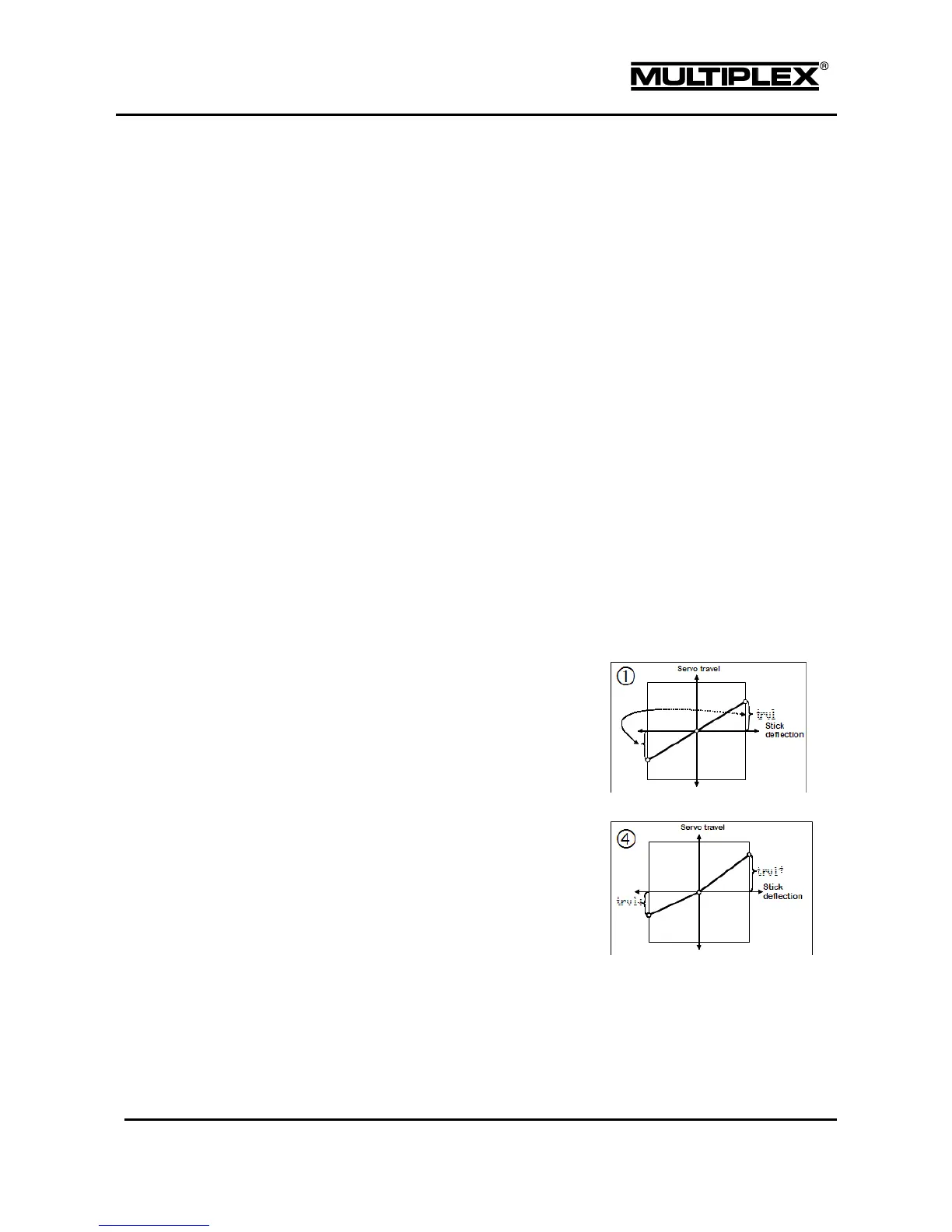
8 options are available for adapting the mixing method. The options
are represented by icons:
Symmetrical option: The neutral
position of the control function is in
the centre (aileron, elevator,
rudder). The control travels on both
sides of the neutral position are
identical.
Bilateral option: The neutral
position of the control function is in
the centre (aileron, elevator,
rudder). The travels on both sides
of the neutral position can be
configured separately.



 To Next Page