Safety
information
Product
information
Mechanical
installation
Electrical
installation
Getting
started
Basic
parameters
Running
the motor
Optimization
NV Media Card
Operation
Building
Automation
Advanced
parameters
Technical
data
Diagnostics
UL listing
information
HVAC Drive H300 167
Issue Number: 3
9 NV Media Card Operation
9.1 Introduction
The Non-Volatile Media Card feature enables simple configuration of
parameters, parameter back-up, storing / reading PLC programs and
drive copying using a SMARTCARD or SD card storing / reading PLC
programs. The drive offers backward compatibility for an Affinity
SMARTCARD.
The NV Media Card can be used for:
• Parameter copying between drives
• Saving drive parameter sets
• Saving an onboard user program
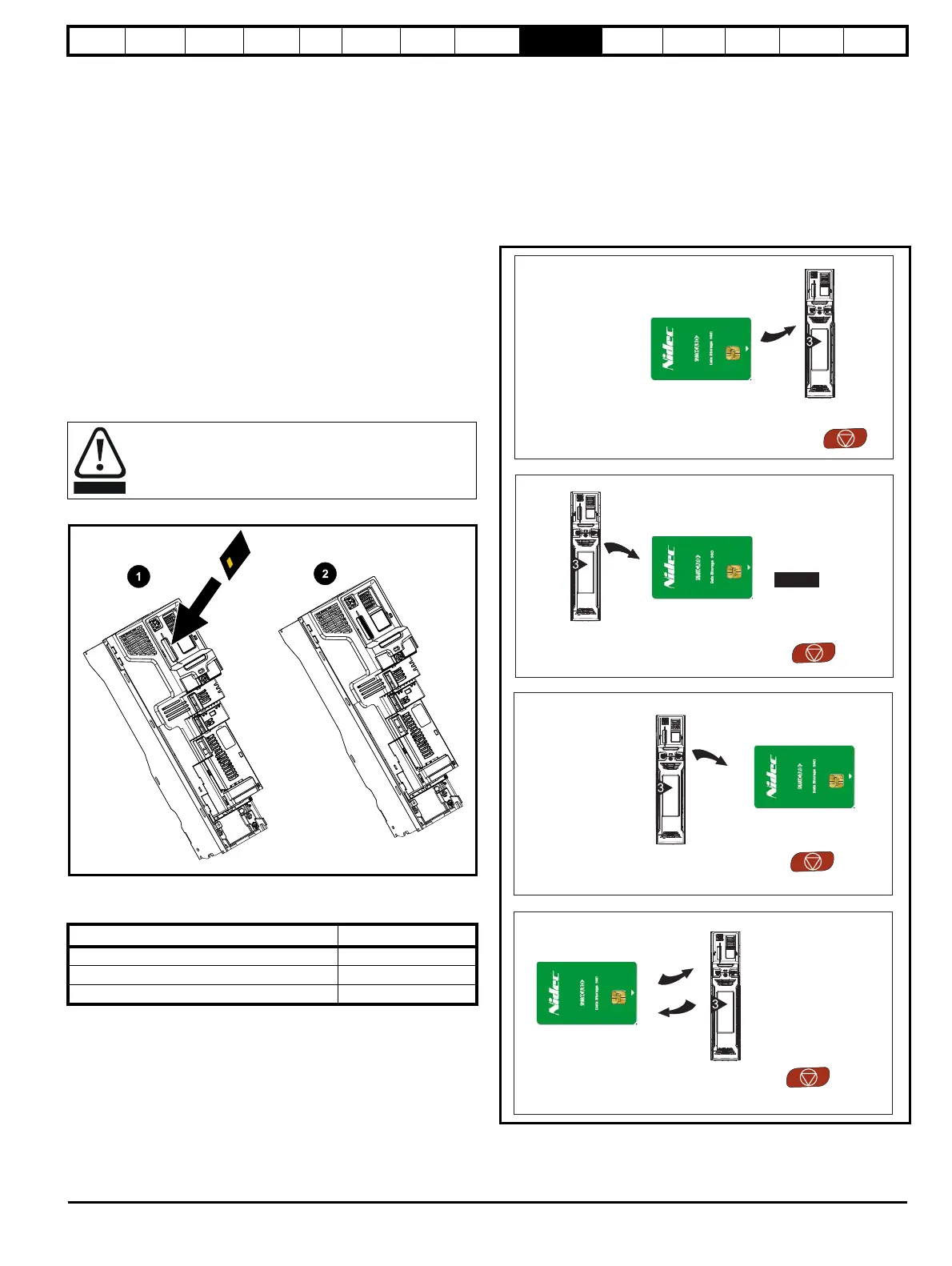
The NV Media Card is located at the top of the module under the drive
display (if installed) on the left-hand side.
Ensure the NV Media Card is inserted with the contacts facing the left-
hand side of the drive.
The drive only communicates with the NV Media Card when
commanded to read or write, meaning the card may be "hot swapped".
Figure 9-1 Installation of the NV Media Card
1. Installing the NV Media Card
2. NV Media Card installed
9.2 NV Media Card support
The NV Media Card can be used to store drive parameter sets and / or
PLC programs set from the H300 in data blocks 001 to 499 on the card.
The H300 is compatible with an Affinity SMARTCARD, and is able to
read and translate the Affinity parameter set into a compatible parameter
set for H300. This is only possible if the Affinity parameter set was
transferred to the SMARTCARD using the difference from defaults
transfer method (i.e. 4yyy transfer).
The HVAC drive H300 is not able to read any other type of Affinity data
block on the card. Although it is possible to transfer difference from
default data blocks from an Affinity into the HVAC drive H300, the
following should be noted:
1. If a parameter from the source drive does not exist in the target drive
then no data is transferred for that parameter.
2. If the data for the parameter in the target drive is out of range then
the data is limited to the range of the target parameter.
3. If the target drive has a different rating to the source drive then the
normal rules for this type of transfer apply.
Figure 9-2 Basic NV Media Card operation
Beware of possible live terminals when installing the NV
Media Card.
NV Media Card Part number
SD Card Adaptor (memory card not included) 3130-1212
8 kB SMARTCARD 2214-4246
64 kB SMARTCARD 2214-1006
Pr = Read +00.030
Drive reads all
parameters from
the NV Media Card
Pr = Program +00.030
Programs all drive
parameters to the
NV Media Card
NOTE
Overwrites any
data already in
data block 1
Pr = Auto +00.030
Auto
Save
Drive automatically
writes to the
NV Media Card
when a parameter
save is performed
Pr = Boot +00.030
Boot
Auto Save
Drive boots from the
on
power up and
automatically writes
to the NV Media Card
when a parameter
save is performed
NV Media Card














 To Next Page