Safety
information
Product
information
Mechanical
installation
Electrical
installation
Getting
started
Basic
parameters
Running the
motor
Optimization
NV Media Card
Operation
Building
Automation
Advanced
parameters
Technical
data
Diagnostics
UL listing
information
28 HVAC Drive H300
Issue Number: 3
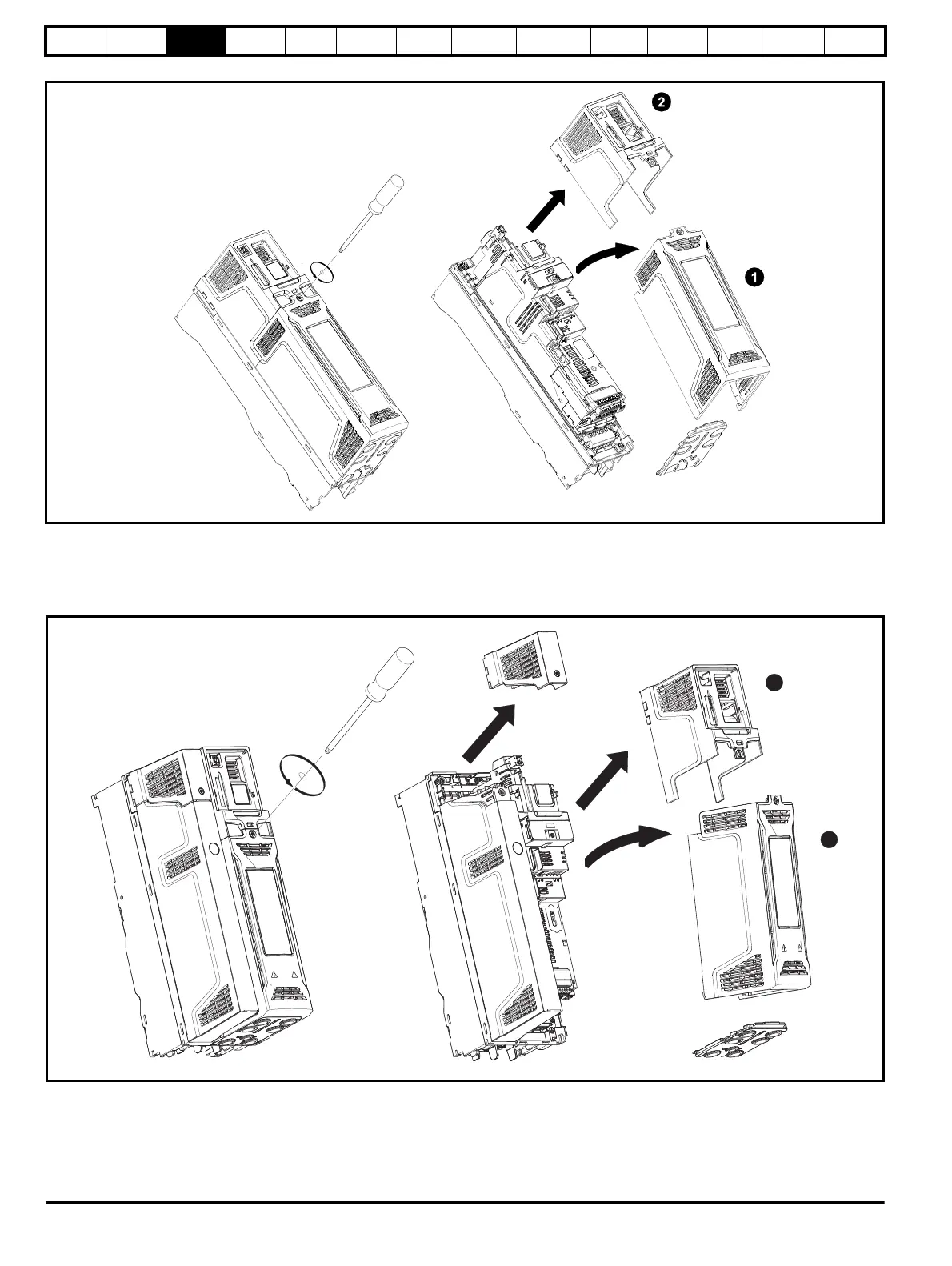
Figure 3-5 Removing the size 3 terminal covers
1. Control / AC / Motor terminal cover
2. DC cover
On size 3 drives, the Control / AC / Motor terminal cover must be removed before removal of the DC / Terminal cover. When replacing the terminal
covers, the screws should be tightened to a maximum torque of 1 N m (0.7 lb ft).
Figure 3-6 Removing the size 4 terminal covers
1. Control / AC / Motor terminal cover
2. DC cover
On size 4 drives, the Control / AC / Motor terminal cover must be removed before removal of the DC / Terminal cover. When replacing the terminal
covers, the screws should be tightened to a maximum torque of 1 N m (0.7 lb ft).














 To Next Page