MULTI GAUGE CONTROLLER OPERATION
3.4.3 TIMER WINDOW
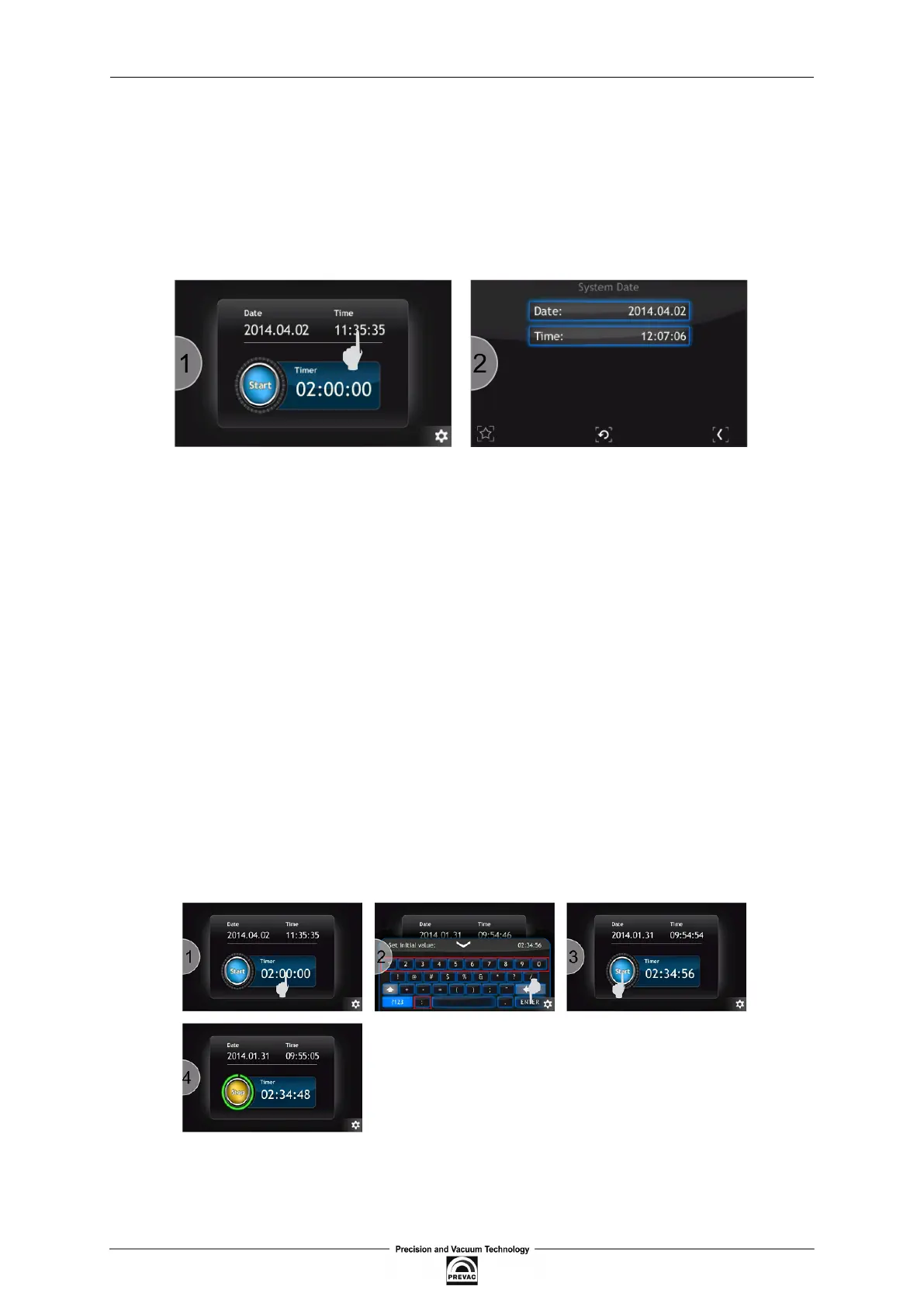
An additional window contains a timer and information on the current time and date. Elapsing time
is connected with the progress bar located around the Start/Stop button. The value of the timer can
be set in a range from 00h:00m:01s to 23h:59m:59s. After pressing the Start button time is counted
down from the set value to zero. The counting ends with an acoustic signal. When the counting ends
the timer is stopped and the value of the time which has been counted is displayed.
Figure 3.20: Entering system date
3.4.3.1 TIMER SETTING
To set the timer carry out the following operations:
1. Press the timer ield.
2. Enter a start value of the timer using the number keys from 0 to 9 and symbol ”:” as a sepa-
rator. Conirm the value by pressing the Enter button.
3. The new value has been set and displayed in the timer ield. Press Start to activate the timer.
4. The timer will start counting time.
Time can also be entered in seconds. Then, the value entered is automatically converted to the
hh:mm:ss format
Figure 3.21: Timer setting
User manual rev. 03 Page 43



 To Next Page