MULTI GAUGE CONTROLLER OPERATION
• Degassing voltage - May be set between 400 and 600V. The MG15 is used during degassing
the electron bombardment method. It is recommended to carry out degassing at the highest
voltage admissible by the gauge. At a higher voltage a lower emission current is required to
obtain the same degassing power, which affects positively the life of the ilament.
3.6.1.4 ACTIVE GAUGE SETTING
To obtain correct indications choose a gauge compatible with the physically connected one. For
that purpose click on Setup menu →Sensor →IG1 or CH3 or CH4 and select the required gauge.
The user can select one of the standard gauges or a gauge named as Deined, which enables any
gauge of a logarithmic character with 0 -10 V output to be connected (details in 3.6.1.5).
A linear gauge deined by the user can also be added. For that purpose Baratron gauges have the
FS Deined item. This item enables any Full scale parameter in Torrs to be introduced.
The MG15 enables also automatic detection of a connected gauge if it has an in-built identiication
resistor. To activate automatic detection of active gauges enter the Setup menu →Sensor →Auto
identiication and activate this option for the chosen vacuum channel. If the connected gauge has
been successfully identiied its name will be displayed in the Sensor menu and on the main window
by the relevant vacuum channel.
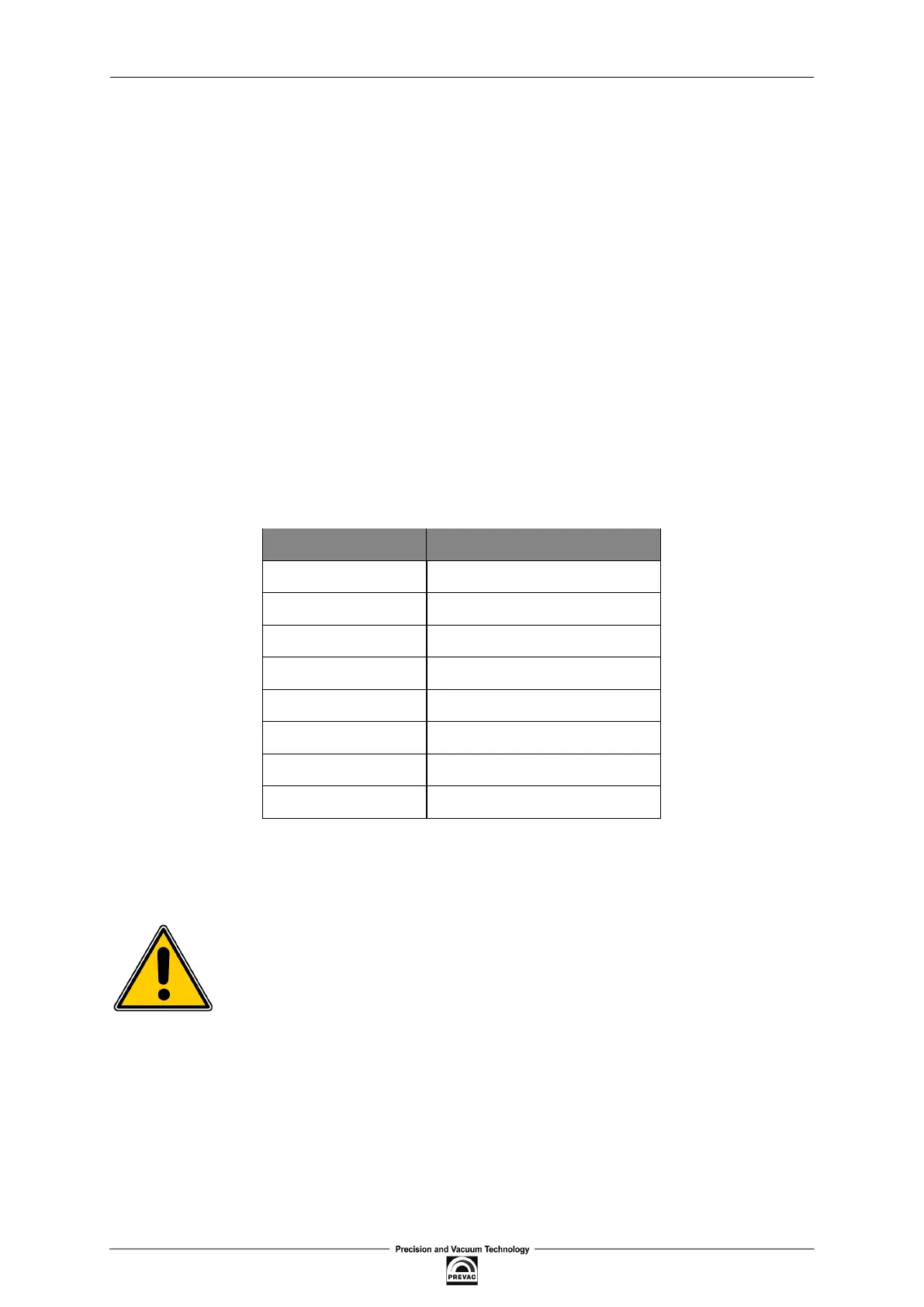
GAUGE IDENTIFYING RESISTANCE
CTR90/91 13,2k
Ω
TTR90/91/221 27kΩ
PTR225 100kΩ
PKR251/360/361 9,1kΩ
PCT280 3,01kΩ
PTR90 85kΩ
ITR90 42kΩ
IKR360/361 5,1kΩ
Table 3.1: Identifying resistances for supported gauges
For CTR90/91 gauges, if they are successfully auto-identiied, specify also the Full scale factor. It
can be done analogically to the manual selection of a gauge type.
Note
If the active gauge cannot be manually set (empty selection list), it means that
the Auto-identiication option is active.
3.6.1.5 USER-DEFINED ACTIVE GAUGE
The option enables the user to deine his own gauge. The condition is that it is a logarithmic active
gauge (0 -10 V).
To deine a gauge for the selected channel enter Setup menu →Sensor →IG1 or CH3 or CH4 →De-
ined and set accordingly the equation factors characterising the gauge:
User manual rev. 03 Page 63



 To Next Page