8-8 Set-Up SYNAX200 Ring SYNAX200
DOK-SYNAX*-SY*-07VRS**-PR01-EN-P
Setting Drive Address
The address is set at every drive (see Fig. 8-13 or Fig. 8-14). It must be
unique in each SYNAX200 ring. There may not be two drives with the
same address. Permitted addresses lie within the range of [1..40].
The machine can now be switched on.
Check Distortion Display
The next step is to check whether there is a sufficient optical level at each
participant, in other words, make sure that the receiver is neither over nor
under-controlled.
Generally, the distortion display is dark (see Fig. 8-12, Fig. 8-13 or Fig. 8-
14: LED H2, H3 ERR or H20). If it lights up, then the transmission path
"ahead of" the participant must be checked.
Control - starting with the transmitter output of the control - in signal
direction, the distortion display of the drive (see Fig. 8-13 or Fig. 8-14).
The distortion display of the PPC is the LED H2 DIST. The distortion
display of the drives is LED "H3 ERR" or "H20".
Check the first drive in the ring. If its distortion display is dark, then
proceed to the next drive. This procedure is followed until the final drive
and then the PPC is checked.
If one of the displays is not dark, then the following must be checked:
• has the transmission path been correctly set?
• has the output power of the previous drive in the ring been correctly
set?
• is the fibre-optics cable to the previous drive defective?
See section "Clearing Errors", chapter 8.4, for checking transmission
rates and output power.
8.4 Clearing Errors
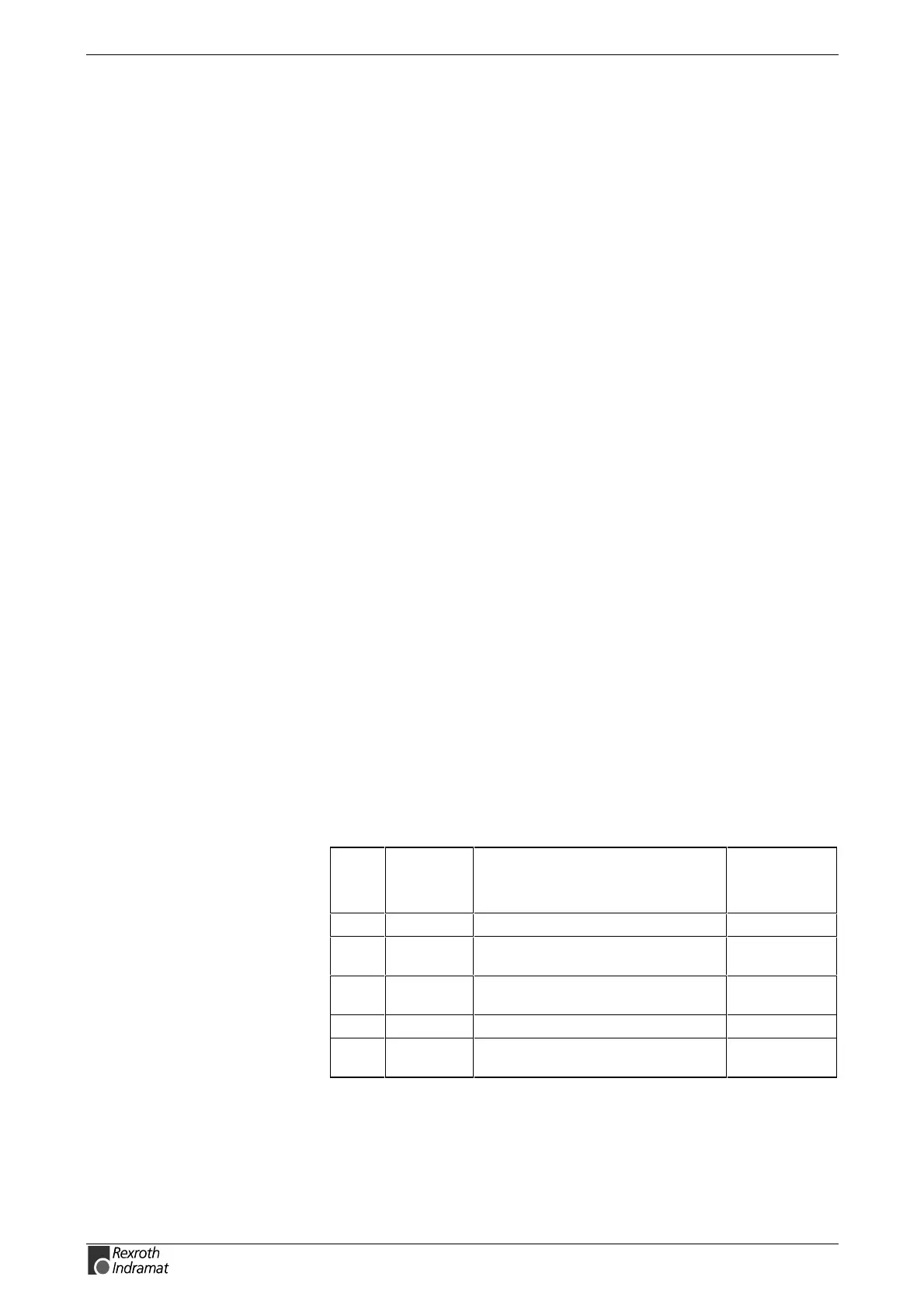
Communications errors are signalled via the following diagnoses:
Dis-
play
C-0-0048
Error
number
C-0-0047
Diagnostics text
C-0-0046
Diagnostics
info
F01 01 ""SERCOS interface - ring break" 10000h
F02 02 "SERCOS interface - no drive
connected"
10000h
F05 05 "SERCOS interface - double drive
telegram failure"
n = address
F06 06 "Fiber optic ring ring not closed" 10000h
F07 07 "drive addresses not correct
(see C-0-0002, C-0-0086)"
10000h
Fig. 8-15: Error messages generated by communications errors
Distortion display may neither
light up or glow!
Check distortion display in "light
direction



 To Next Page