Roland VS-2000 Owner’s Manual www.RolandUS.com 277
22—EZ Routing
The EZ ROUTING screens are where you go to set up the connections that allow
signals to travel within the VS-2000. This chapter provides an overview of the EZ
ROUTING screens we’ve been discussing all along, and describes the VS-2000’s helpful
EZ Routing tools.
The EZ ROUTING Screens
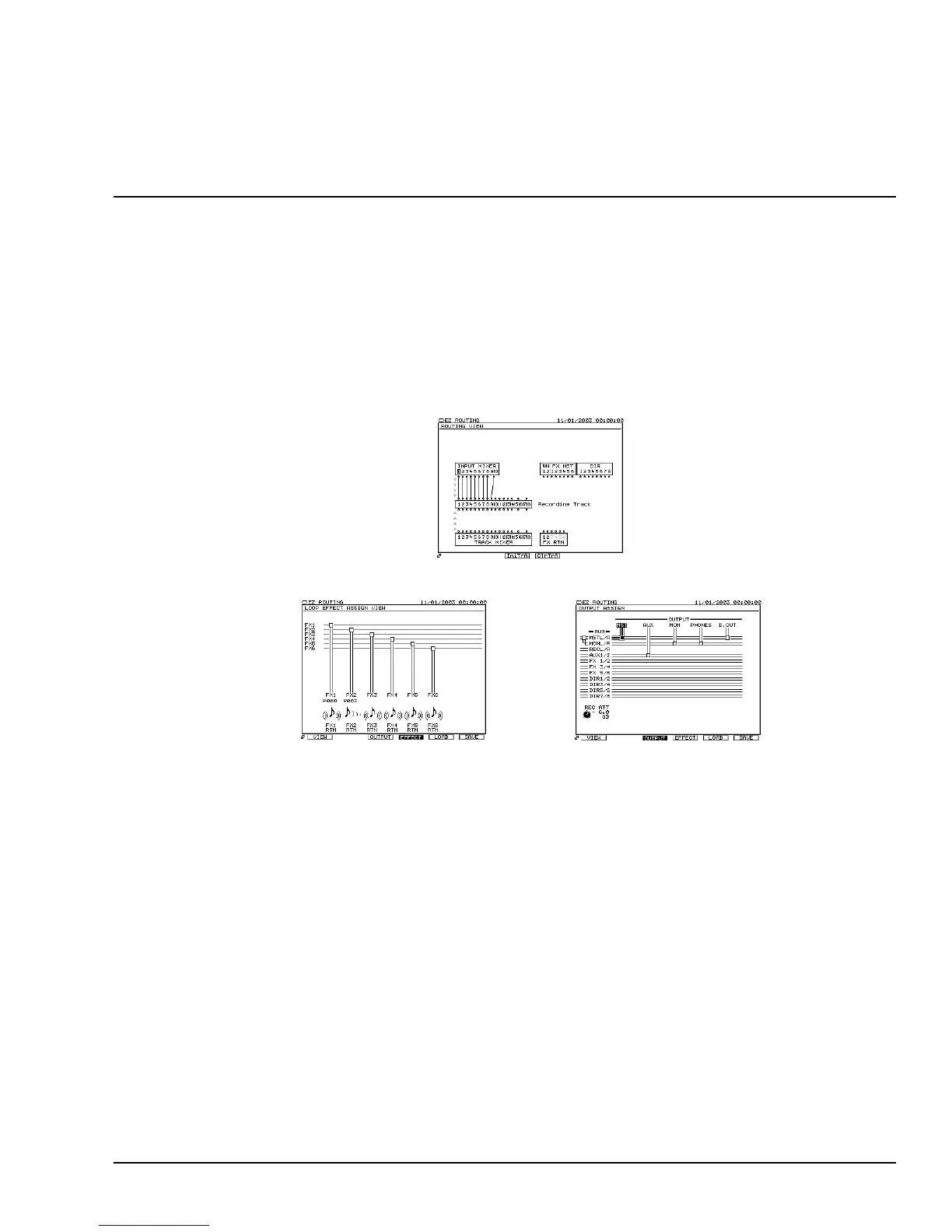
There are three EZ ROUTING screens on which routing is performed:
Navigating the EZ ROUTING Screens
To view the EZ ROUTING screens, press EZ ROUTING.
The EZ ROUTING screens have two pages that are identical except for the F buttons
displayed at the bottom of the screen. Press PAGE to toggle between these two sets of F
buttons. One page has a set of F buttons for each EZ ROUTING screen:
• F1 (VIEW) • F3 (OUTPUT) • F4 (EFFECT)
Press a screen’s F button to view the screen.
The other page provides tools for resetting input and hard disk recorder track routings:
• F3 (IniTrA) • F4 (ClrTrA)
We’ll discuss these on Page 280.
EZ ROUTING VIEW
OUTPUT ASSIGNLOOP EFFECT ASSIGN
VS2000OMUS.book 277 ページ 2004年10月20日 水曜日 午後3時3分



 To Next Page