Date Code 990215 Inputs, Outputs, Timers, and Other Control Logic 7-35
SEL-351P Manual Técnico
Traditional Indicating Panel Lights
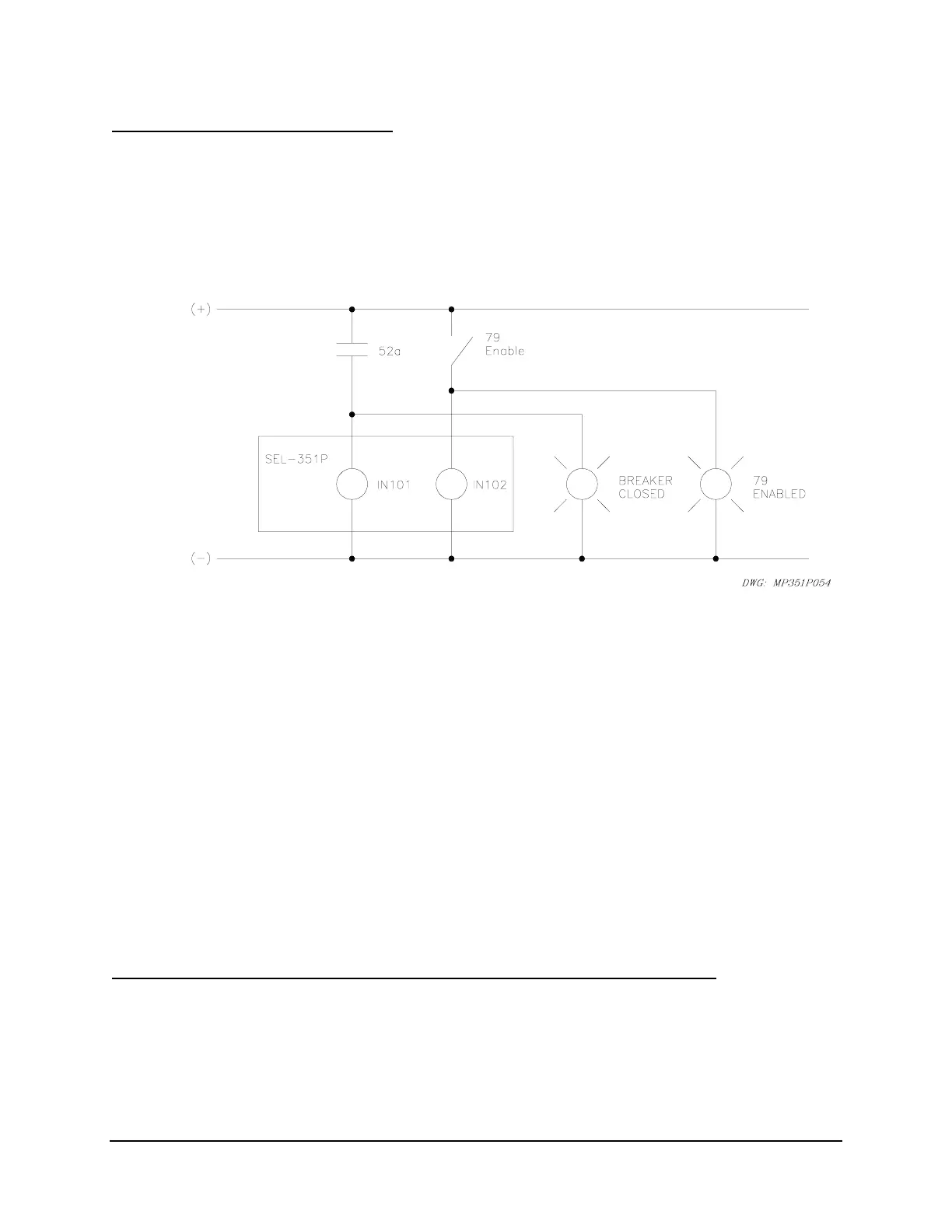
Figure SECTION 7: .27 shows traditional indicating panel lights wired in parallel with SEL-
351P optoisolated inputs. Input IN101 provides circuit breaker status to the relay, and input
IN102 enables/disables reclosing in the relay via the following SEL
OGIC
Control Equation
settings:
52A = IN101
79DTL = !IN102 [= NOT(IN102); drive-to-lockout setting]
Figure SECTION 7: .27: Traditional Panel Light Installations
Note that
Figure SECTION 7: .27 corresponds to Figure SECTION 7: .2 (settings example).
Reclosing Relay Status Indication
In
Figure SECTION 7: .27, the 79 ENABLED panel light illuminates when the “79 Enable”
switch is closed. When the “79 Enable” switch is open, the 79 ENABLED panel light
extinguishes, and it is understood that the reclosing relay is disabled.
Circuit Breaker Status Indication
In
Figure SECTION 7: .27, the BREAKER CLOSED panel light illuminates when the 52a
circuit breaker auxiliary contact is closed. When the 52a circuit breaker auxiliary contact is
open, the BREAKER CLOSED panel light extinguishes, and it is understood that the breaker is
open.
Traditional Indicating Panel Lights Replaced with Rotating Default Display
The indicating panel lights are not needed if the rotating default display feature in the SEL-351P
is used.
Figure SECTION 7: .28 shows the elimination of the indicating panel lights by using
the rotating default display.



 To Next Page