BEFORE
WEIGHING
MAINTENANCE
TROUBLESHOOTING
FOR YOUR
INFORMATION
USING THE
BALANCE
USING MORE CONVENIENTLY
115
Continued on next page
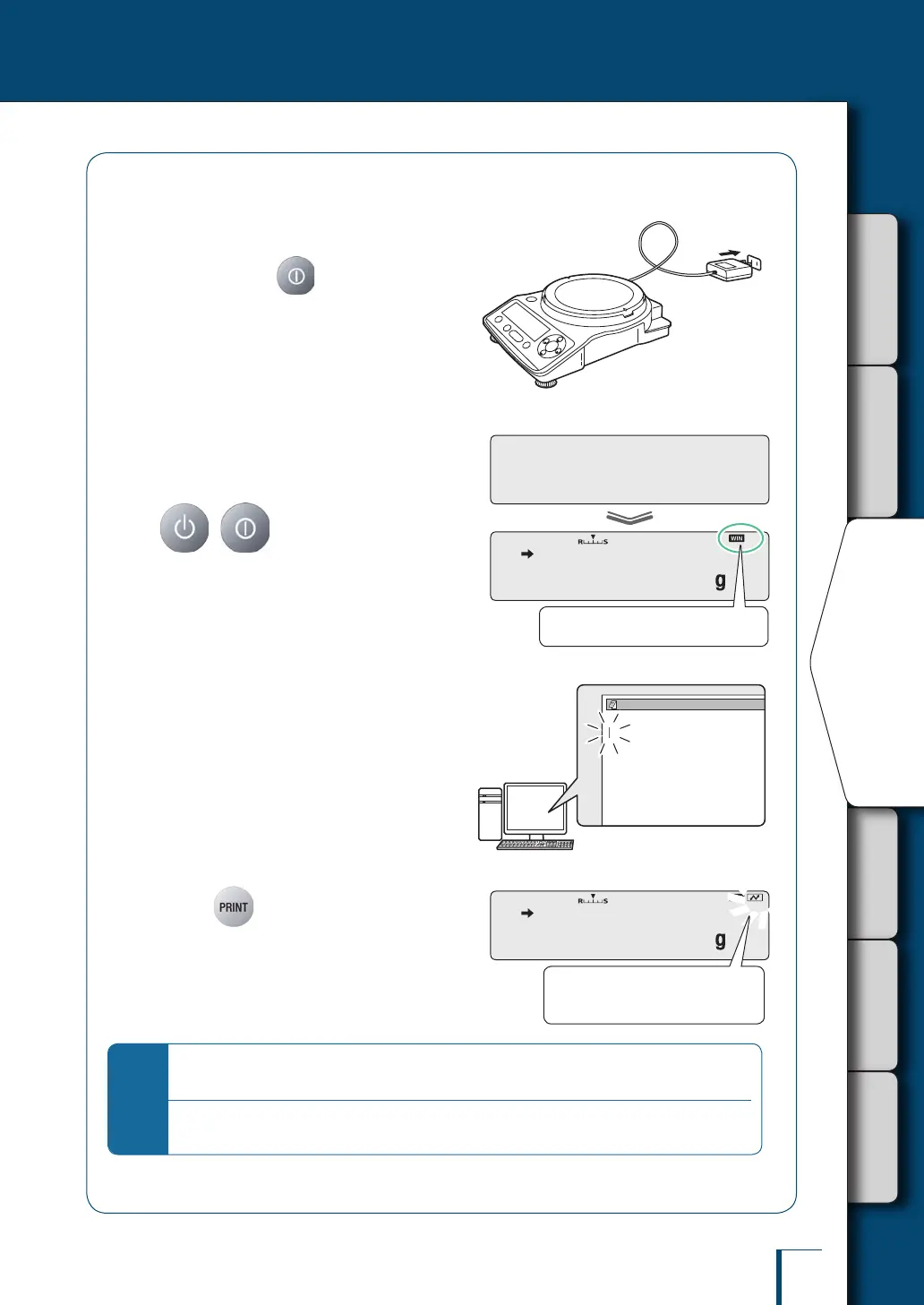
Checking operation
1
Connect the AC adapter to the
power outlet (with the TXB
series, press ).
The balance's self check display (^ page
31) will be shown.
2
When [OFF] is displayed, press
( with the TXB series)
to enter the weighing mode.
3
At the PC, start up Excel (or
another application such as
Notepad).
Key entry will be enabled and the cursor will
be displayed at the position where entry is
possible.
4
Press on the balance.
The numerical value displayed on the balance
will be transferred to the cursor position.
*
When the auto print function is used together with the WindowsDirect communication
function…
Check that operation is normal even when using the auto print function.
^ "Printing / Outputting Automatically (Auto Print Function)", page 106
! !O!F!F
! ! !0.0!0!0
! ! !0.0!0!0
Check if the Win symbol is lit.
/
/
/
/
/
/
/
/
/
/
/
Upon transfer, the communication
symbol will ash.



 To Next Page