SWT 3000 Equipment Manual Chapter 3: Service program PowerSys
© SIEMENS AG 2008 Edition p3_3_2x 08/09 Page - 5
Starting the service program
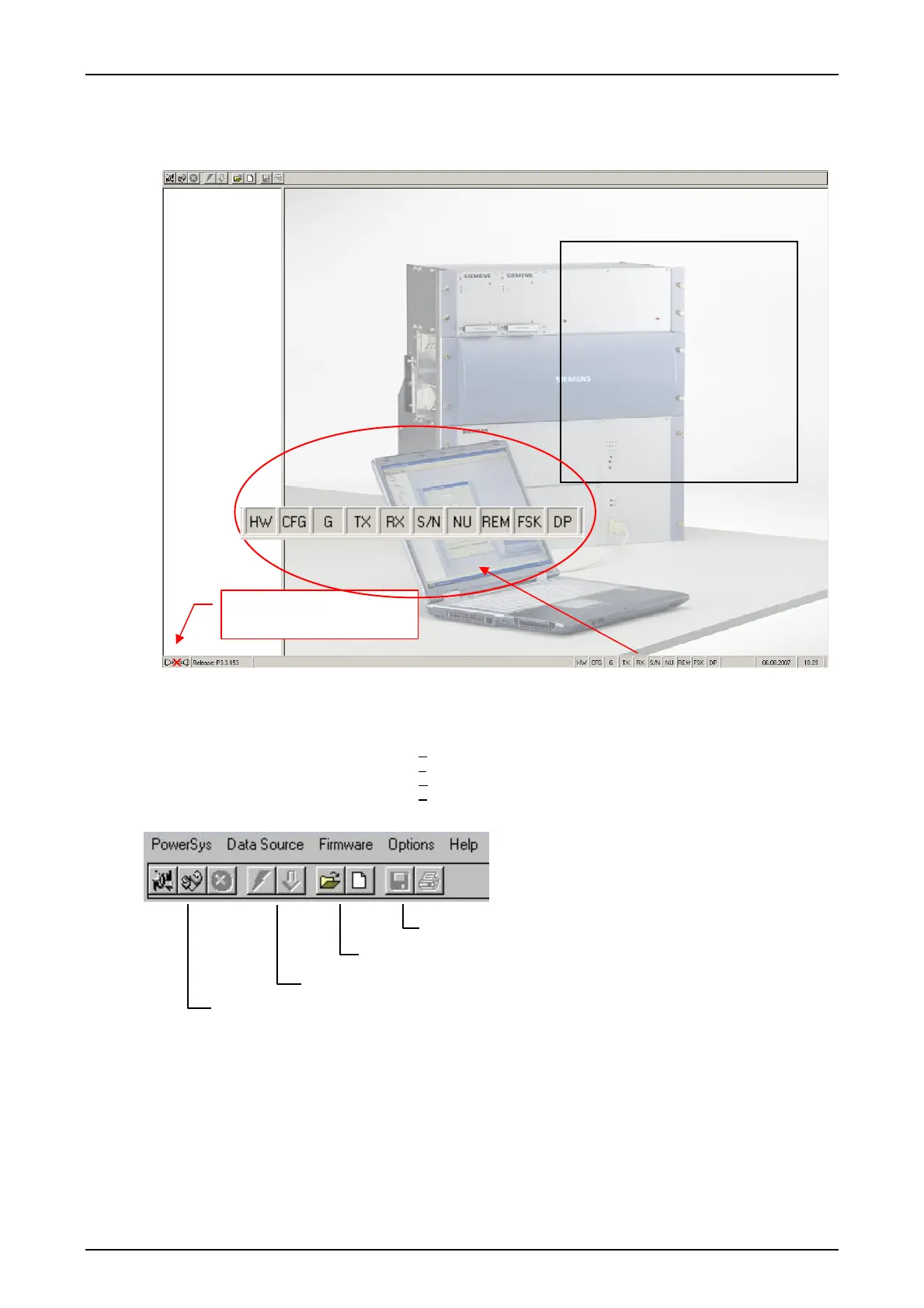
After starting the program the following menu appears:
Figure 2: PowerSysWin2000 service program
Menu bar: The menu bar is located at the top edge of the screen:
PowerSys
D
ata source
F
irmware
O
ptions
H
elp
With the buttons below the following functions can be carried out:
Save, print
Data source file, New data file
Program device data, sent configuration to the device
Data source device, remote device, abort the connection
Figure 3: Functions of the PowerSys buttons
Status of the connection to the
device
Alarm display:
Red = Alarm activated (only if the
connection to the device existing!)
HW module alarm
CFG Configuration fault
G General alarm
TX Transmitter alarm
RX Receiver alarm
S/N Signal to noise alarm
NU Non urgent alarm
REM Fault in the remote station
FSK FSK Alarm
DP DP switched to secondary
bitrate










 To Next Page