SWT 3000 Equipment Manual Installation and Commissioning
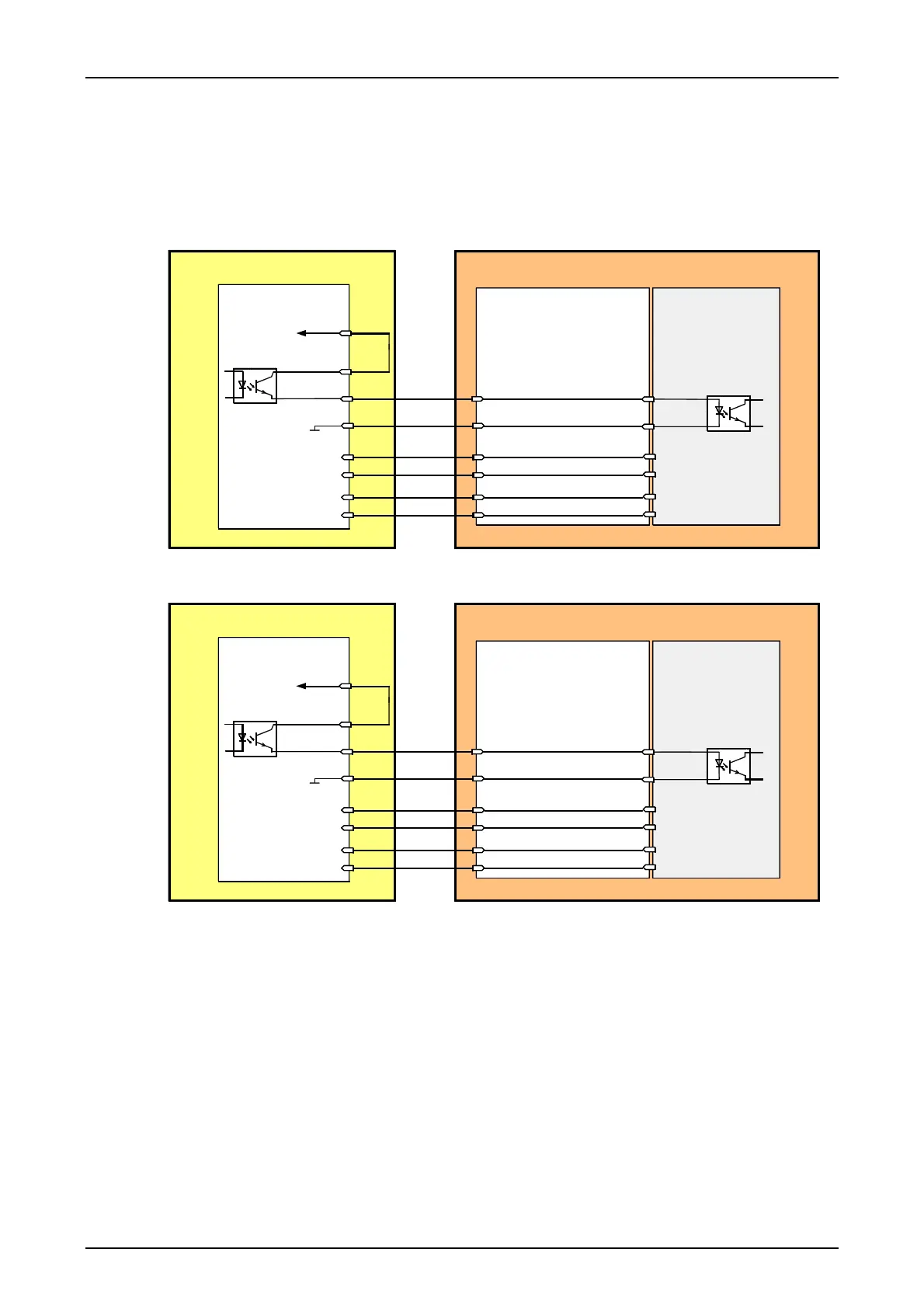
Connection of an external SWT 3000 to the PowerLink50/100
The PowerLink50/100 and the backplane from the CFS-2 has a different connector panel com-
pared with the older version. The connection of the CLE module from an external SWT 3000 is car-
ried out via SUB-D female connectors to the VFx modules. The principle is shown in the figures be-
low. In this case the VFx ports 3 resp. 4 must be used.
CLE
CFS-2
P12V
S6IN_A
S6OUT
GND12
S6IN_B
S6OUT_GND
F6OUT_A
F6IN_B
F6IN_A
F6OUT_B
a18
c13
c11
a20
c5
c3
c9
c7
4-wire input A
X1
VFx
SWT 3000
PowerLink
4-wire input B
4-wire output A
4-wire output B
SUB-D connector
Connector panel
Port 3
12
31
10
29
11
30
Figure 21: Connecting an external SWT 3000 to the port 3 of the VFx modules
CLE
CFS-2
P12V
S6IN_A
S6OUT
GND12
S6IN_B
S6OUT_GND
F6OUT_A
F6IN_B
F6IN_A
F6OUT_B
a18
c13
c11
a20
c5
c3
c9
c7
4-wire input A
X1
VFx
SWT 3000
PowerLink
4-wire input B
4-wire output A
4-wire output B
SUB-D connector
Connector panel
Port 4
19
37
14
33
15
34
Figure 22:
Connecting an external SWT 3000 to the port 4 of the VFx modules
© SIEMENS AG 2008 Edition p3_3_2x 08/09 Page - 35










 To Next Page