SWT 3000 Equipment Manual Installation and Commissioning
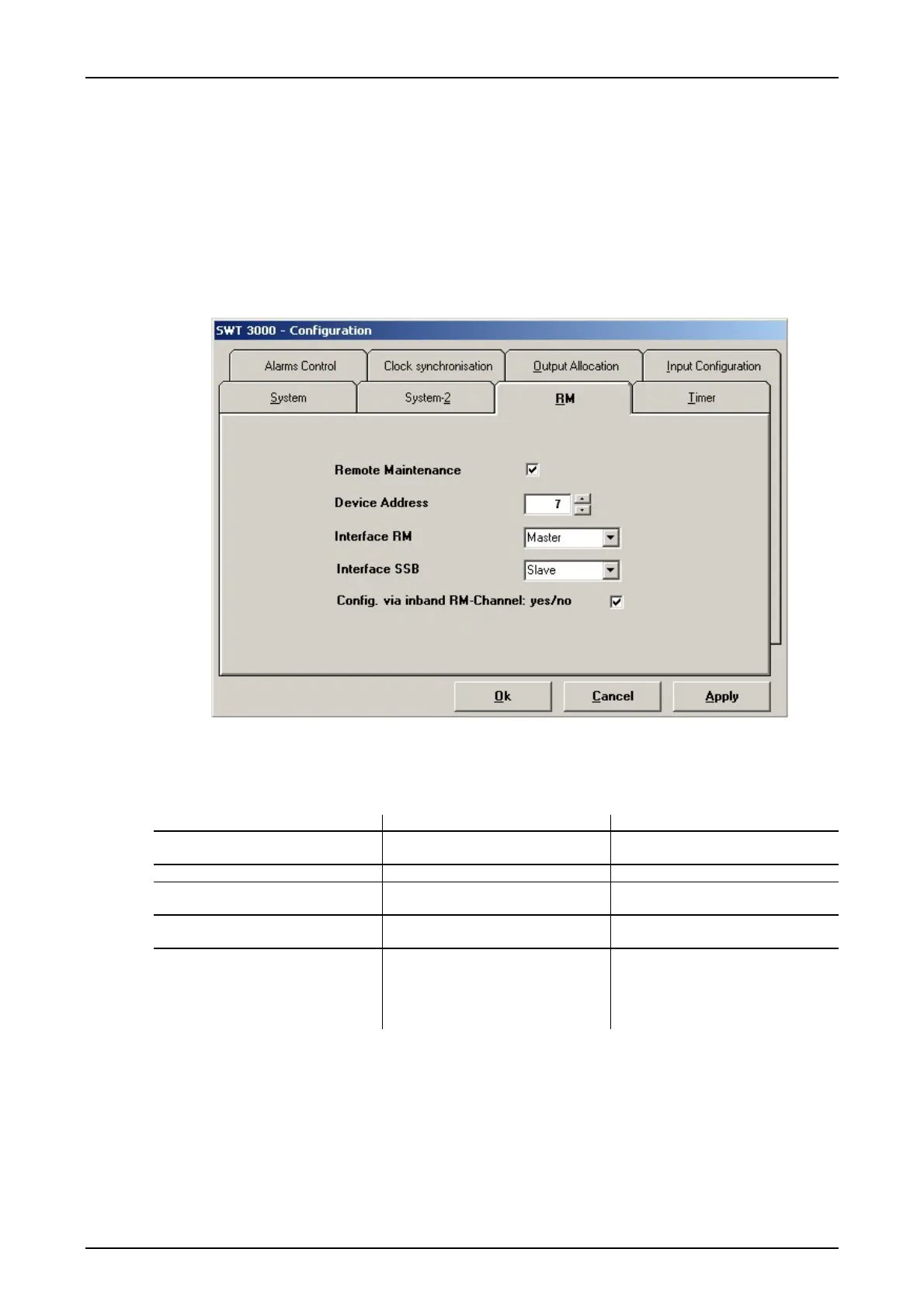
SWT 3000 <RM> configuration:
Device data can be transmitted between the terminal devices of one or more SWT 3000 routes
using RM. This makes it possible to import the parameter settings, the measuring points and the
event list of the distant station from an SWT 3000 with the control PC.
The device data are transmitted by binary frequency modulation (FSK) of the idle tone (guard) via
the analog interface resp. via the frame of the digital interface. The RM function is activated in the
menu <Configuration> <RM>. The device must also be assigned an RM address.
For remote configuration via the RM channel the corresponding check box has to be activated.
Figure 45: RM Configuration menu
Setting options for the RM configuration:
Table 47: Setting options for RM configuration
Menu option Setting options Comments
Remote Maintenance
;
RM activated
RM deactivated
Device address 0 to 249 RM address
Interface RM Master
Slave
Setting remote station Slave
Setting remote station Master
Interface SSB Master
Slave
Setting remote station Slave
Setting remote station Master
Config. via inband RM.Channel:
yes/no
;
Configuration of the remote device
via RM channel enabled
Configuration of the remote device
via RM channel disabled
© SIEMENS AG 2008 Edition p3_3_2x 08/09 Page - 51










 To Next Page