SNMP and Remote Access SWT 3000 Equipment Manual
Page - 16 Edition p3_3_2x 08/09 © SIEMENS AG 2008
Commissioning SNMP
LED Indicators
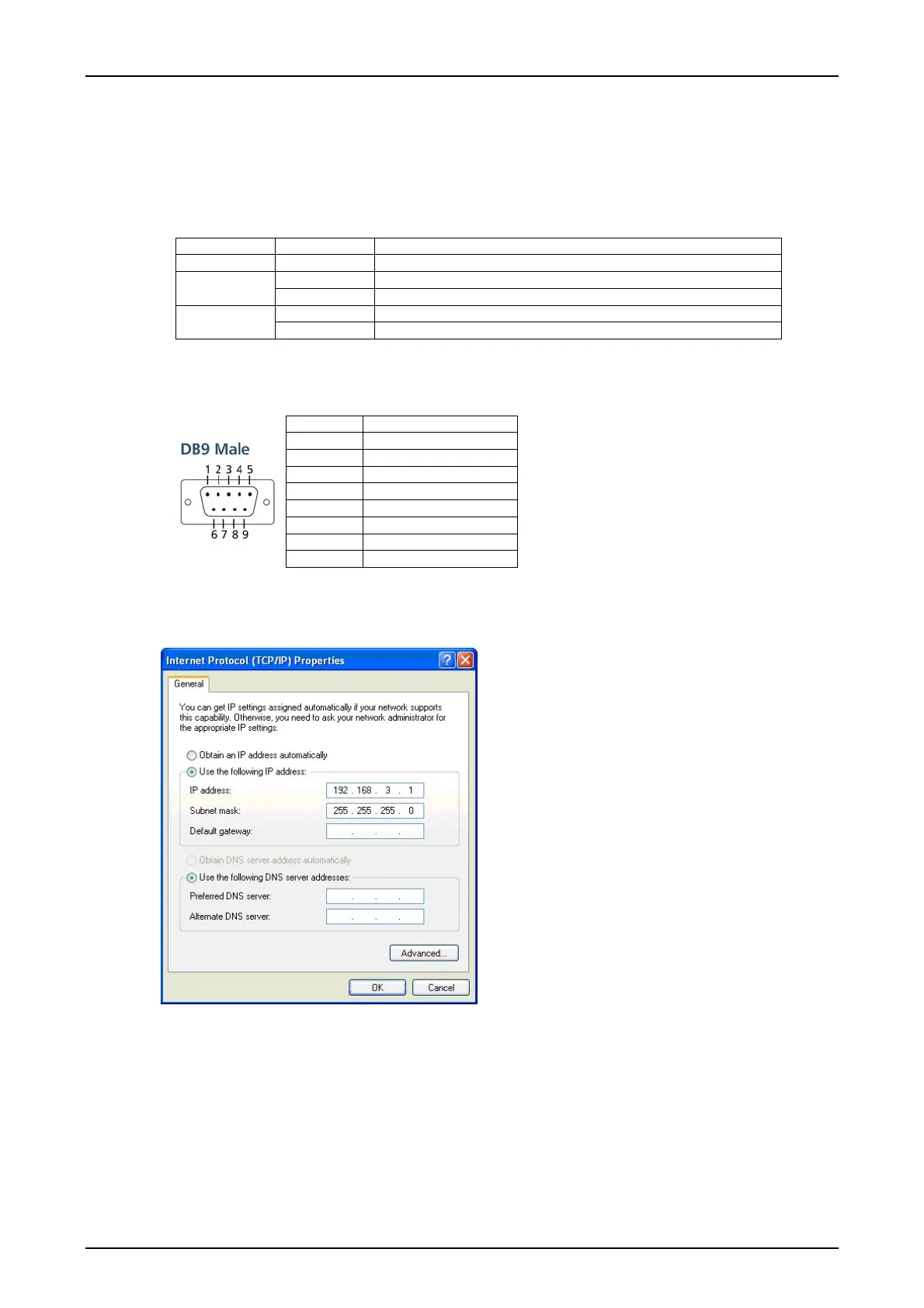
The following LED indicators are located on the top panel of the SNMP terminal adapters.
Table 2: LED indicators
LED Name LED Colour LED Function
Ready Green Power is on and functioning normally
Green Serial port 1 / 2 is transmitting P1/P2 (Tx)
Off Serial port 1 / 2 is not transmitting
Yellow Serial port 1 / 2 is receiving data P1/P2 (Rx)
Off Serial port 1 / 2 is not receiving data
RS232 interface
Table 3: Pin assignment of the Sub D connector
Pin RS232
1 DCD
2
RxD
3
TxD
4 DTR
5
GND
6 DSR
7 RTS
8 CTS
Activated ports
IP Address
Figure 9: Adjustment of the IP address
All SNMP server are delivered with the default
IP address: 192.168.3.127 at LAN port 1.
The connected Service PC has to be adjusted
to an IP address in the same network like
192.168.3.1:










 To Next Page