SNMP and Remote Access SWT 3000 Equipment Manual
Page - 20 Edition p3_3_2x 08/09 © SIEMENS AG 2008
SWT 3000 Remote Access
General information
A remote access server (RAS) connection serves complete system functionality administration
identical to local on-site operation. Standard TCP/IP network protocols are used for easy access to
each SWT 3000 from anywhere within a company Intranet. The system can interface with your own
network security systems and firewalls, providing you with just the right security level your company
requires.
The remote access to the SWT 3000 is possible with the service program PowerSys. With the
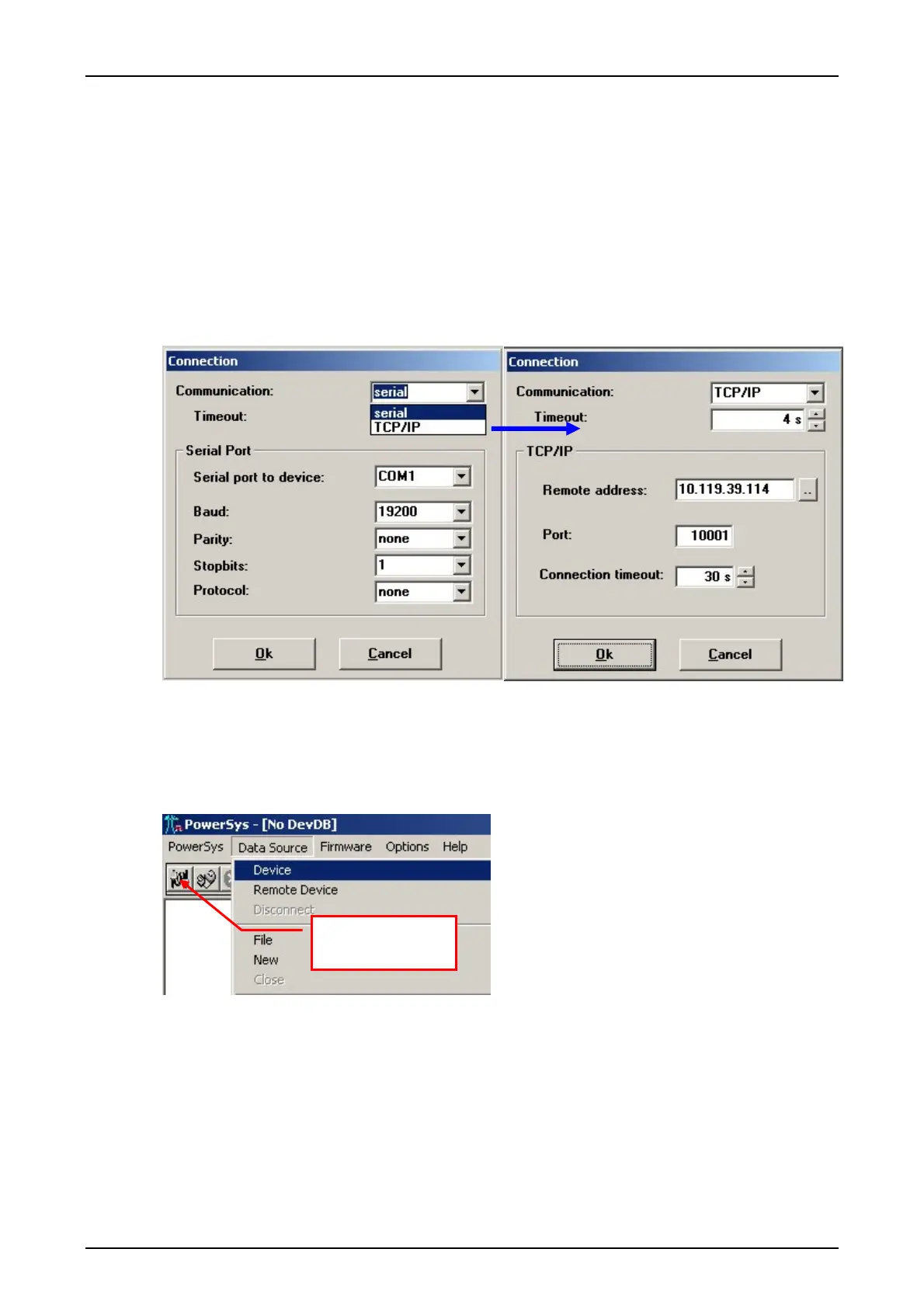
PowerSys menu <Options / Connection> the connection to the device via serial interface or
TCP/IP has to be configured.
Figure 12: Configuration example for the TCP/IP connection
After the TCP/IP connection has been selected the IP address and port of the remote access
server (RAS) or SNMP server has to be entered.
The service program is connected with the menu <Data source/Device> or the corresponding
button as shown in the figure below.
Figure 13: Connecting the service PC
Data source devi-
ce button.










 To Next Page