SNMP and Remote Access SWT 3000 Equipment Manual
Page - 14 Edition p3_3_2x 08/09 © SIEMENS AG 2008
Installation instructions for the SNMP adapter in a SWT 3000 device:
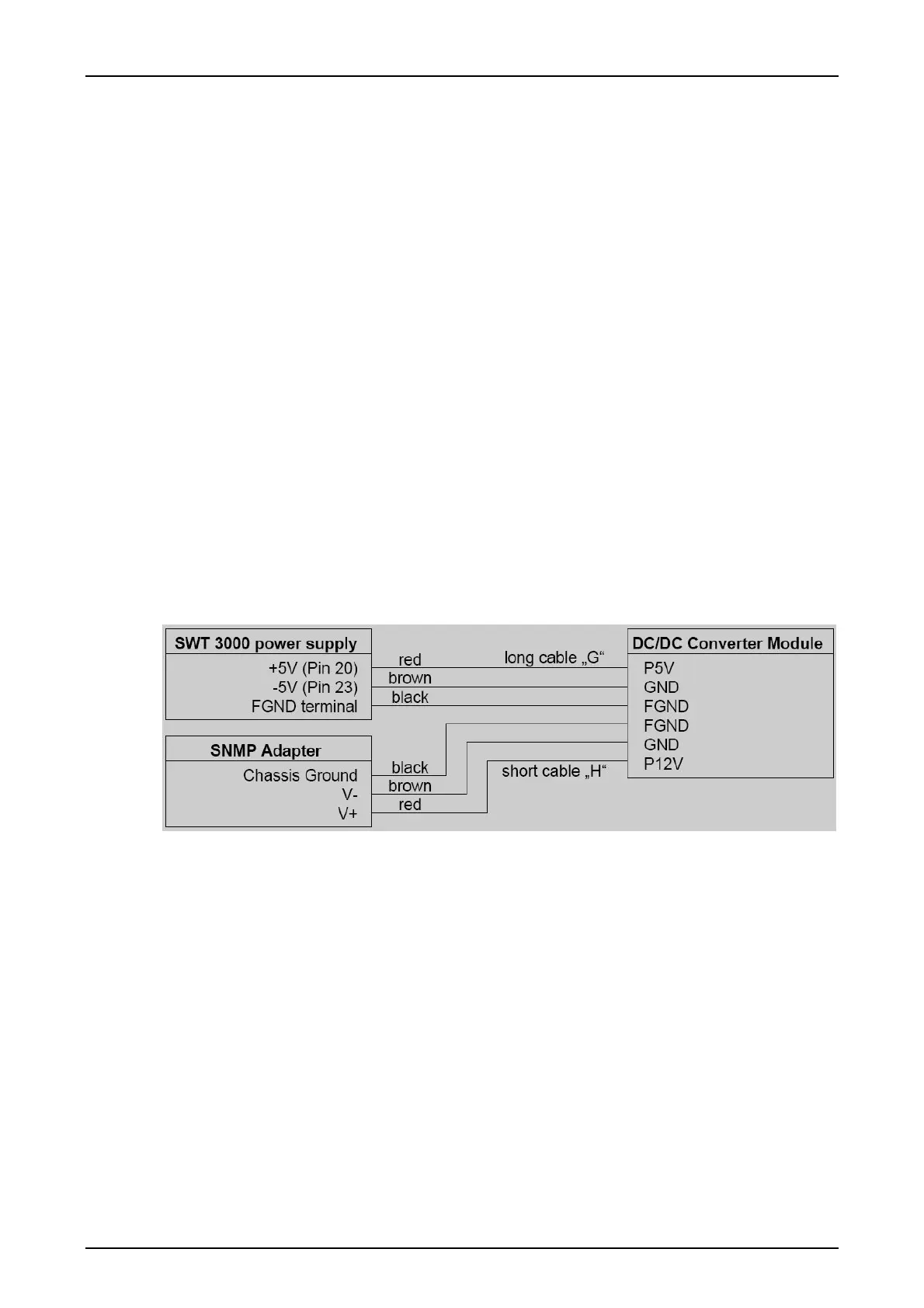
A DC/DC converter module converts the ± 5V of the SWT 3000 to ± 12V for the SNMP adapter.
Along with the SNMP adapter and the converter module, all necessary cables and
mounting
hardware are provided:
A 1 SNMP adapter
B 1 Bracket for SNMP adapter
C 1 Adapter connector for SNMP adapter
D 1 DC/DC converter module
E 8 Screws M2,5x20
F 8 spacers (11mm long)
G 1 long cable (connects SWT 3000 power source with DC/DC converter)
H 1 short cable (connects DC/DC converter with SNMP adapter)
J 2 cable ties
K 2 cable tie holders
L 2 plastic rivets
M 2 slotted screws
N 8 screws M2,5x8 for SWT 3000 with single power supply higher SNMP adapter
brackets
The figure below shows the wiring diagram for the SNMP adapter:
Figure 7: Wiring diagram










 To Next Page