SWT 3000 Equipment Manual Installation and Commissioning
Time/date
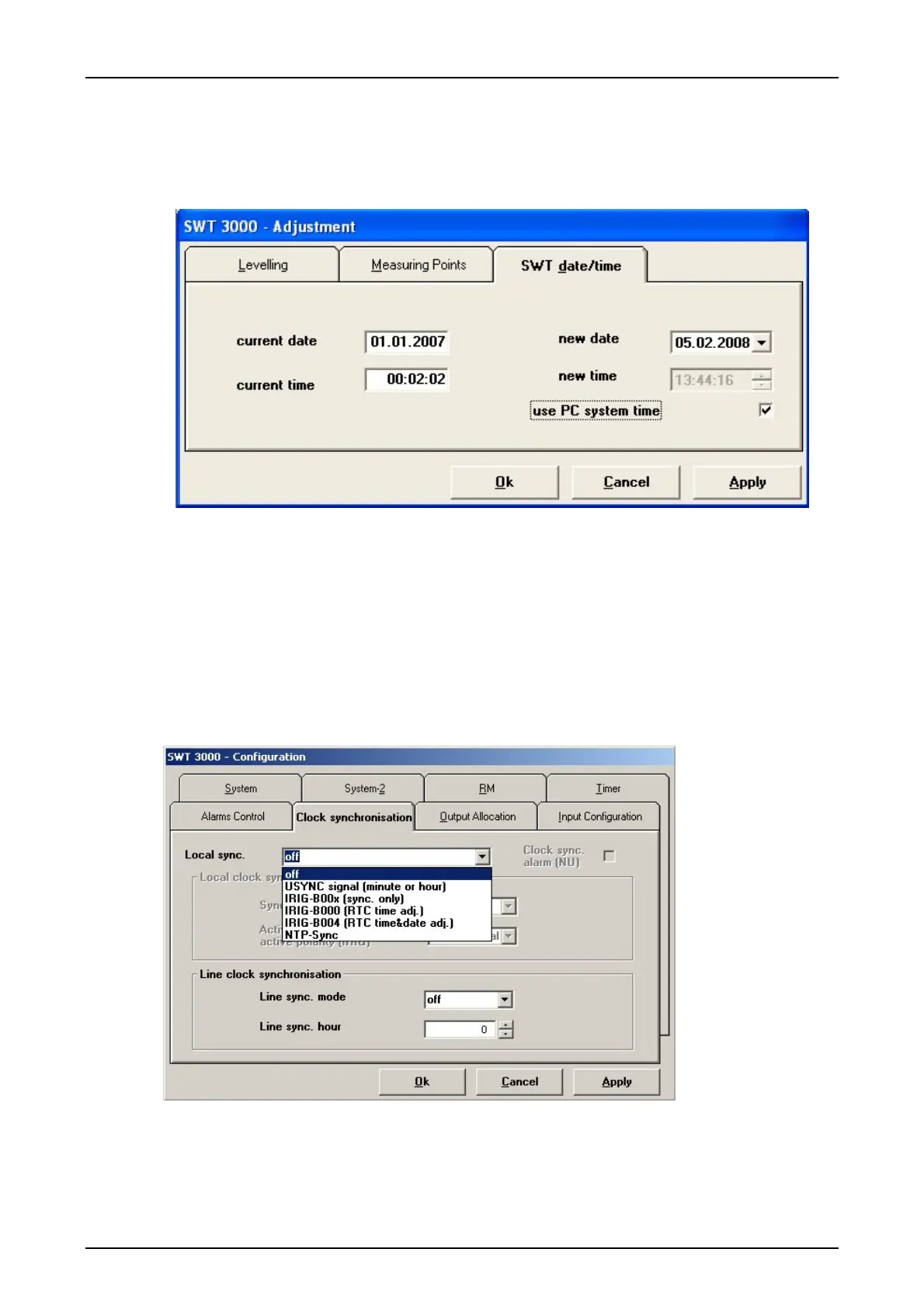
It is only possible to set the time and date after the data have been imported from a connected
device. The tab <SWT date/time> is then inserted in the <Adjustment> menu.
Figure 34: Setting of date and time of an SWT 3000
For the time adjustment the option <use PC system time> or a manual adjusted <new date> resp.
<new time> can be used (
available from PowerSys versions ≥ P3.2.216). The internal clock is ad-
justed when operating the <Apply> or <OK> button.
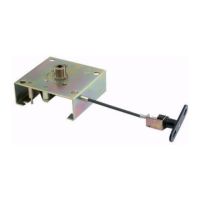
Clock synchronisation
The system-internal clock can be synchronized by an external clock. The clock synchronisation
input (USYNC) on the module ALRS (terminal a1/c3) is provided for this. The operating point of the
input voltage can be set between 15V (strap x3 (1-2)) and approx. 54V (strap X3 (2-3)) (see also
connection of the ALRS module).
Figure 35: Options for the SWT 3000 clock synchronisation
© SIEMENS AG 2008 Edition p3_3_2x 08/09 Page - 43










 To Next Page