SWT 3000 Equipment Manual Installation and Commissioning
Receive level for analog interfaces:
The incoming receive level on the trunk line can be measured at the input socket Îy of the CLE
and amplified by 0 dB, 6 dB or 12 dB with straps W1 - W3 (Table 2.5).
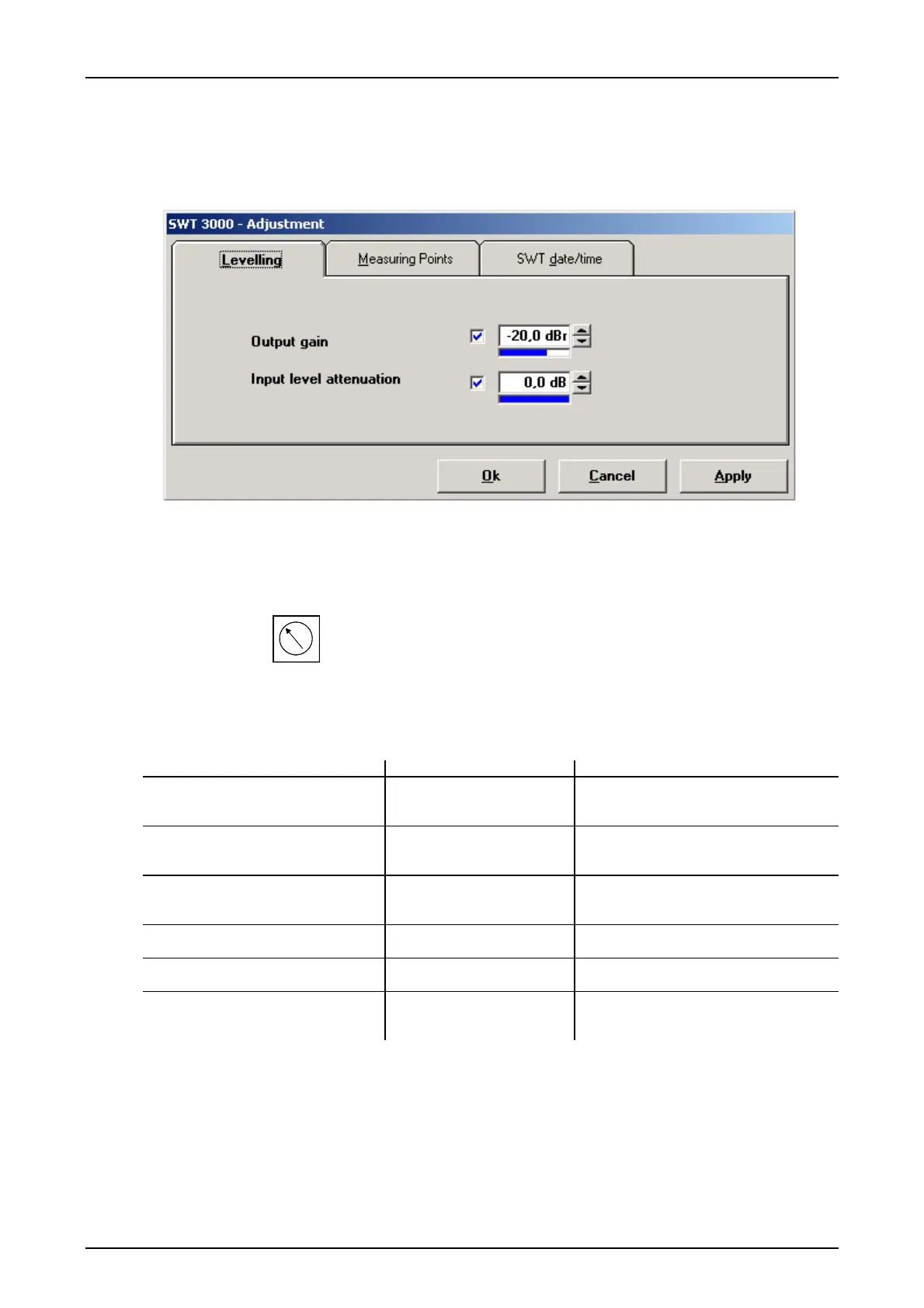
Figure 32: Setting the input level attenuation
The input level attenuation can be set from 0.0 - -60 dBr and is used for checking the receive level
reserve.
Receive level setting:
Measurement: At the input socket
Îy of the CLE and PU3f.
Function range: +4 to -33dB at the input of the PU3f
When using a PowerLink straps W1 - W3 on the CLE must be set so as to give 0 dB at the input
of the PU3f. The operating thresholds for the receive level alarm and the option of disabling the
output in case on an S/N alarm can be set with
<Configuration> <Receiver-Alarms>.
Table 42: Setting options for receiver alarm
Menu option Setting options Comments
Threshold for receive level alarm -30 dB / -24 dB / -18 dB
Receive level on the CLE amplified by
0 dB (W1).
Æ effective setting:
-30 dB / -24 dB / -18 dB
Receive level on the CLE amplified by
6 dB (W2).
Æ effective setting:
-36 dB / -30 dB / -24 dB
Receive level on the CLE amplified by
12 dB (W3).
Æ effective setting:
-42 dB / -36 dB / -30 dB
Activate EALR in case of S/N alarm Yes *)
No
Relay receive alarm is also activated in
case of S/N alarm.
Disable outputs in case of S/N alarm Yes
No *)
Command output disabled in case of
S/N alarm
Activate NDALR relay in case of
general alarm
Yes
No *)
Relay NDALR is also activated in case
of general alarm
*) As-delivered state
© SIEMENS AG 2008 Edition p3_3_2x 08/09 Page - 41










 To Next Page