Page 37
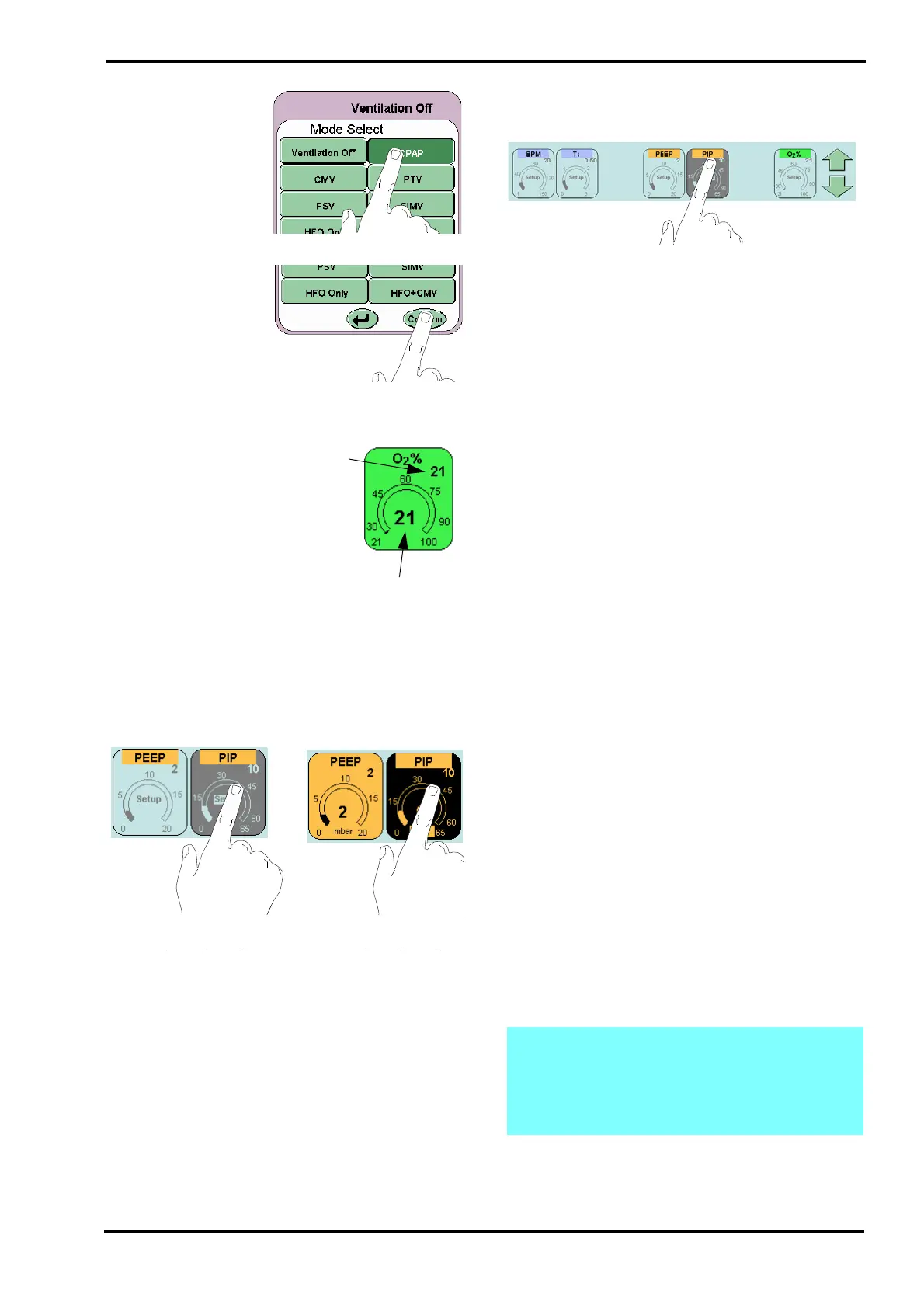
Select the required
mode. The mode
selected will be
highlighted by a colour
change (from light
green to dark green).
Touch the confirm
button this will activate
the chosen mode. If the
user does not press the
confirm button the
ventilator returns to the
current mode after 20
seconds.
10.3.1.2 Parameter
The parameter control
has two values
displayed. The value in
the top right hand
corner is the set value.
The value in the centre
of the control is the
measured.
The parameter controls
can be selected in two ways. First in the preview
stage before entering a mode (Example A), the
parameters do not display the measured value and
have a blue background. The second when in a
selected mode (Example B), the measured value is
displayed and the parameter control is coloured
(Blue, Orange or Green).
For example A the selected parameter changes
colour to grey and for example B the colour changes
to black.
10.3.1.3 Up / Down Arrows
The arrows appear when a function or parameter
which can be modified is selected.
The up arrow increases the chosen value and the
down arrow decreases the value. The arrow
selected changes colour when touched.
The arrow can be touched repeatedly to increment
the parameter in individual increments or held down
to rapidly change the value. Holding down to rapidly
change the value is limited to steps of 10
increments.
User will have to release and repress the arrow to
continue the next rapid increase of 10 increments.
This feature is to prevent any parameter being set to
maximum in one action.
10.3.1.4 Ti (Inspiratory Time) Parameter control
The Ti parameter control functions as described
above but increments by 0.01 seconds.
Tidal Volume (Vte TTV) Parameter Control
The tidal volume parameter control functions as
described but has 3 resolutions.
From 2ml to 10ml the parameter increments in
0.2ml steps (Fine resolution).
From 10ml to 100ml the parameter increments in
1ml steps (Standard resolution).
From 100ml to 200ml the parameter increments in
5ml steps (Coarse resolution).
10.3.1.5 O
2
% Parameter Control
The O
2
% parameter control is the only parameter
that does not function as described above. The O
2
%
parameter control allows for rapid setting to 100%
O
2
. The user can increase the percentage of O
2
from the set percentage to 100% by activating the
O
2
% parameter and holding down the up arrow.
(The control is not limited to steps of 10
increments).
To decrease the percentage of O
2
, the parameter is
limited to steps of 10 increments.
Note: If the up arrow is held down for a total
of 8 seconds, the ventilator will reset the
percentage of O
2
to the original setting. This
is a safety feature in case the touchscreen
develops a fault.



 To Next Page