Page 40
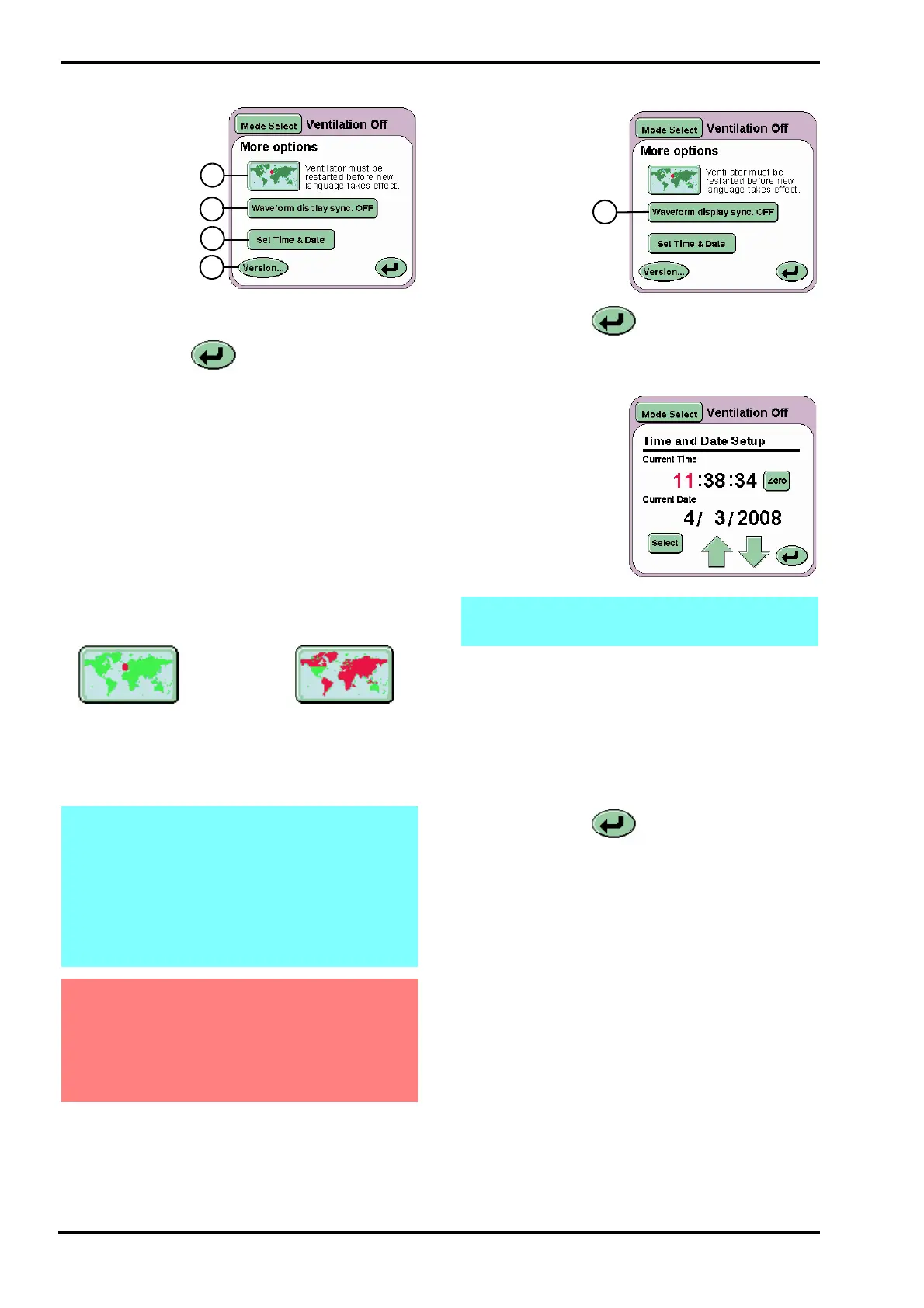
Displayed on this
panel are four
buttons:
Language Toggle
button (L)
Waveform Display
Sync button (M)
Set Time and
Date button (N)
Version.. button
(O)
The Return button returns the user to the
Services panel.
10.6.7 Language Toggle
The ventilator software can be supplied to the user
with a secondary language installed. The user
needs to refer to the user manual that accompanies
the ventilator to find which language apart from
English is installed. See page 2 for the software
version number and language couple.
To change the language of the user interface press
the Language Toggle button (L) and hold for 2
seconds, so the map turns red. Turn OFF and
restart the ventilator. The ventilators user interface
will now be in the second language.
Repeat the process to return the user interface
language to English.
10.6.8 Waveform Display Sync
The Waveform
Display Sync
button (M)
overlays the
waveforms from
one sweep with
that from the
next. See
“Waveforms” on
page 54
The Return button n returns the user to the
Services panel.
10.6.9 Set Time and Date
The Set Time and
Date button (N) allows
the user to set the
internal clock and
calendar of the
ventilator. The date
and time is displayed
above the pressure
waveform window.
The value highlighted in red can be changed by
incrementing the value up or down using the arrow
controls.
Pressing the Select button highlights the next value
to be changed. The seconds can not be modified in
this manner, but can be zeroed using the Zero
button.
The Return button returns the user to the
More Options panel.
Note: The user can change the secondary
installed language by accessing the language
selection program via the controller services
panel. For a detailed description of how to
access the language selection program and
change the secondary installed language
please refer to page 125 of the “Technical
Information” section.
Warning: Changing the user interface
language or selecting a new secondary
language cannot be carried out whilst the
ventilator is in use. Either process of
changing the language requires restarting the
ventilator.
Ventilator set to
English
Ventilator set to
foreign language
Note: the ventilator uses the 24 hour clock
system and Day/Month/Year date system.



 To Next Page