Page 36
10. User Interface
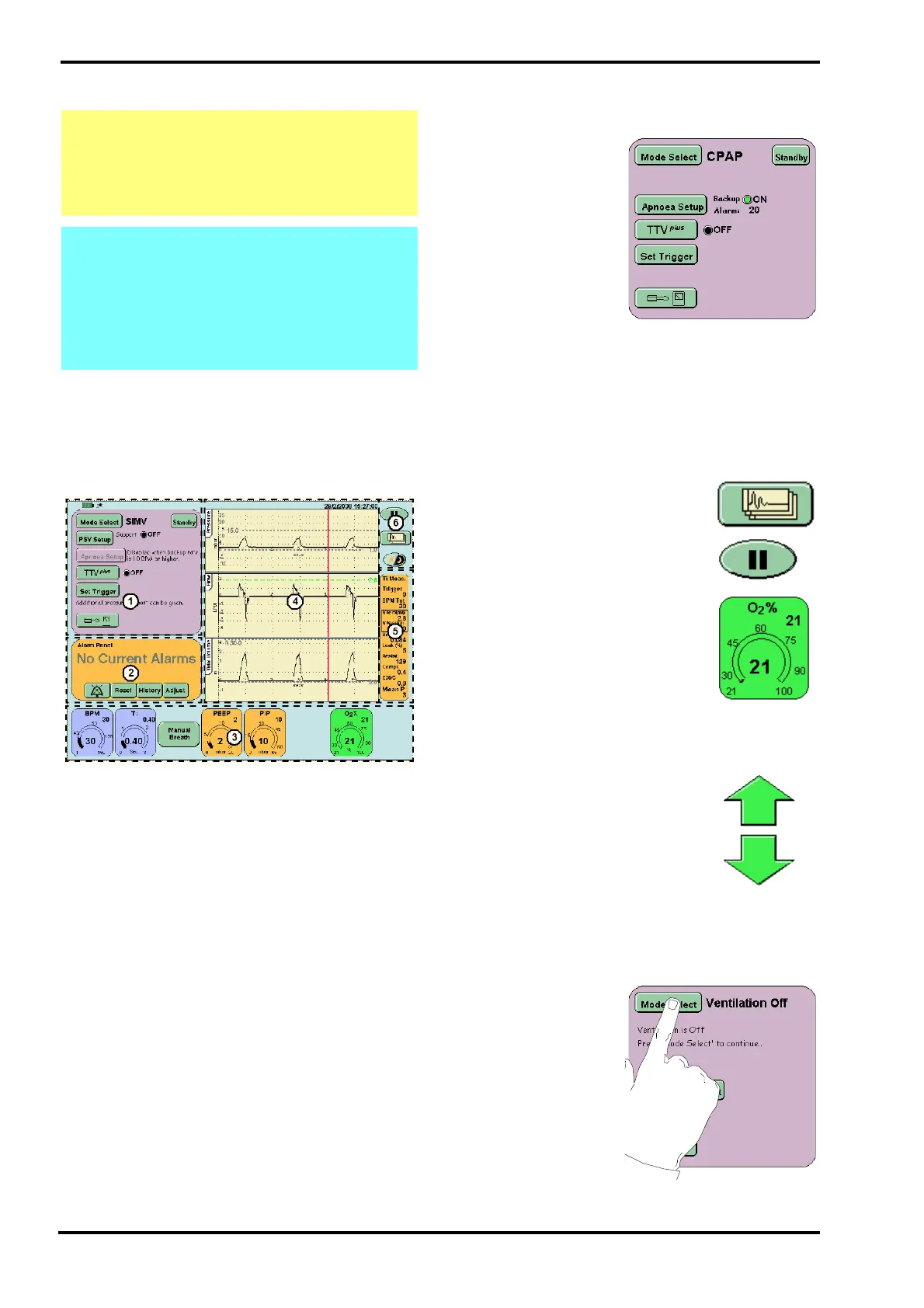
The ventilator is controlled via the touchscreen
(user interface). All the controls are accessible
through the user interface. The interface is divided
into sections. Each section groups related controls
or displays. The diagram below shows a typical
screen with the groups marked by dotted lines.
10.1 User Interface Sections
1. Mode panel
2. Alarm panel
3. Ventilation Parameters panel area
4. Waveform windows
5. Lung mechanics and measurement panel
6. Display options
The touchscreen as the name suggests is controlled
by touch. When using the ventilator it is advisable to
have clean dry hands (gloved hands will also
activate controls). Only a small amount of pressure
is required to activate a control.
10.2 Description of User Interface
Indicators
In the mode panel the
user will find indicator
lights next to functions
that can be turned ON
or OFF.
When a function is
OFF the light is
coloured Black and
the text OFF is
displayed.
When that function is ON the light is coloured Green
and the text ON is displayed.
10.3 Description of User Interface
Controls
The interface has three types of control: Button,
Parameter and Arrow.
The buttons are coloured green,
change shade when touched, but
vary in shape. The buttons are
used to select a function or mode.
The parameter controls vary in
colour but are all the same shape. A
selected parameter will change to
black when selected. The
parameter control selects a
ventilator setting for modification. In
the center of the control is the
measured value and in the top right
is the set value.
The up/down arrows allow
modification of a selected
parameter or control variable.
10.3.1 Examples of Control Use
The following section describes the use of each of
the above controls.
10.3.1.1 Buttons
Touch the mode select
button and this will
activate the mode
select panel.
Caution: Do not use a sharp instrument, such
as a pen to activate the touchscreen controls
as the excessive pressure applied by the
point will damage the touchscreen
membrane.
Note: The ventilator touchscreen works on a
one touch principle. If the user touches the
screen at two points, the first point touched is
recognized and the second is ignored.
Resting a finger on the screen will be
registered as the first touch, thus blocking all
further operations.



 To Next Page