Page 38
10.4 Description of the Mode Panel in
Ventilation Off Mode
The Mode panel functions vary between modes of
ventilation and “Ventilation Off”.
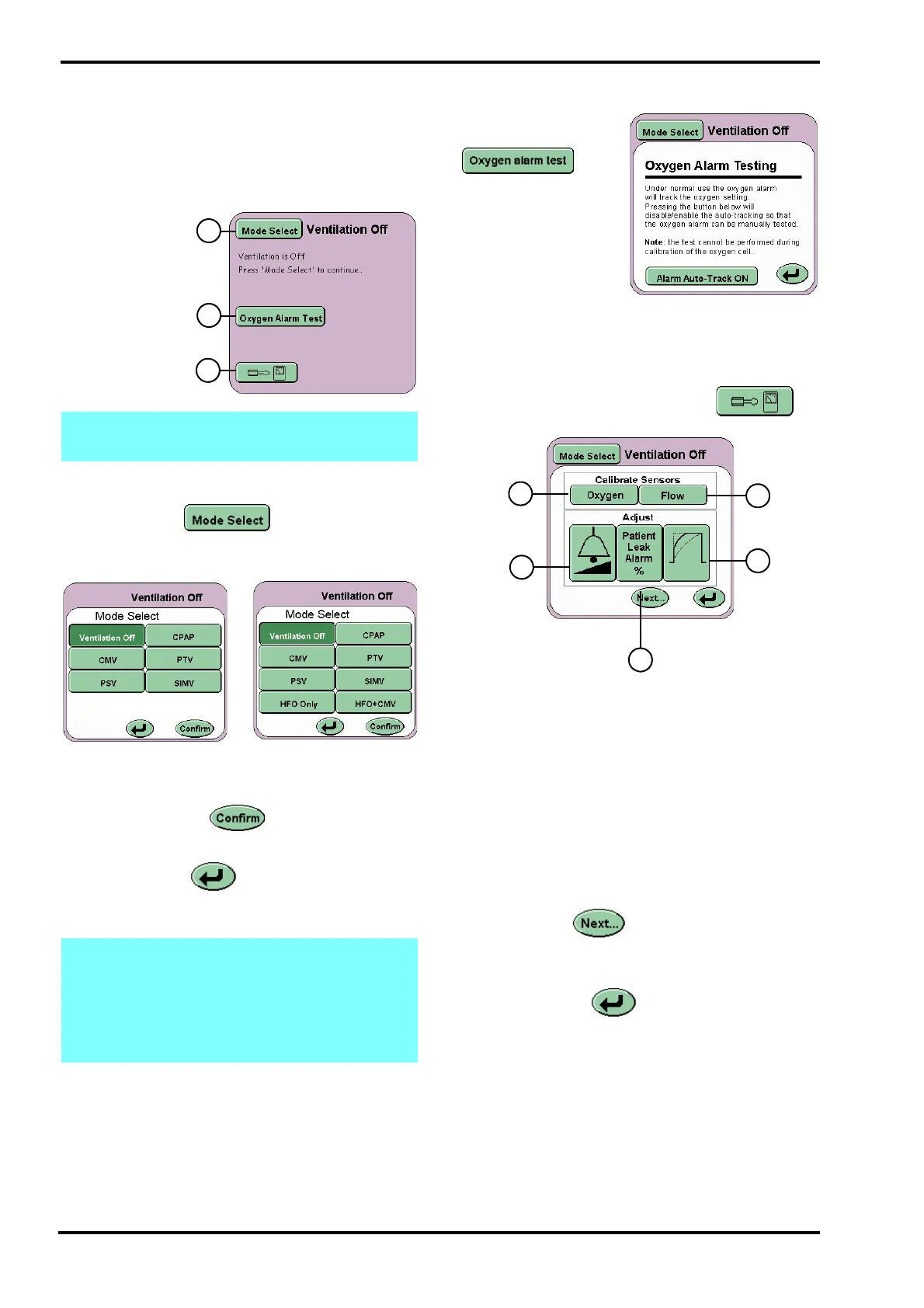
Mode Panel in Ventilation Off Mode
The Mode Panel
displays the
Mode Select
button (A), the
Oxygen alarm
test button (B)
and the Options
and Service Data
button (C).
10.5 Mode Select Button
The Mode Select button activates the
Mode Select Panel. The panel displays all the
ventilation modes that can be selected.
Selection of the mode has to be confirmed by
pressing the Confirm button. (Note the
confirm button flashes between green and white).
The Return button returns the user to the
current mode and cancels any parameter changes
made in the preview mode.
10.5.1 Oxygen Alarm Test
The Oxygen Alarm
Test button
activates the Oxygen
Alarm Testing panel.
This panel allows the
user to test the High
and Low Oxygen
alarm prior to use.
For a detailed description on how this test is carried
out, see “Oxygen Alarm Test” on page 162.
10.6 Services Panel
The Options and Service Data button on
the Mode Panel activates the Services panel.
Displayed on this panel are five buttons:
In the Calibrate Sensors area
Flow (D)
Oxygen (E)
In the Adjust area
Wave shaping (F)
Volume control (G)
Patient leak alarm (H)
The Next button advances the user to the
More Options panel (See “More Options Panel” on
page 39).
The Return button returns the user to the
Ventilation OFF panel.
Note: In Ventilation OFF mode alarm sounds
are muted to the minimum setting (1).
Note: When changing between modes, for
any alarms that have been triggered the alarm
sounder volume is set to its minimum setting,
for a period of 10 seconds. After the 10
seconds has expired, the volume will return
to the user set value.



 To Next Page