Page 39
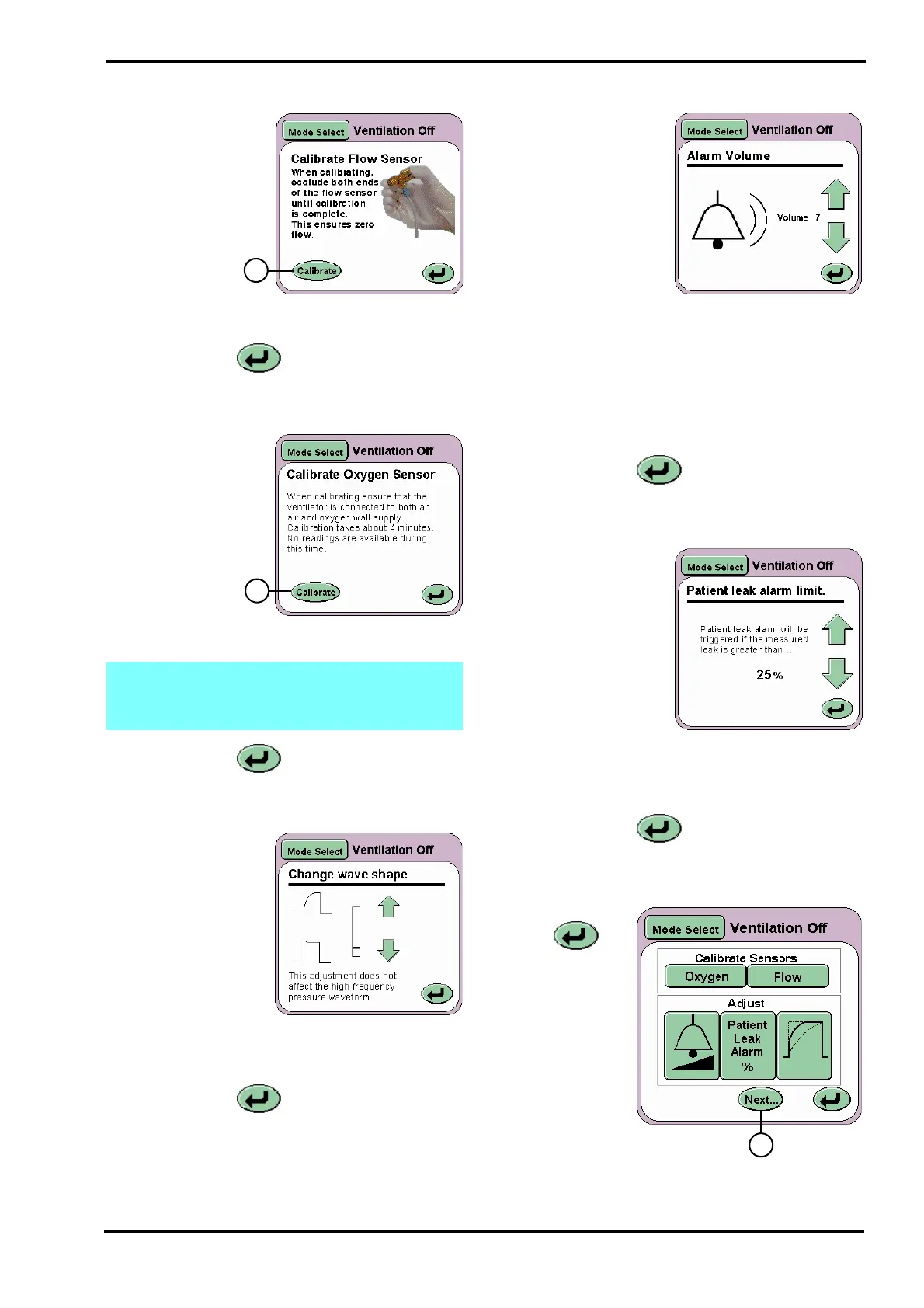
10.6.1 Flow
On pressing the
Flow button (D)
the Calibrate Flow
Sensor panel will
be displayed. The
Calibrate button
(I) runs the
calibration routine
for the flow
sensor. For more
details on the flow
sensor and calibration see page 100.
The Return button returns the user to the
Services panel.
10.6.2 Oxygen
On pressing the
Oxygen button (E)
the Calibrate
Oxygen Sensor
panel will be
displayed. The
Calibrate button
(J) runs the one
point calibration
routine (100% O2)
for the Oxygen
monitoring system.
The Return button returns the user to the
Services panel.
10.6.3 Wave Shaping
On pressing the Wave
shaping button (F) the
Change Wave Shape
panel will be
displayed.
The panel allows the
user to modify the
pressure wave to
produce a square or
tapered wave shape.
Using the arrows the wave shape is modified in
realtime in the pressure waveform window.
The Return button returns the user to the
Services panel.
For more information see “Wave Shaping” on
page 71 of the “Operational Considerations”
chapter.
10.6.4 Alarm Volume
On pressing the
Volume Control button
(G) the Alarm Volume
panel will be
displayed.
The alarm volume
panel allows the user
to set the alarm
sounder volume
between 7 (maximum)
and 3 (minimum). The sounder level settings below
3 can not be selected as normal background noise
could mask the alarm.
The setting 1 is the minimum sound level as stated
in the standard BS EN 475: 1995. This setting is
used by ventilator in situations where the alarm
sounds would be a nuisance.
The Return button returns the user to the
Services panel.
10.6.5 Patient Leak Alarm Limit
On pressing the
Patient Leak Alarm %
button (H) the Patient
Leak Alarm Limit
panel will be
displayed.
The patient leak alarm
limit panel allows the
user to increase or
decrease the alarm
threshold percentage.
For a detailed description of the Patient leak alarm
limit see “Patient Leak Alarm” on page 75.
The Return button returns the user to the
Services panel.
10.6.6 More Options Panel
The Return
button (K)
advances the
user to the More
Options panel.
Note: See “Oxygen Calibration Routines” on
page 126 for information on the two point
oxygen sensor calibration.



 To Next Page