Page 44
10.7.3 Apnoea Setup for PTV & PSV and SIMV
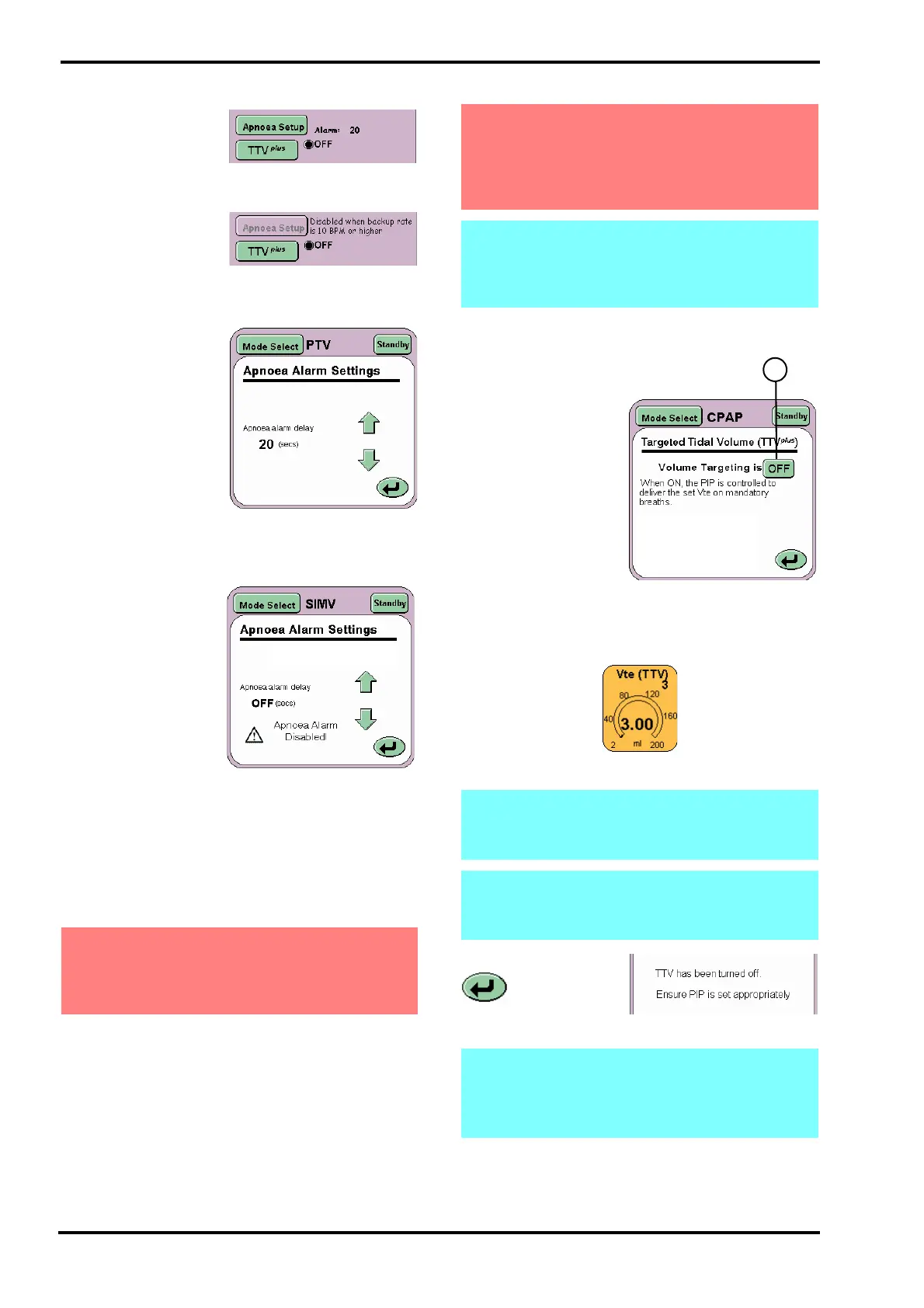
For PTV, PSV and
SIMV the Apnoea
setup button only
becomes active when
the backup breath rate is 9 BPM or lower.
At 10 BPM and above
the Apnoea alarm is
inactive.
The ventilator defaults to 30 BPM so the Apnoea
alarm is inactive.
The Apnoea Settings
panel when active
allows the user to set
the Apnoea alarm
delay only.
The user at backup
rates of 9 BPM or
lower can set the
apnoea alarm delay
from 5 to 60 seconds.
The default value is 20
seconds.
10.7.3.1 Disabling the Apnoea alarm in SIMV
The user has the
ability to disable the
Apnoea alarm for
breath rates below 10
BPM. When the flow
sensor is
disconnected in SIMV
mode the Apnoea
alarm delay now has a
new setting “OFF”.
The user selects the “OFF” setting via the arrow
buttons, and the “OFF” setting is the next increment
after 60 seconds of Apnoea alarm delay.
When the user selects “OFF” from the Apnoea
alarm delay, the Apnoea Alarm is disabled.The
SIMV mode panel will display the text “OFF” instead
of the alarm delay time.
The user can enable the Apnoea Alarm at any time
by setting the Apnoea alarm delay between 5 and
60 seconds or by connecting the flow sensor.
10.7.4 TTV
plus
for CPAP, PSV, PTV & SIMV
The Targeted Tidal
Volume (TTV
plus
)
panel allows the user
to turn ON or OFF
volume targeting.
Volume targeting (Vte
(TTV)) is activated by
the ON/OFF toggle
button (Z).
When Volume
Targeting is ON the
Vte (TTV) parameter
panel appears
allowing the Tidal
Volume target to be
set.
The Return button
returns the
user to the current
mode panel.
Warning: When the Apnoea Alarm is set to
“OFF” when in SIMV mode without the flow
sensor connected, an alternative method of
detecting an apnoeic episode must be used.
Warning: Disabling of the alarm in SIMV has
been allowed, so the user can use the
ventilator non-invasively. The ventilator
should not be used invasively with the
apnoea alarm disabled.
Note: The Apnoea alarm is automatically
enabled when the flow sensor is connected
and calibrated or if the user leaves SIMV
mode and enters PTV or PSV modes.
Note: When TTV
plus
has been selected the
Peak Inspiratory Pressure (PIP) will change to
MAX PIP.
Note: When TTV
plus
has been turned OFF, the
user has to ensure that the PIP is set
appropriately.
Note: Transition to CPAP. On transition from
any mode with TTV
plus
to CPAP, TTV
plus
will be
switched off and alarm limits shall return to
the default settings on exit of TTV
plus
.



 To Next Page