Page 43
10.7.1 Standby Button (All modes)
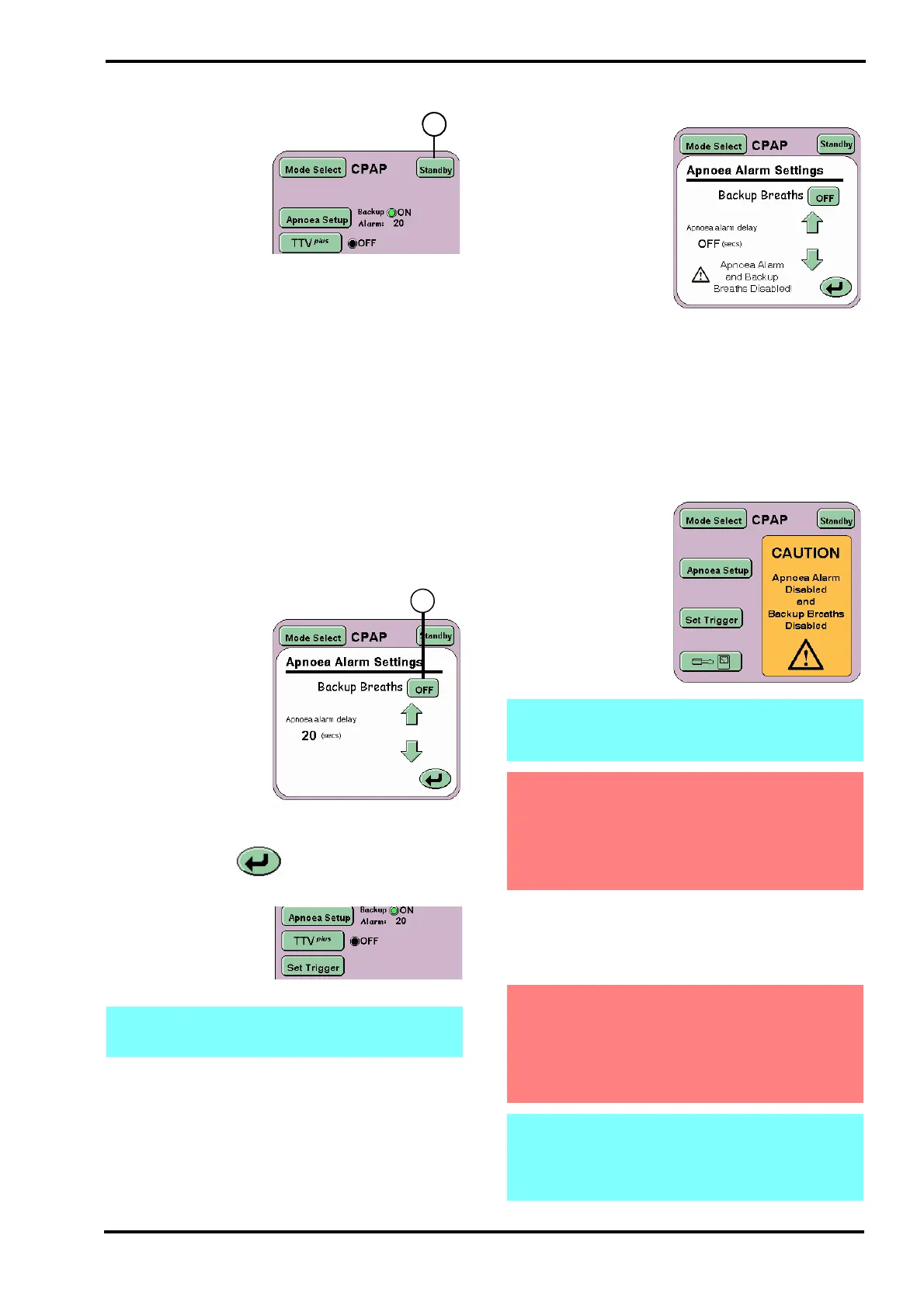
The Standby button
(X) suspends the
current mode of
ventilation for 90
seconds. Though
ventilation has ceased
the ventilator
maintains the mean
pressure.
The Standby button has to be pressed for 3
seconds before ventilation is suspended.
Ventilation will restart after the 90 second period.
Ventilation can be restarted at any time within the
90 second Standby period by repressing the
Standby button.
All alarms generated by entering the Standby mode
are displayed in the alarm panel, but the audible
component is reduced to the minimum value.
When restarting, the ventilator will carry out a “soft
start” to ventilation, gradually increasing the
pressure until the user settings are achieved.
10.7.2 Apnoea Setup for CPAP
The Apnoea Alarm
Settings panel allows
the user to set the
Apnoea alarm delay
and to activate backup
breaths if apnoea is
detected.
The Backup Breaths
function is activated
by the ON/OFF toggle
button (Y) and the
Apnoea alarm delay is
controlled by the arrow buttons.
The Return button returns the user to the
current mode panel.
In the mode panel the
function indicator will
change from black to
green and display the
word ON.
10.7.2.1 Disabling the Apnoea alarm in CPAP
The user has the
ability to disable the
Apnoea alarm. When
the flow sensor is
disconnected in CPAP
mode the Apnoea
alarm delay now has a
new setting “OFF”.
The user selects the
“OFF” setting via the
arrow buttons. The
“OFF” setting is the
next increment after
60 seconds of Apnoea
alarm delay.
When the user selects “OFF” from the Apnoea
alarm delay, the Apnoea Alarm is disabled as well
as the ability to deliver backup breaths, (the Apnoea
alarm is the trigger for backup breaths). The Apnoea
alarm settings panel displays a warning.
The CPAP mode
panel also displays a
warning to the user
that the Apnoea Alarm
and Backup breaths
are disabled.
The user can enable the Apnoea Alarm at any time
by setting the Apnoea alarm delay between 5 and
60 seconds. When the Apnoea alarm is enabled the
backup breaths function is also enabled.
Note: For CPAP mode without a flow sensor
connected, the TTV
plus
button is disabled.
Note: turning OFF the Apnoea alarm in CPAP
mode also sets the Apnoea alarm to OFF in
SIMV mode.
Warning: When the Apnoea Alarm is set to
“OFF” when in CPAP mode without the flow
sensor connected, an alternative method of
detecting an apnoeic episode must be used.
The ventilator will not alarm or provide
mechanical backup breaths.
Warning: Disabling of the alarm in CPAP has
been allowed, so the user can use the
ventilator non-invasively. The ventilator
should not be used invasively with the
apnoea alarm / backup breaths features
disabled.
Note: The Apnoea alarm is automatically
enabled when the flow sensor is connected
and calibrated or if the user leaves CPAP
mode and enters PTV or PSV modes.



 To Next Page