Page 49
To modify an alarm threshold the user should first
press the adjust button in the alarm panel. The user
should then touch the adjustment column or the
symbol and numerical value of the alarm threshold
required in the waveform window.
The alarm threshold changes colour to red and
starts to flash, indicating that the alarm can be
modified and the adjustment arrows should appear
in the lower right-hand corner of the screen.
The alarm threshold can now be modified using two
methods.
The first method is by using the up and down arrow
keys in the lower right-hand corner of the screen.
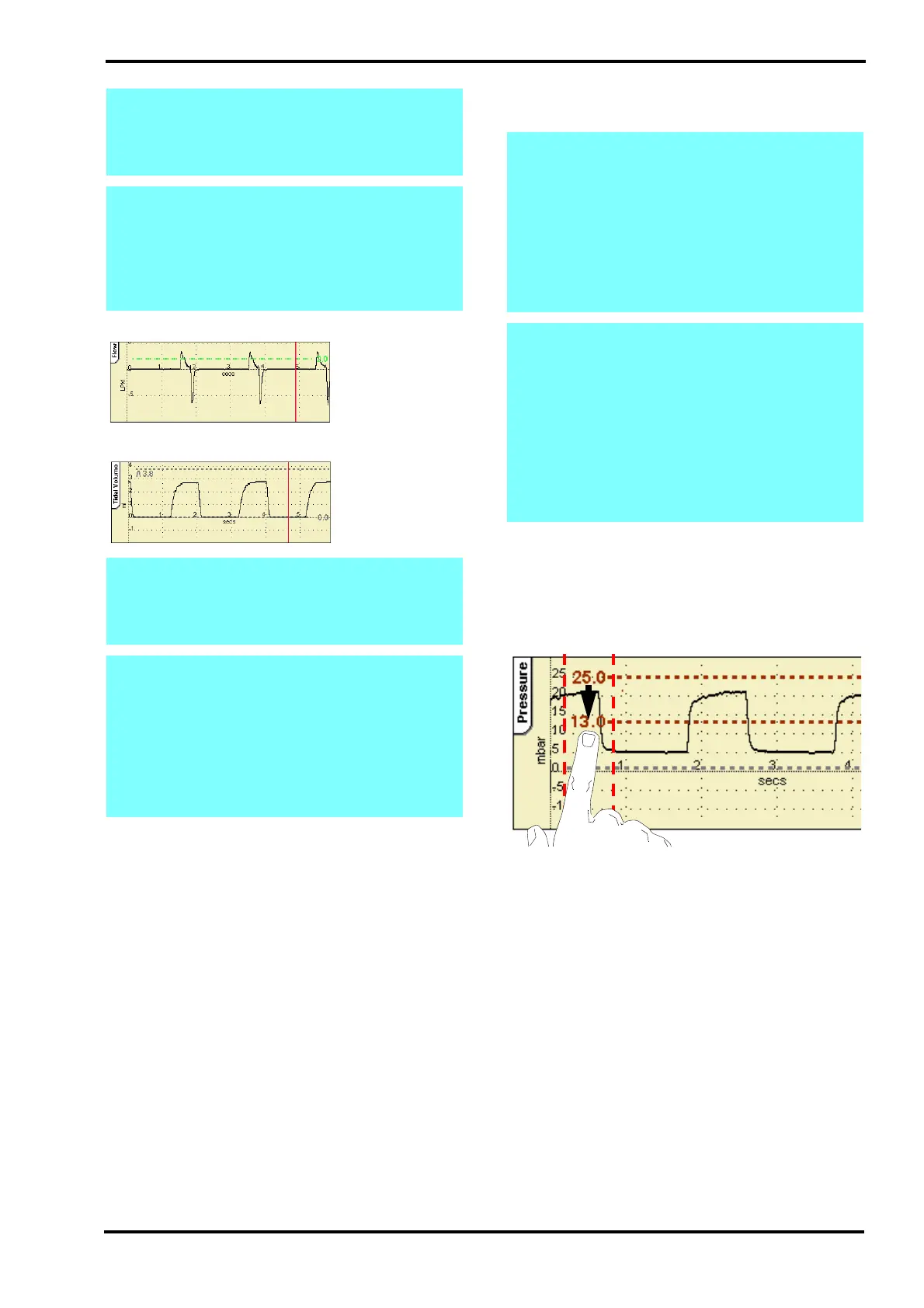
The second method is by touching the screen above
or below the text of the highlighted alarm but within
the adjustment column. This is a coarse method of
adjustment.
The illustration shows the High alarm being coarsely
set from 25 mbar to 13 mbar.
Fine adjustment can be made by use of the arrows
displayed in the lower right hand corner of the
screen.
Note: The High and Low Pressure Alarm
thresholds auto track the pressure waveform
by 5mbar for conventional modes of
ventilation and 10mbar for HFO modes.
Note: In CPAP, PTV, PSV and SIMV modes, the
Flow window has a breath detection
threshold. This threshold is activated by the
Set Trigger button or can be modified in the
same manner as an alarm threshold
described above.
Note: In all conventional modes there are
High and Low Tidal Volume alarm thresholds.
These thresholds are modified in the same
manner as any alarm threshold.
Note: When a flow sensor is connected, there
are High and Low Minute Volume alarm
thresholds. These thresholds are modified in
the same manner as any alarm threshold.
They can be accessed by holding down the
Adjust button for 3 seconds or selecting the
minute Volume waveform from the loops and
waveform button.
High Tidal Volume
Low Tidal Volume
Note: The user can only adjust the alarm
thresholds to 15mbar above the maximum
PIP or 15mbar below the minimum pressure
in conventional ventilation. 20mbar above the
maximum PIP or 20mbar below the minimum
pressure in HFO or combined mode
ventilation (HFO + CMV). This safety feature
stops the user to set the alarm threshold so
high that in practice the alarm is turned off.
Note: The user must be made aware that the
Low Alarm threshold will only autotrack down
to 1mbar in conventional ventilation. If the
user wishes to set the alarm lower than 1mbar
then this has to be done manually. If the alarm
threshold is manually set lower than 1mbar
and a pressure related parameter is adjusted
the low alarm threshold will return to 1 mbar.
The user will have to manually re-adjust the
alarm threshold to the required level.



 To Next Page