59
BUILDING SCREEN
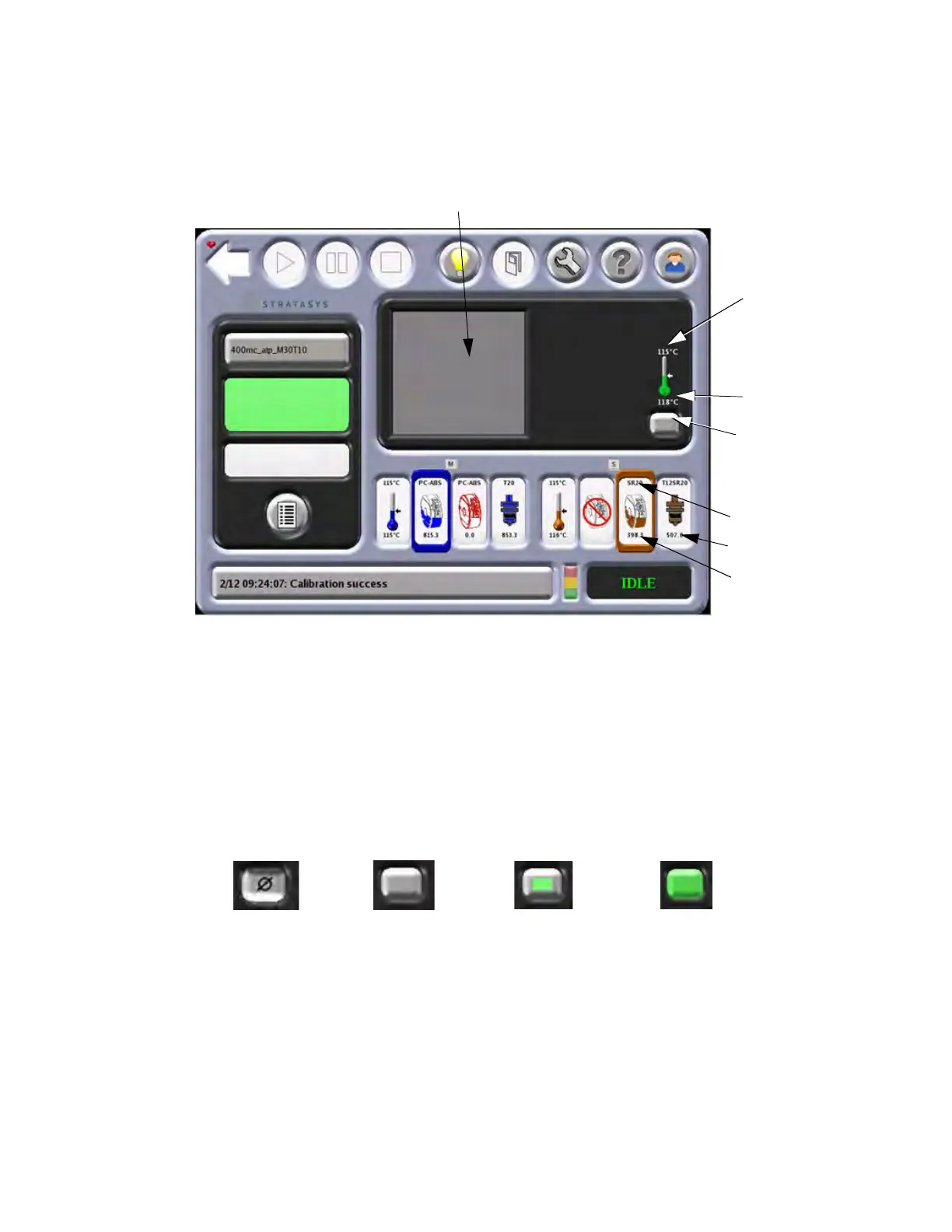
The Building Screen displays the progress of the part being built. Oven temperature is displayed as well as
platen vacuum for large and small build sheets. The icon will turn green when vacuum is present.
Figure 4-21: Bu
ilding Screen
PLATEN VACUUM
Pressing the Platen Vacuum button turns off the platen vacuum so a build sheet can be removed. When off, the
button displays a Ø symbol. Vacuum is restored by closing the oven door. The button is colored solid white to
represent a lack of vacuum with a build sheet in place. A solid green color represents there is vacuum with a
large build sheet in place. Green surrounded by white represents that vacuum is present with a small build sheet
in place.
Figure 4-22: Pl
aten Vacuum Icons
Platen Vacuum
Build Progress
Set Point Temperature
Actual Temperature
Material Name
Odometer
Amount of Material
Vacuum Off
No Vacuum
Small Build
Sheet
Large Build
Sheet














 To Next Page