94
LOADING MATERIAL TO THE LIQUEFIER TIPS
Perform the following steps to load material to the liquefier tips:
1. Make sure the system is in the Pause or Idle mode.
2
. From the Main Menu, select O
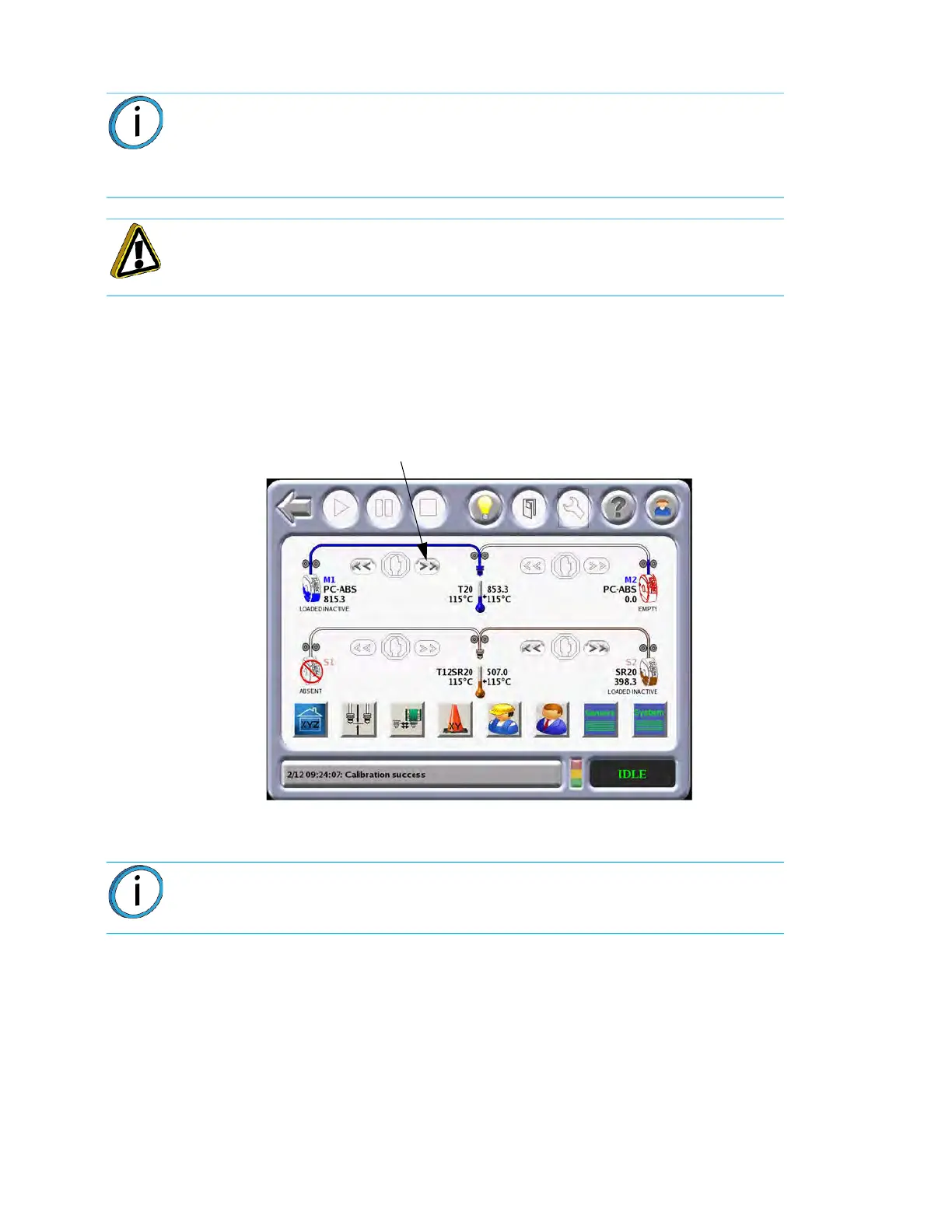
perator Tools and the following screen will appear.
Figure 4-41: Op
erator Tools
3. Select the material to be loaded and press the Loa
d icon.
• The head warms up to the material operating temperature (Automatic - based on SmartSpool
d
ata). This step also sets the oven temperature to the correct value for the material being
loaded.
• The canister drive motor starts to push the filament to the liquefier tips.
•
For some materials (i.e., SR-20) the order of steps A and B is reversed.
•
When the filament reaches the head (takes 2 to 4 minutes), it enters the liquefier tip, and the tip
p
urges a small amount of material.
• A successful load is indicated by a steady green LED. A complete load and purge cycle should
t
ake less than five minutes.
Note: If you are changing to a different material type or changing tips, follow the
procedure outlined in “Changing Tips or Material Type” on page
96.
Loading filament to the liquefiers is done in the Idle or Paused mode only, not
wh
ile building.
Caution: If the material type is changed, the tips must be changed.
Note: Model and support materials must be compatible. If a selected material is
incompatible with a loaded material, a material mis-match load error will occur.
The selected material will not be loaded.
Load














 To Next Page