Basic Features
The Phone System Tab 103
3.10.4.1 VIEWING CALL HISTORY
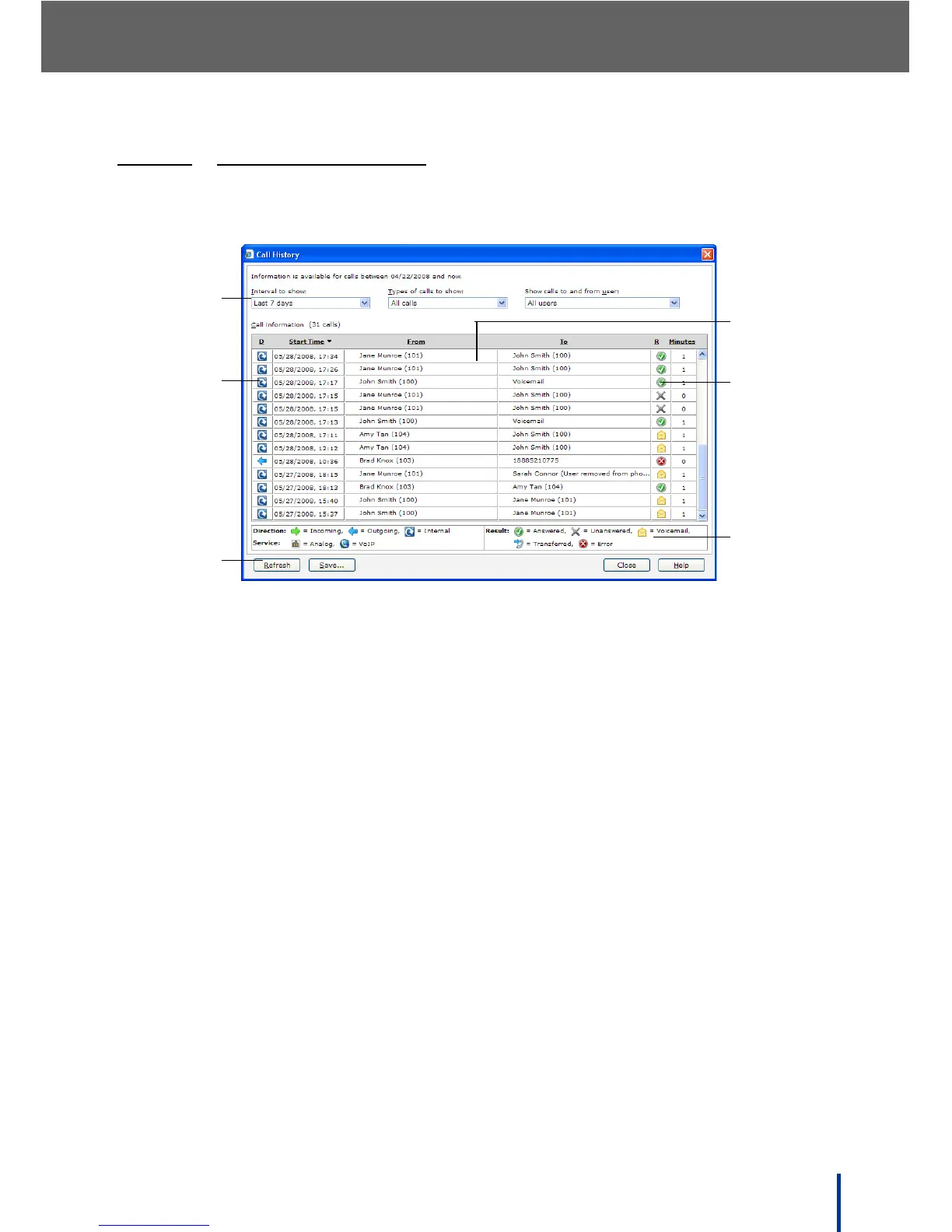
The Call History screen enables the administrator to view all system call activ-
ity, whether incoming, outgoing, and internal.
The Call History screen is composed of the following areas:
1. Filters—filter the Call History by time scale, call type, and user.
2. Call Direction—displays traffic flow, incoming, outgoing, or internal.
3. Actions—Refresh, Save, Close, and Help buttons:
• Refresh the screen to update with the latest information.
• Save the current Call History to a .csv file.
• Close Call History.
• Get Help with Call History.
4. Call History list—roll over the desired entry with the mouse pointer to view
detailed call information.
5. Call Result—displays call results as described in the Legend panel.
6. Legend panel—description of icons used in the Call History list.



 To Next Page