Introduction
8 Tour of the Syspine Phone System
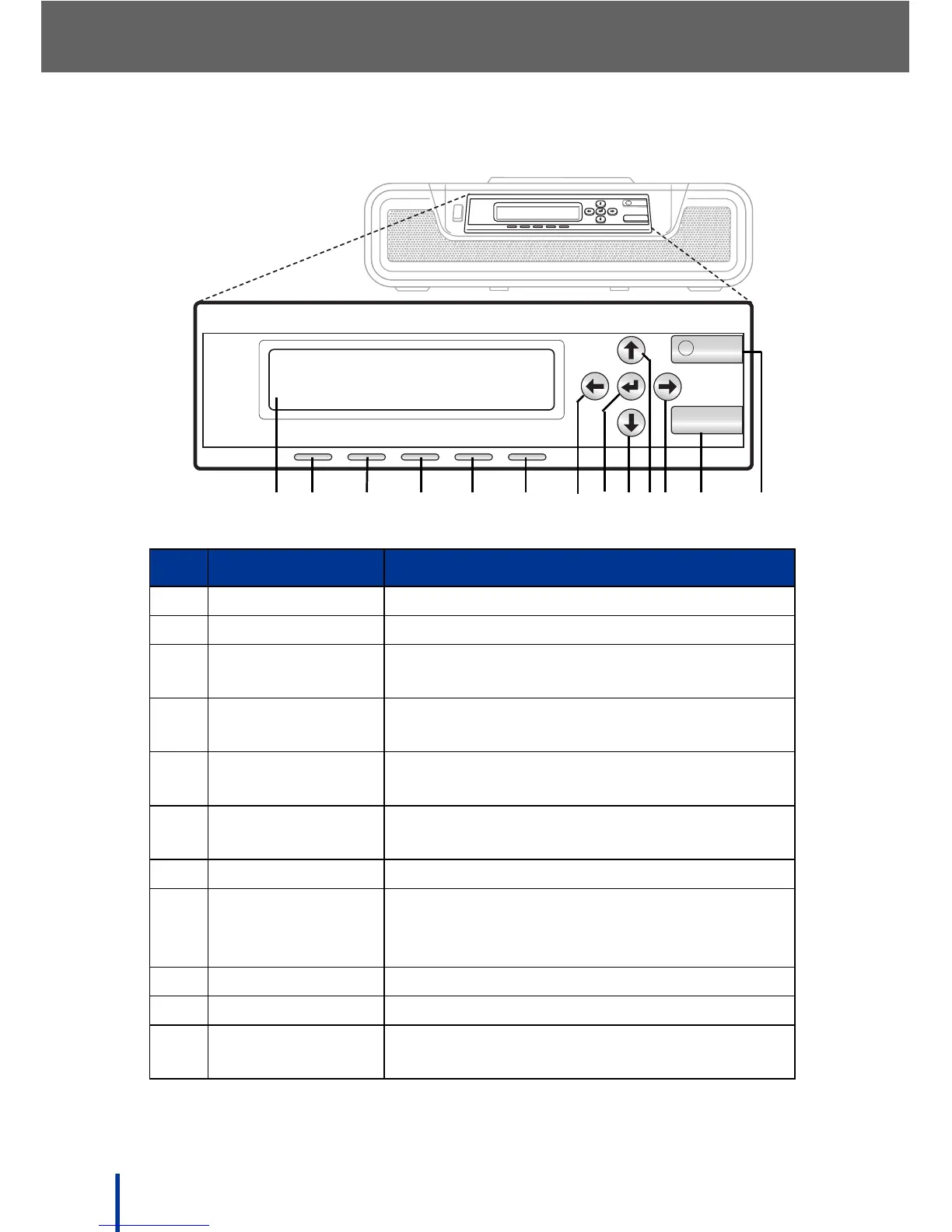
1.3.5 LCD Panel
No. Item Description
1. LCD panel 2 x 16 characters 5 x 7 dot display
2. Power LED LED lights orange in power-on state
3. System LED LED lights blue when system is in ready
state
4. Line Module1
LED
Tri-color Line 1 Module LED
5. Line Module2
LED
Tri-color Line 2 Module LED
6. Gateway Module
LED
Tri-color Gateway Module LED
7. Left Button Up one level in Admin Mode
8. Enter Button Press to Apply settings / Down one level in
Admin mode
Hold for 5 seconds to enter Admin Mode
9. Down Button Scroll down through options in Admin Mode
10. Up Button Scroll up through options in Admin Mode
11. Right Button View lower line message
Select option in Admin Mode
R
ES
E
T
IP
QUANTA COMPUTER
POWER SYSTEM LINE1
LINE2 GATEWAY
Syspine DOS-A50
POWER SYSTEM LINE1 LINE2 GATEWAY
RESET
IP



 To Next Page