Installation
Hardware Installation 27
2.1.9 Connecting IP Phone 310s to the LAN
After connecting the DOS-A50 to the LAN and a suitable power outlet, connect
all the required IP Phone 310s at once to the LAN.
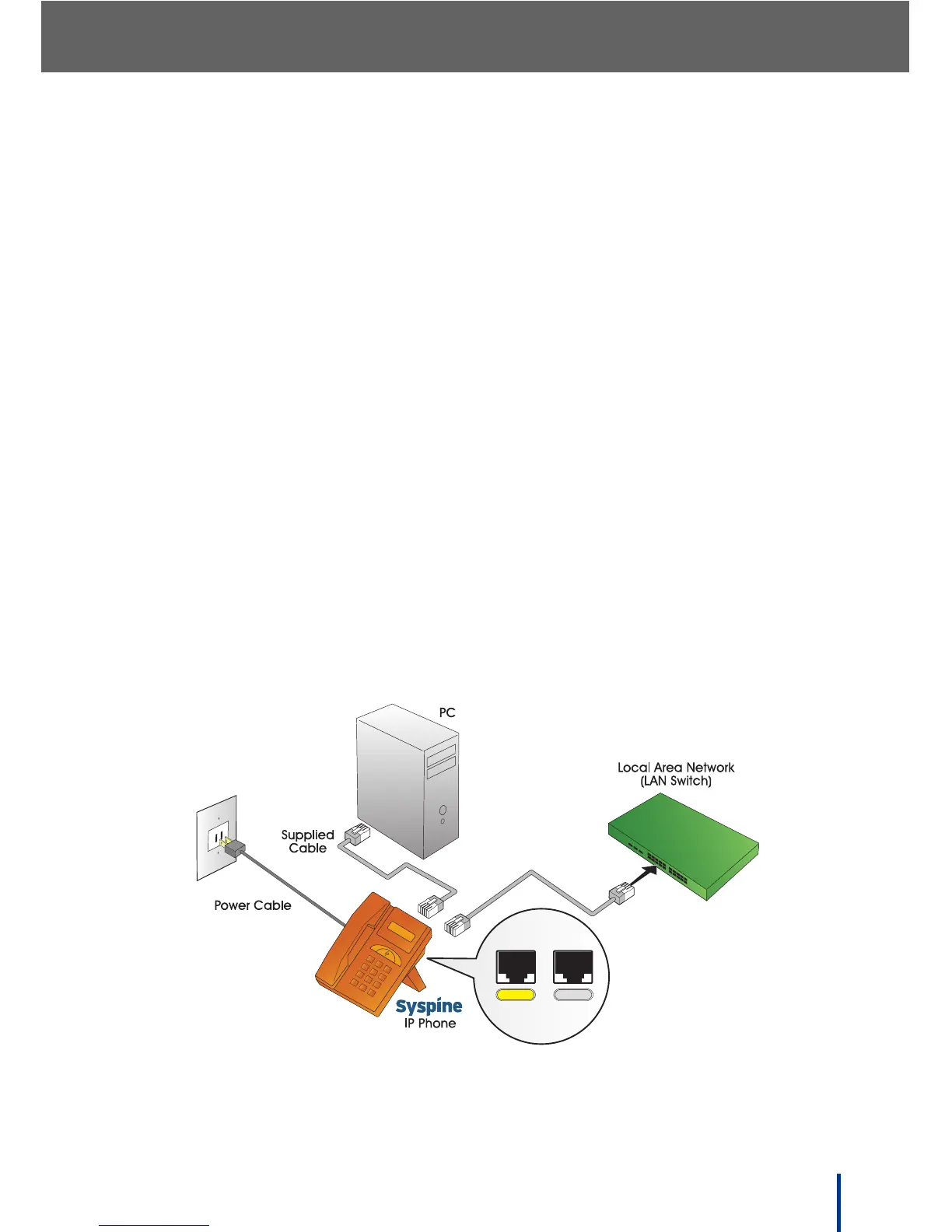
The IP Phone 310 supports daisy-chain connection for limited port access
using the supplied Ethernet cable.
IMPORTANT!
PoE operation is not possible when wiring in daisy chain sequence—
power adapters must be used on series phones.
Perform the following steps to connect the IP Phone 310 as part of a daisy-
chain:
1. Disconnect the existing LAN cable from the PC.
2. Plug the LAN cable into the LAN port on the IP Phone 310.
3. Using the supplied Ethernet cable, connect the PC port on the IP Phone
310 to the LAN port on the PC.
4. Using the supplied power cables for each phone, connect the IP Phones to
a power source.
N
OTE: If the IP Phone 310 is connected through a PoE device, it is not neces-
sary to connect the power adapter.
5. Record the IP address for each phone as displayed on the LCD screen.
N
OTE: If the IP address is not displayed, enter # * 47 (# * IP) on the keypad to
display the IP address.
If port access is not a consideration and a daisy chain connection is not required,
attach the IP Phone 310 directly to the LAN switch with the supplied cable.



 To Next Page