Basic Features
118 The Base Unit Tab
3.11.3.2 RESTORING VOICEMAIL AND SETTINGS
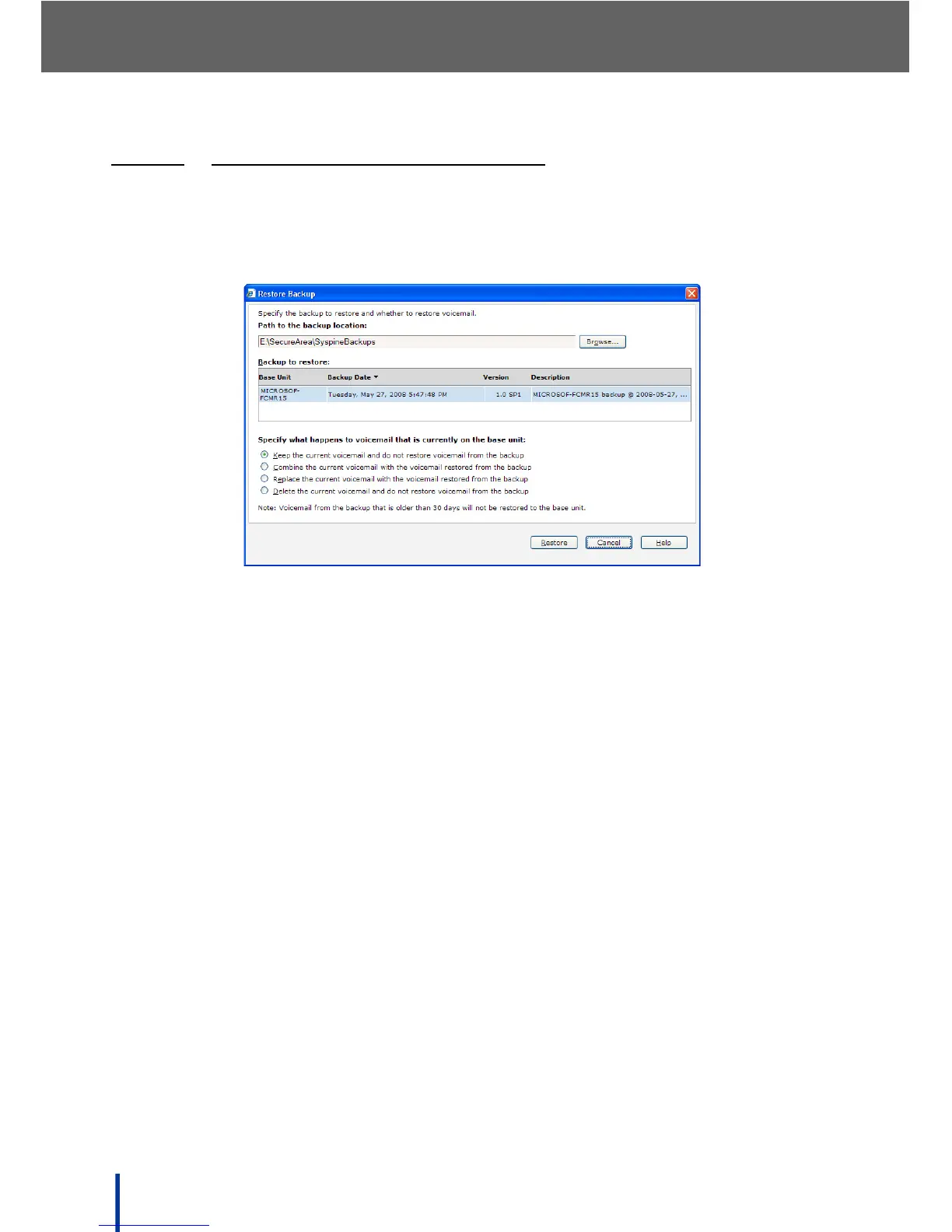
To restore data from a previously saved file, perform the following steps:
1. Click Restore Backup in the Backup panel.
The Restore Backup screen displays.
2. The Path to the backup location field is completed automatically with the
filepath to the most recent backup. If the required backup is located else
where, click Browse.
3. Select the required backup from the Backup to restore field (there is only
one backup in the example).
4. In the Specify what happens to voicemail that is currently on the base
unit panel select from:
N
OTE: Voicemail from the backup more than 30 days old is not restored.
• Keep the current voicemail and do not restore voicemail from the
backup — only configuration files are restored from the backup.
• Combine the current voicemail with the voicemail restored from the
backup — configuration and voicemail files are restored from the backup.
Backup voicemail is combined with existing voicemail on the DOS-A50.
• Replace the current voicemail with the voicemail restored from the
backup — configuration and voicemail files are restored from the backup.
Backup voicemail overwrites existing voicemail on the DOS-A50.
• Delete the current voicemail and do not restore voicemail from the
backup — configuration files are restored from the backup and the existing
voicemail on the DOS-A50 is deleted.



 To Next Page