22
COMPONENTS
OTHER SCREEN DISPLAYS
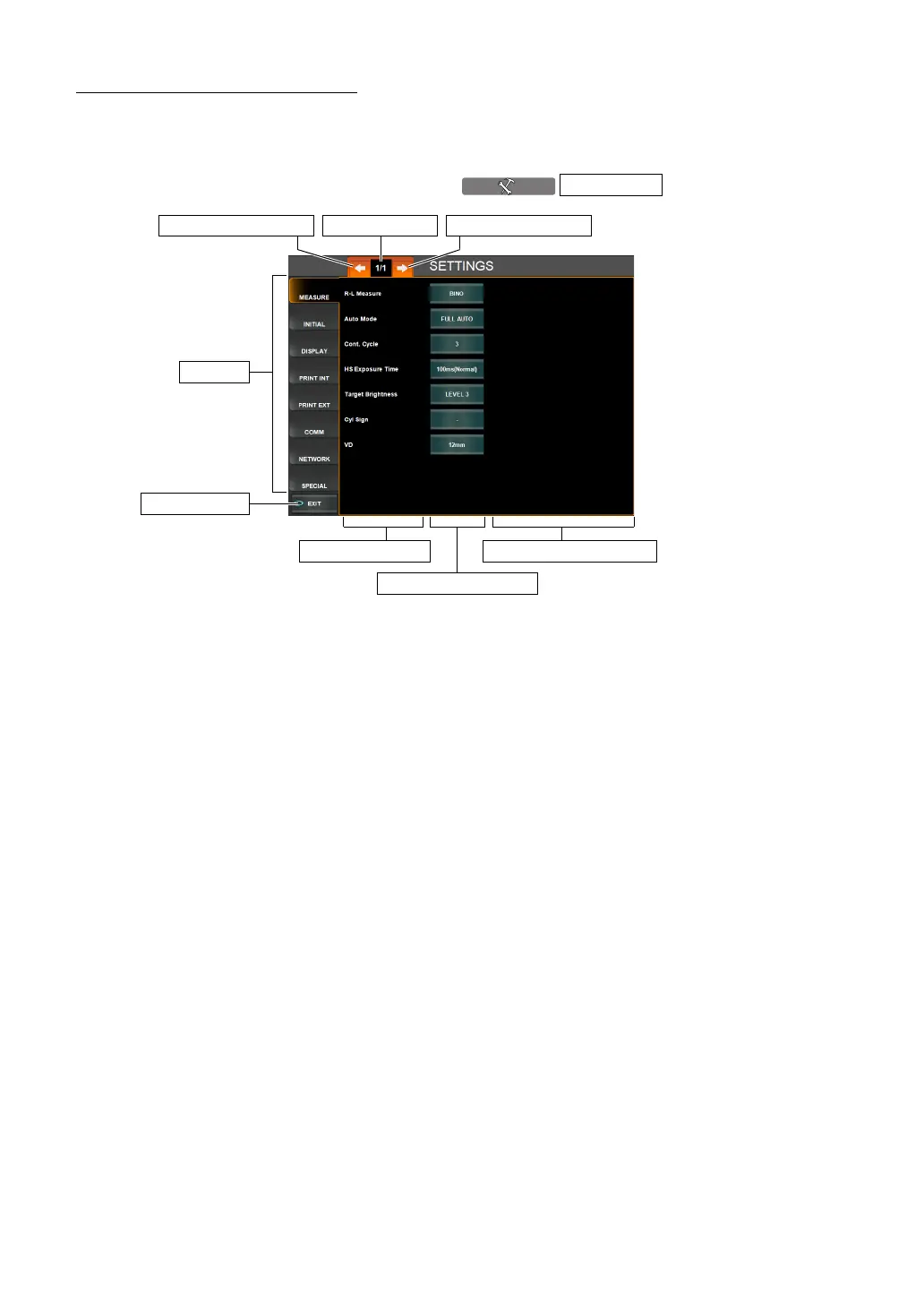
MENU SCREEN
Various settings are done on this screen. (See page 111.)
The screen is displayed by pressing the button.
(1) Index Set items are classified by tabs for each subject. The selected
index is highlighted in orange.
(2) Page display Indicates the page position of the displayed index page.
(3) Page Feed button Feeds index pages (when there are multiple pages in the index).
(4) Page Return button Returns the preceding page in the index.
(5) Set Item display Displays set items in the index.
(6) Set Condition button Displays the set condition of current set items. When pressed, the
color changes to orange and the Setting Change button is dis
-
played.
(7) Setting Change button Select items for changing the setting by pressing the button.
When selected, the result is reflected on the Set Condition button.
(8) EXIT button Saves the set contents and returns to the MEASUREMENT
screen.
SETTINGS
(5) Set Item display
(1) Index
(8) EXIT button
(6) Set Condition button
(7) Setting Change button
(3) Page Feed button(4) Page Return button (2) Page display



 To Next Page