18
COMPONENTS
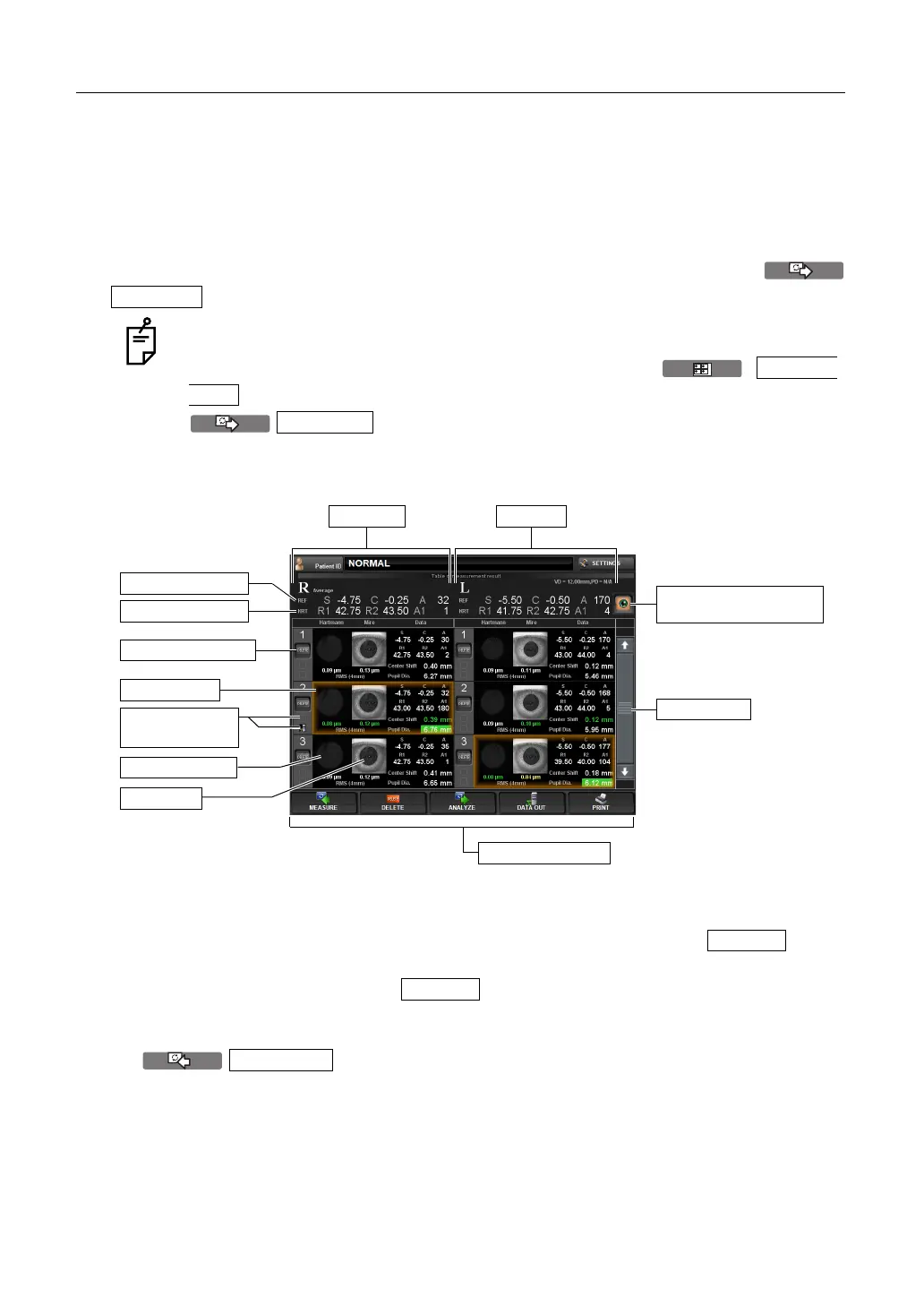
CONTROL PANEL COMPONENTS (MEASUREMENT RESULT LIST SCREEN)
MEASUREMENT RESULT LIST SCREEN
On the Measurement Result List screen, a list of measurement results can be confirmed. By
selecting the data to be displayed, data output to the external PC, printing data, initial display
on the Analysis screen, and clearing data can be done.
When plural measurements are performed under Auto mode, the screen is changed automat-
ically to the Measurement Result List screen.
In the case of Manual mode or Auto Tracking mode, it is displayed by tapping the
button after the measurement.
(1) Scroll bar By scrolling the measurement result, measurement data can be
scrolled up and down.
(2) DELETE button Select the data to be deleted. The selected button
turns on in orange. Under this condition, deletion is done by tap-
ping the button of the (3)Function button.
(3) Function button Available functions are listed. Select the corresponding button on
the touch panel.
button The Measurement screen is returned and an addi-
tional measurement can be done. However, if data
are outputted to the connected PC or printed by the
internal/external printer, the display is changed to
In case of the serial measurement, the screen does not shift to the Table of mea-
surement result screen automatically after measurement completion. The Table of
measurement result screen can be displayed by tapping
button on the progress measurement map displayed with tapping of the
after measurement. In case of Pupillometry, the screen
does not go automatically to the Table of measurement result screen after finishing
the measurement.
ANALYZE
RESUL
LIST
ANALYZE
(3) Function button
(1) Scroll bar
Right eye
Typical REF value
Typical KRT value
Selected data
(5) Recommended data
selection button
Left eye
Mire Image
Hartmann Image
(2) DELETE button
(4) Printed icon/
output icon
DELETE
MEASURE



 To Next Page