61
INDIVIDUAL OPERATIONS
DISPLAYING MEASUREMENT VALUES
Data of the latest measurements are displayed on the control panel screen.
Display of measurement values only: Measurement was done correctly.
ERROR: Measurement was not done correctly.
CLEARING ALL MEASUREMENT VALUES
When multiple patients are measured continuously without printing/transferring the measure-
ment data of the previous patient, measurement values of the new patient are saved following
the measurement data of the previous patient.
It is possible to clear any unnecessary data.
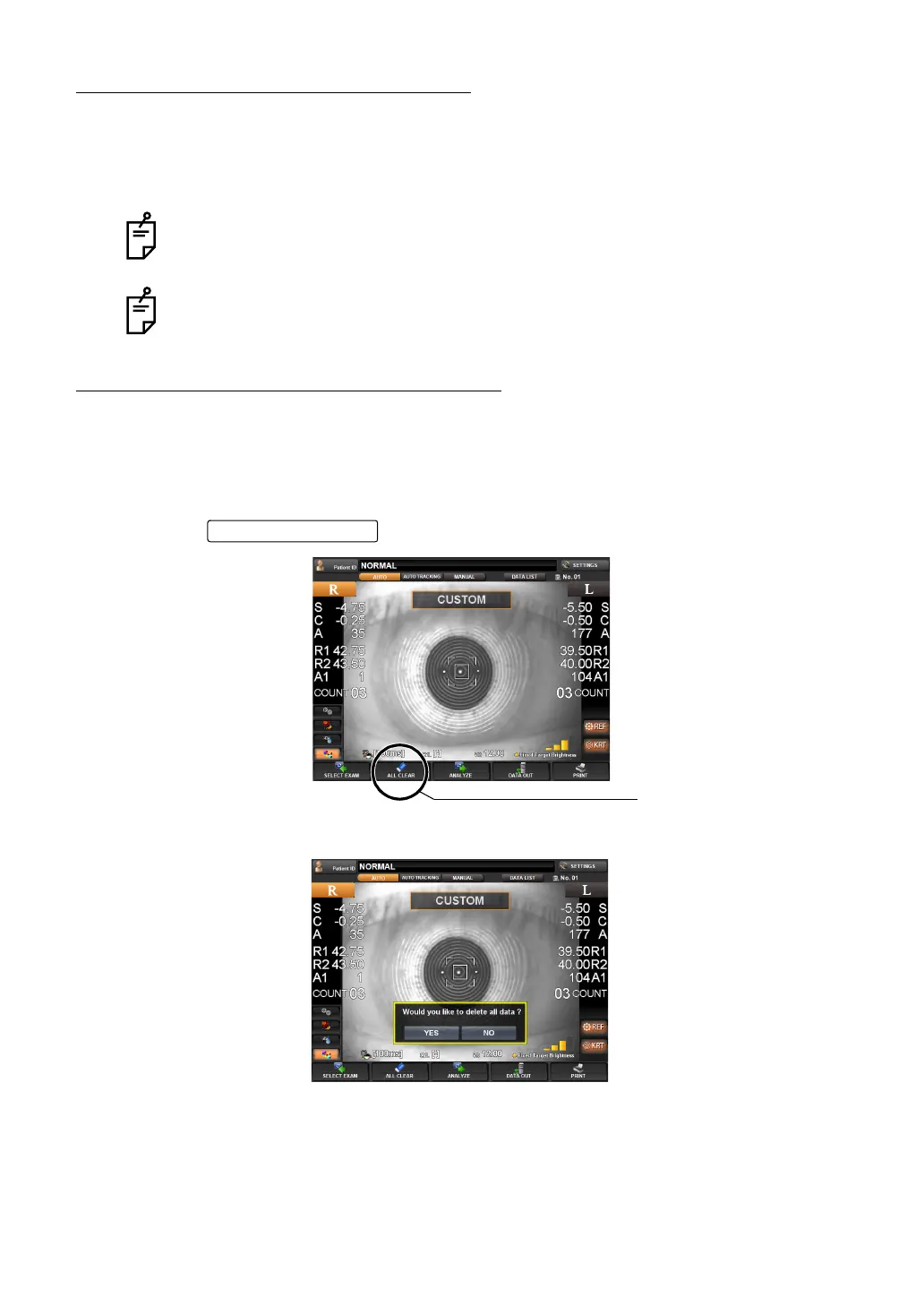
1 Tap the of the control panel.
2 A message "Would you like to delete all data ?" is displayed.
If "Yes" is selected: All measurement values are cleared.
If "No" is selected: Measurement can be continued.
3 When "Yes" is selected, a message "Clearing data..." is displayed.
For messages on the control panel screen, see "MESSAGE LIST" on page 184.
It is possible to display all measurement data on the screen. For details, see "DIS-
PLAYING ALL MEASUREMENT DATA" on page 70.
ALL CLEAR button
ALL CLEAR button



 To Next Page