94
DISPLAYING THE MEASUREMENT RESULT
(6) Measurement valueThe measured pupil diameter, and the coma aberration, spherical
aberration, total high order aberration, and S/C/A values in 4.00mm
and 6.00mm analysis zones are displayed.
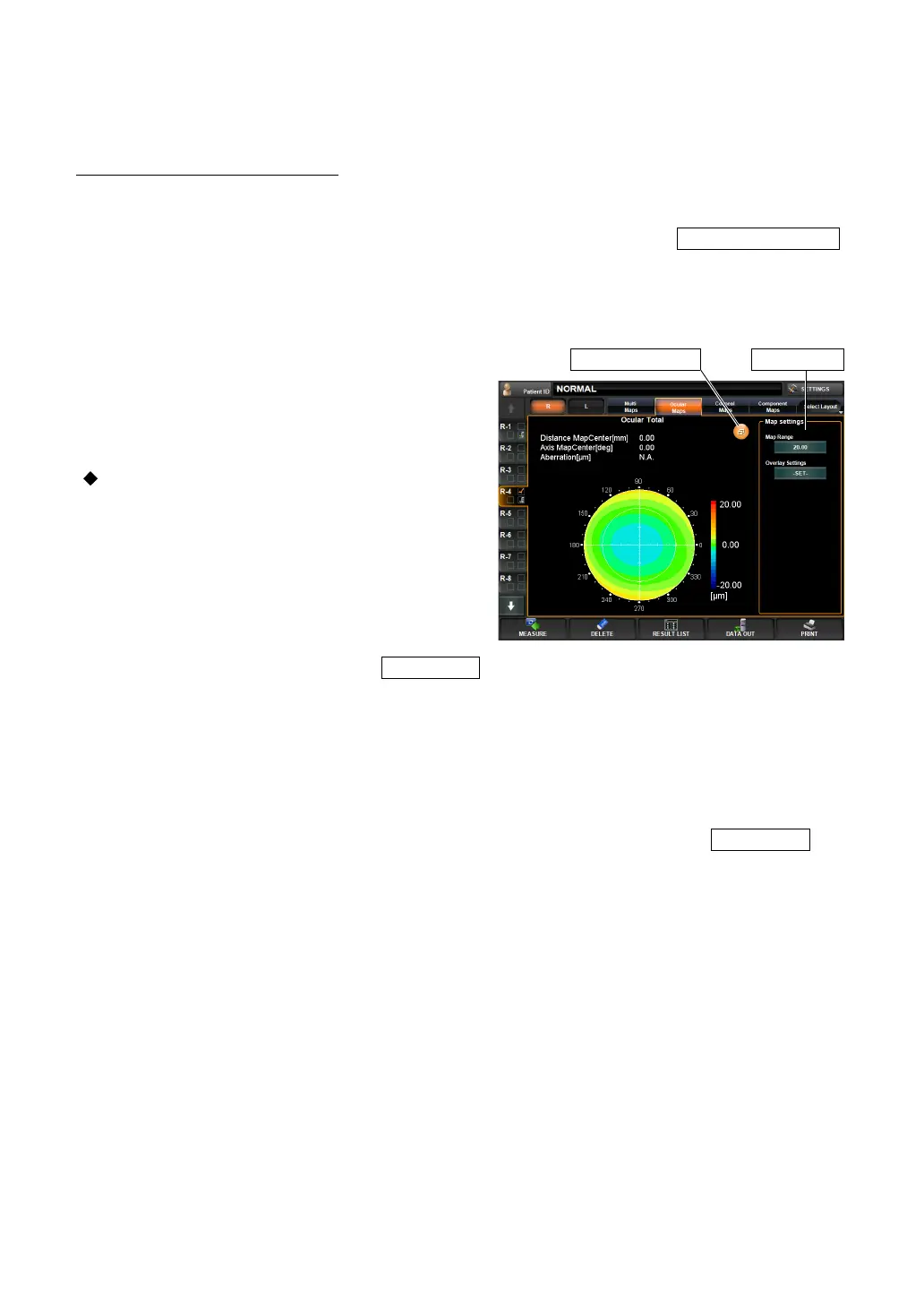
ENLARGEMENT DISPLAY
When tapped, the map display is enlarged.
• To return to the original screen, drag the map downward, or tap the .
For the operation of the control panel, see "OPERATION METHOD OF CONTROL PANEL"
on page 13.
EXAMPLE: TOTAL ABERRATION
The following items are displayed at the top left
of the screen:
• Coordinate values (distance and angular
direction from the center)
• Aberration value
Near the "Map Setting" displayed on the
right, the following display setting can be
done:
• Display step
The display step is set.
1 By pressing the Map Range button,
ten keys are displayed.
2 Enter the number and tap the : the setting is done.
• Overlay setting
1 By pressing the Overlay settings button, the following overlay buttons are displayed:
• Map overlay (cross scale)
• Map overlay (angle scale)
• Map overlay (mm grid scale)
2 Tap on the button of the desired overlay to be turned ON, and press the : the
overlay is displayed on the map.
Zoom Down button
Zoom Down button Map settings



 To Next Page