37
PREPARATIONS
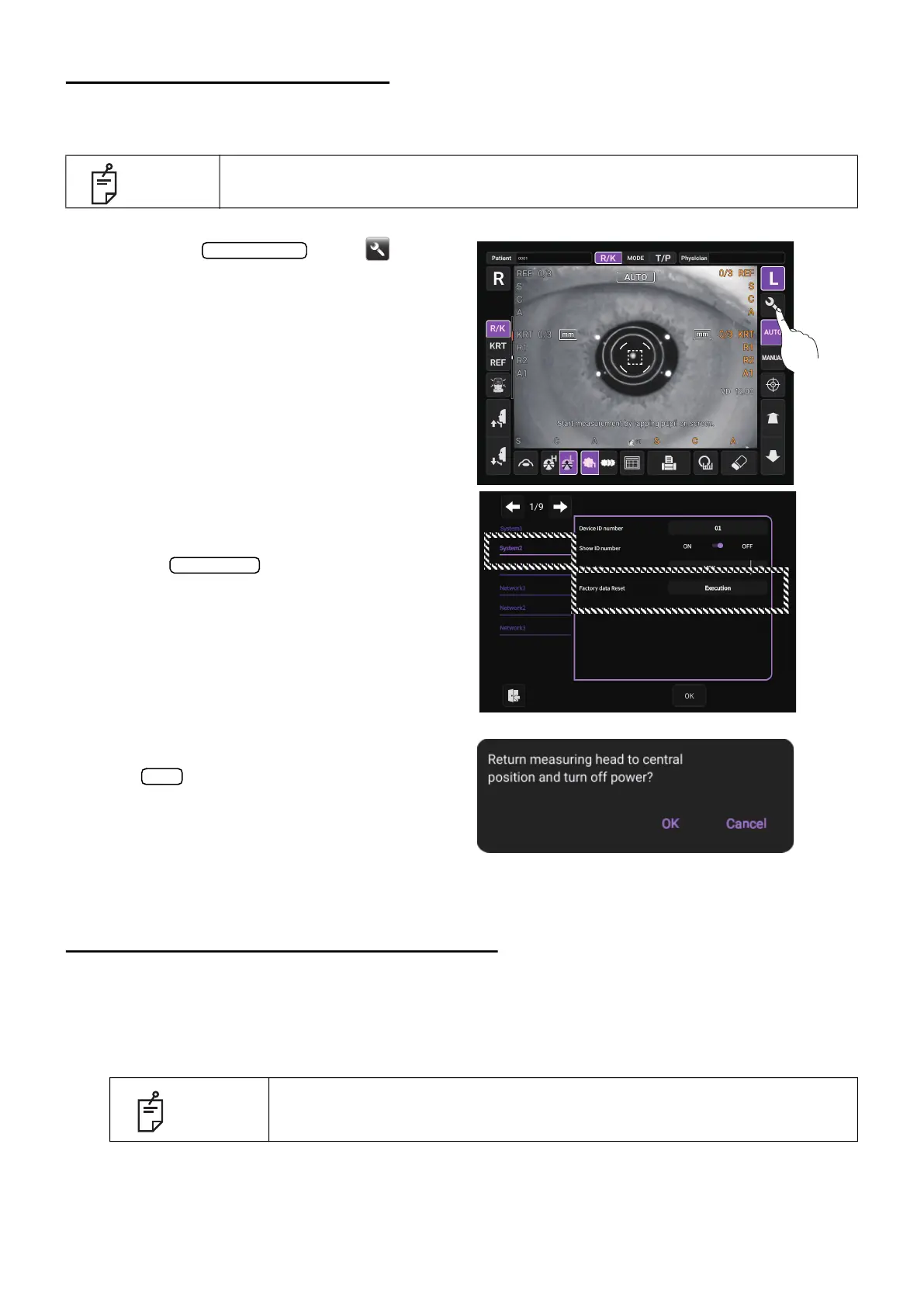
RESTORE DEFAULT SETTINGS
If resetting the region to be used is required such as by setting the wrong region, perform the follow-
ing operation.
1 Tap the button .
Setup screen is displayed.
2 Select the “Factory data Reset” for
“System 2” on the setup screen, tap
the
.
* Even if the screen is displayed in
a different language or different
layout from the illustration, the
“Factory data Reset” is always
displayed in the bottom descrip
-
tion of the “System 2”.
3 A message appears. Press the
button to return the measure-
ment head to the last position. Wait
until the measurement head has
completed the movement.
4 Turn off the power and turn on the power again, you can set the region after starting.
RECOVERY FROM POWER SAVE STATUS
This instrument adopts the power save system for saving electric power. When the instrument is not
operated for a set time, the control panel becomes a screensaver.
1 Tap the control panel or operate the control lever.
The power saving is cancelled and measurement is enabled.
NOTE
If the factory default is carried out, clear the setting information of all users.
NOTE
The time to start the power save status can be changed at “Auto power
save” for “System 1” on the setup screen. (See page
103).
Setting menu
Execution
OK



 To Next Page