86
OPTIONAL OPERATIONS
IOL MODE IN TONO/PACHY
SETTING THE IOL MODE
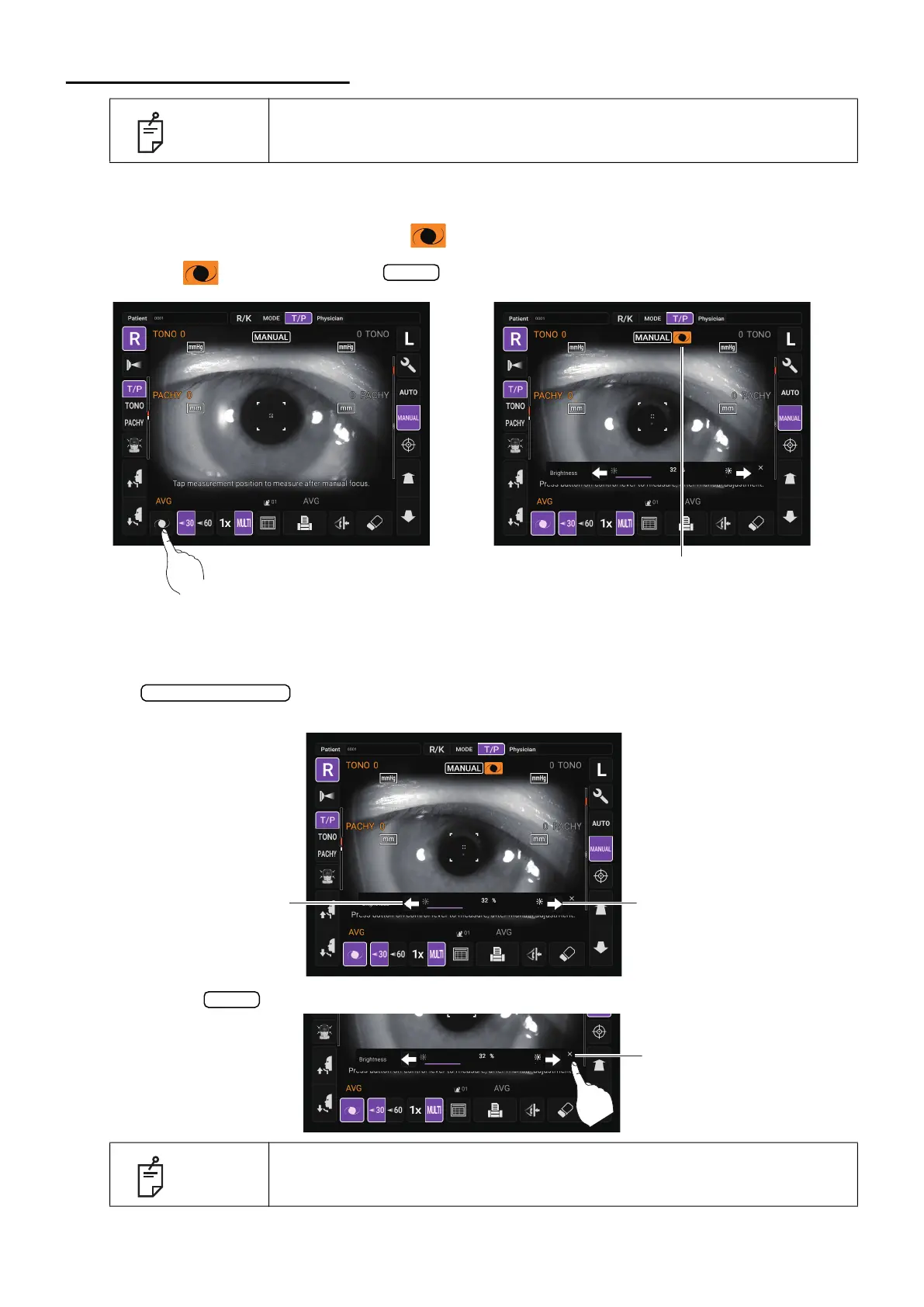
1 Check the Measurement screen. If is displayed, IOL mode is set.
2 If no is displayed, tap the button to change to IOL mode.
SETTING THE IOL LED BRIGHTNESS
1 If the alignment dot is difficult to see, adjust the LED brightness by touching the
button for “Brightness” or the light gauge to make it easier to check the
alignment dot.
2 Tap the button, the LED brightness setting display disappears.
NOTE
Alignment may not be performed normally with IOL inserted eye. If it occurs,
carry out measurement in IOL mode.
NOTE
The value sets at “Brightness” remains in “IOL LED Brightness” in the
“Function(T/P)1” on the Setup screen.
IOL
IOL mode display
Light volume up/down
Light volume down button
Light volume up button
Exit
Exit button



 To Next Page