81
OPTIONAL OPERATIONS
MANUAL MODE IN TONO/PACHY
SETTING THE MANUAL MODE
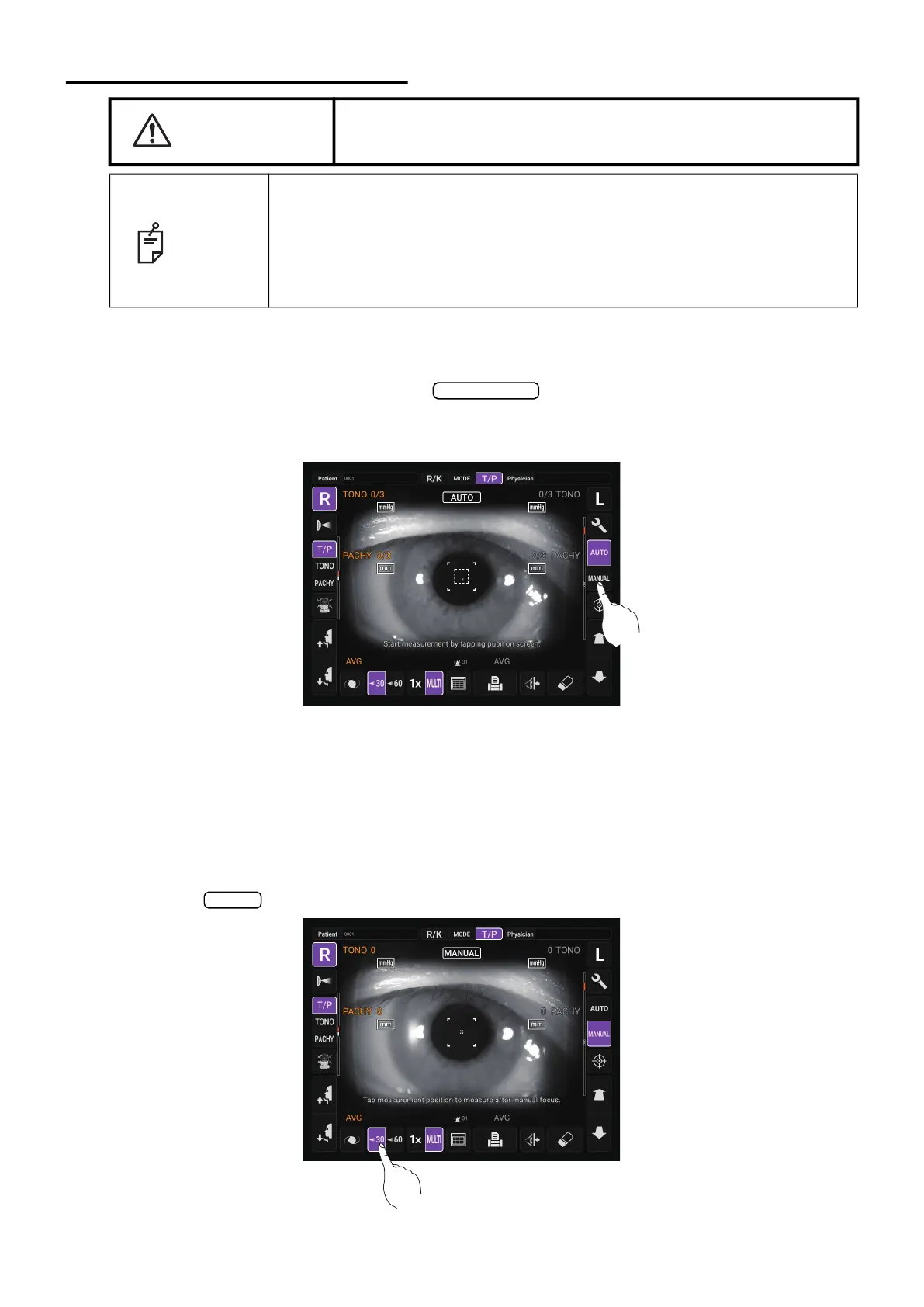
1 Check the Measurement screen. If the button is “MANUAL”, the mode is Manual
mode.
2 If “AUTO” (Auto mode) is displayed, tap it and change to “MANUAL”.
SETTING THE MEASURING RANGE
In this instrument, the measuring range can be switched in 2 steps between “7-30” and “30-60”.
Normally, “7-30” is used, but if the patient's intraocular pressure is high, switch it to “30-60”. The
default setting is “7-30” upon power on.
1 Check the Measurement screen.
2 Tap the button of the control panel and set the measuring range.
CAUTION
Be careful not to get the finger or hand of the operator who is
opening the eyelids caught in the device.
NOTE
• Adjust the height of the instrument table so that the patient can sit com-
fortably. Otherwise, correct measurement values may not be obtained.
• Do not perform measurement if the patient holds their breath or is ner-
vous. Otherwise, correct measurement values may not be obtained.
• If the instrument is moved before measurement values are displayed, it
may cause incorrect measurement results.
Auto/Manual
30/60



 To Next Page