76
OPTIONAL OPERATIONS
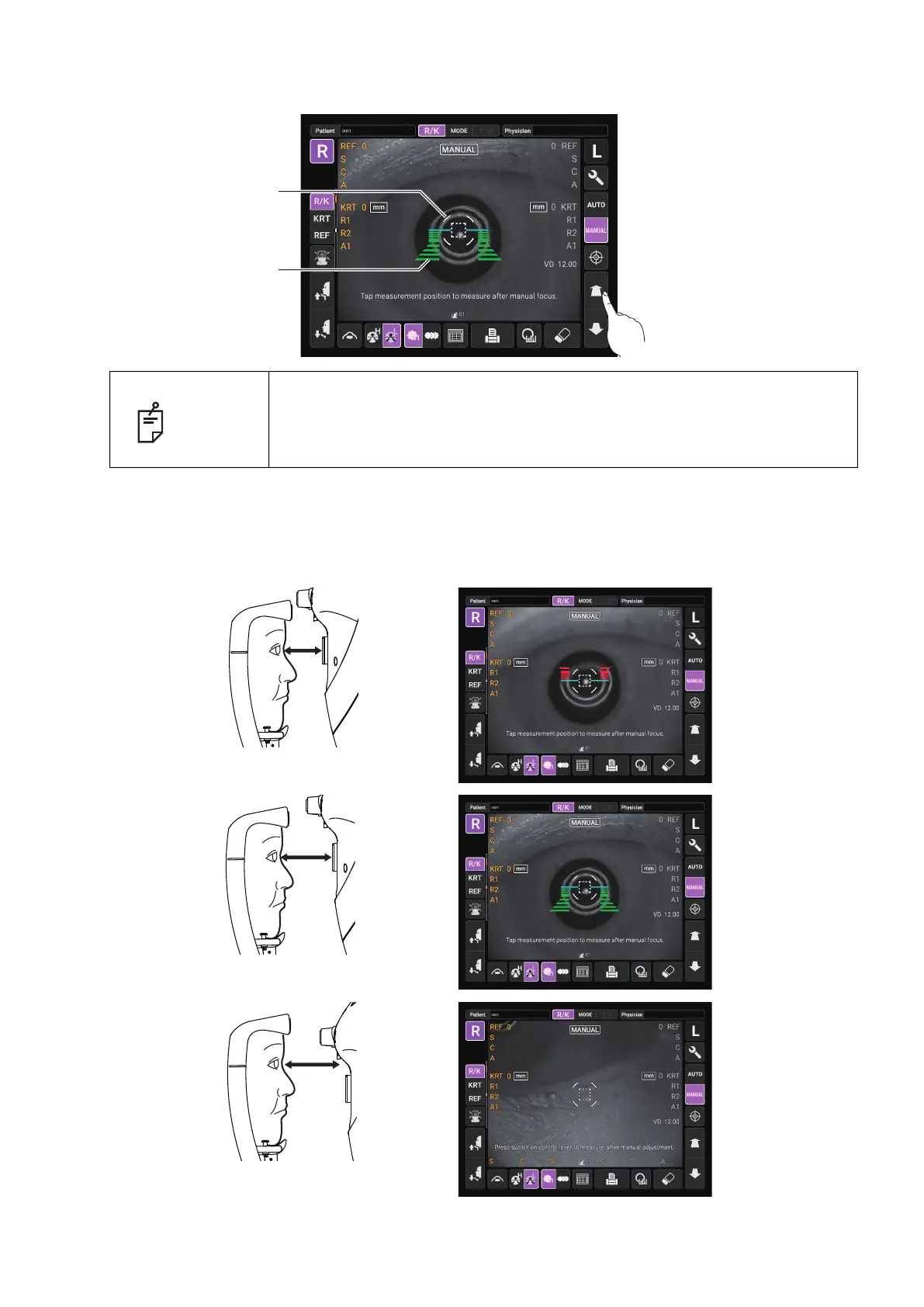
4 When the main body unit is brought closer to the patient's eye, Z alignment bars appear on the
control panel screen.
If the instrument is too close to the patient's eye in comparison with the optimal alignment position, Z
alignment red bars appear on the upper side of the center horizontal bar (light blue). If it is too far, Z
alignment green bars appear on the lower side of the
center horizontal bar (light blue). The number of
bars are reduced accordingly as the optimal alignment reference position comes closer. If the instrument
is completely off the alignment range, Z alignment bars and horizontal bar (light blue) do not appear.
NOTE
Do not allow the eyelash and eyelid to cover the outer alignment mark to
ensure stable measurement. Otherwise, correct measurement values may
not be obtained.
Outer alignment mark
Z alignment bars
Too close
Too far
Off the alignment range



 To Next Page