D292144.6.fm The Setup Screens
Chapter 3: Human Machine Interface 3-29
The TM-500’s Tray Pitch Wizard guides the user through the process of determining and setting
the tray pitch for a specific tray. Enter the number of columns and rows in the selected tray, then
press the Right Arrow button to proceed to the next Pitch Wizard screen.
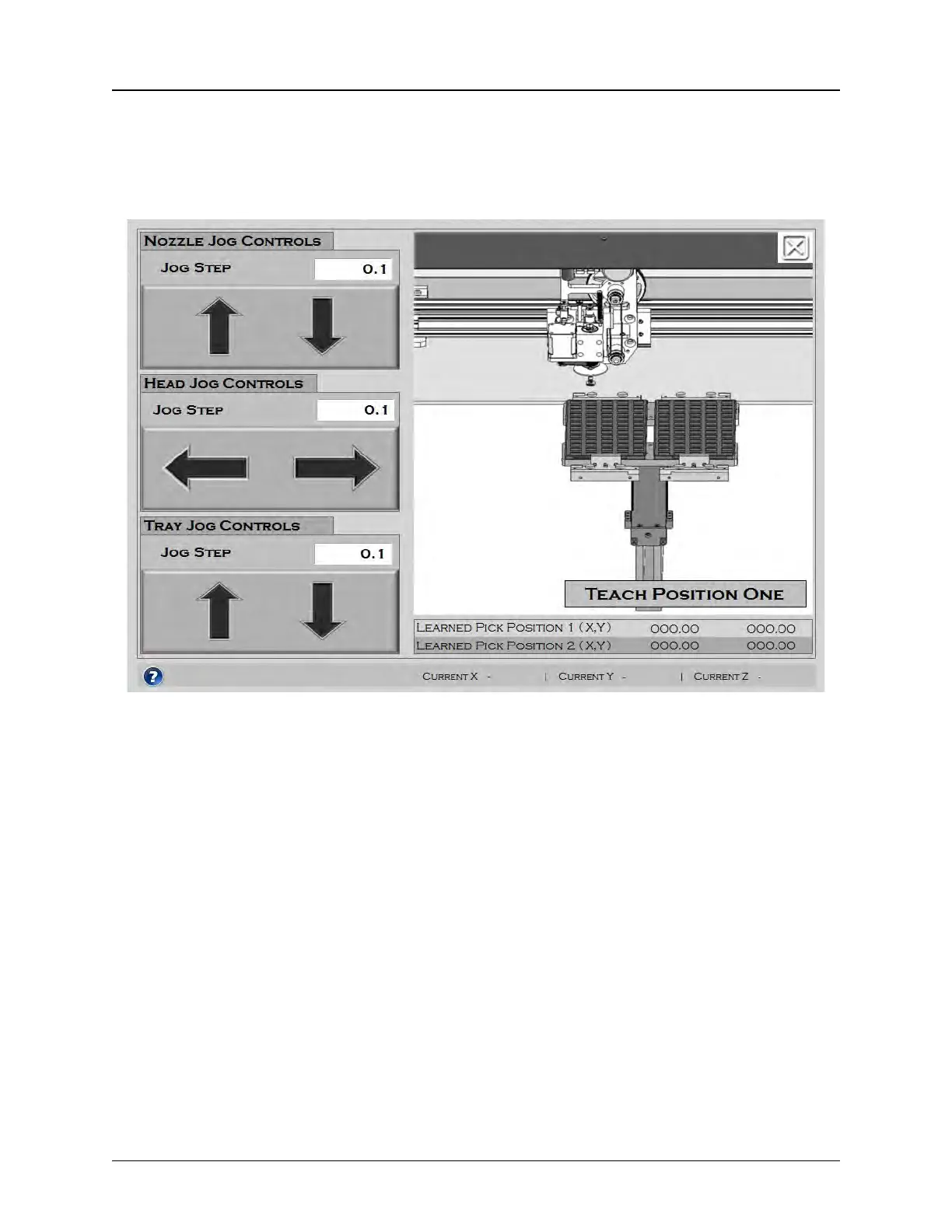
Pitch Wizard Screen 2
The second Pitch Wizard screen allows the user to teach the pick position of the first pocket that
will be picked. The Jog buttons move the nozzle up and down, the pick head left and right and
the tray in and out. The graphic animation on the right illustrates the process.
Use the Jog buttons to center the nozzle over the first pocket in the tray. Press Teach Position
One to teach Pick Position 1 (Origin) for this job. The learned position will be displayed below the
animation on the right.
Note: The TM-500 uses the Origin position to automatically calculate Reject To Tray and
Output To Tray positions.
Press the Question Mark Icon for further information. Press the Left Arrow button to return to
the previous step.
Once Pick Position 1 has been taught, the third Pitch Wizard screen will open.



 To Next Page