EasyManua.ls Logo

Valleylab CUSA EXcel-8 - Page 116

Valleylab CUSA EXcel-8
239 pages
Print Icon
To Next Page IconTo Next Page
To Previous Page IconTo Previous Page
Loading...
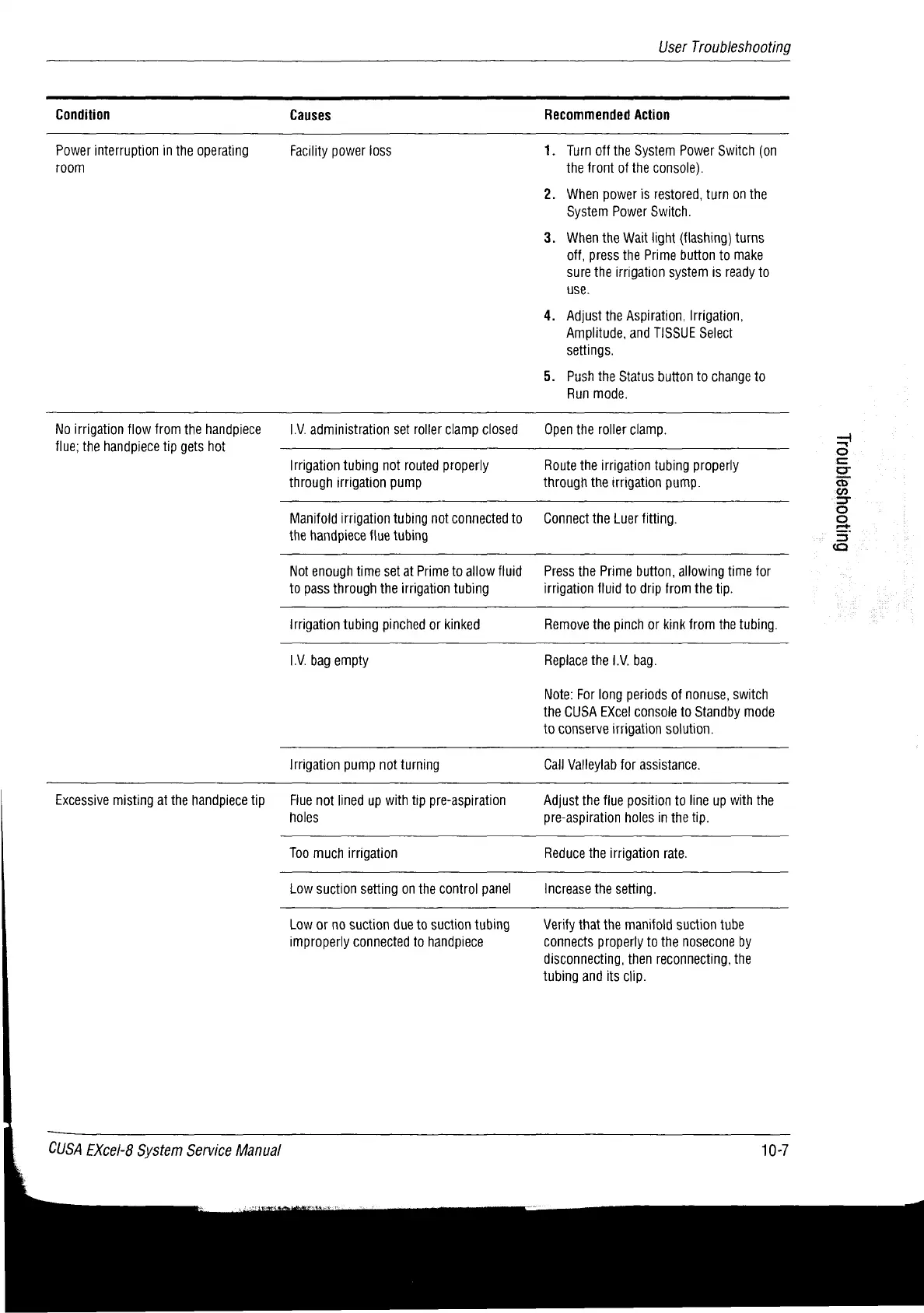
User
Troubleshooting
Condition
Causes
Recommended
Action
Power
interruption
in
the
operating
room
Facility
power
loss
1.
Turn
off
the
System
Power
Switch
(on
the
front
of
the
console).
2.
When
power
is
restored,
turn
on
the
System
Power
Switch.
3.
When
the
Wait
light
(flashing)
turns
off,
press
the
Prime
button
to
make
sure
the
irrigation
system
is
ready
to
use.
4.
Adjust
the
Aspiration,
Irrigation,
Amplitude,
and
TISSUE
Select
settings.
5.
Push
the
Status button
to
change
to
Run
mode.
No
irrigation
flow
from
the
handpiece
flue;
the
handpiece
tip
gets
hot
I.V.
administration
set
roller
clamp
closed
Open
the
roller
clamp.
Irrigation
tubing
not
routed
properly
through
irrigation
pump
Route
the
irrigation
tubing
properly
through
the
irrigation
pump.
Manifold
irrigation
tubing
not
connected
to
the
handpiece
flue
tubing
Connect
the
Luer
fitting.
Not
enough
time
set
at
Prime
to
allow
fluid
to
pass
through
the
irrigation
tubing
Press
the
Prime
button,
allowing
time
for
irrigation
fluid
to
drip
from
the
tip.
Irrigation
tubing
pinched
or
kinked
Remove
the
pinch
or
kink
from
the
tubing.
I.V.
bag
empty
Replace
the
1.V.
bag.
Note:
For
long
periods
of
nonuse,
switch
the
CUSA
EXcel
console
to
Standby
mode
to
conserve
irrigation
solution.
Irrigation
pump
not
turning
Call
Valleylab
for
assistance.
Excessive
misting
at
the
handpiece
tip
Fiue
not
lined up
with
tip
pre-aspiration
holes
Adjust
the
fiue
position
to
line
up
with
the
pre-aspiration
holes
in
the
tip.
Too
much
irrigation
Reduce
the
irrigation
rate.
Low
suction
setting
on
the
control
panel
Increase
the
setting.
Low
or
no
suction
due
to
suction
tubing
improperly
connected
to
handpiece
Verify
that
the
manifold
suction
tube
connects
properly
to
the
nosecone
by
disconnecting,
then
reconnecting,
the
tubing
and
its
clip.
CUSA
EXcel-8
System
Service
Manual
10-7
Sunooysajqnos]

Table of Contents

Related product manuals