EasyManua.ls Logo

Valleylab CUSA EXcel-8 - Remove the Control Panel Assembly

Valleylab CUSA EXcel-8
239 pages
Print Icon
To Next Page IconTo Next Page
To Previous Page IconTo Previous Page
Loading...
Control
Head
Components
RO
AS
N
E
D
important
When
the
screws
are
loose,
take
care
not
to
let
the
control
panel
assembly
fall
out
of
the
control
head.
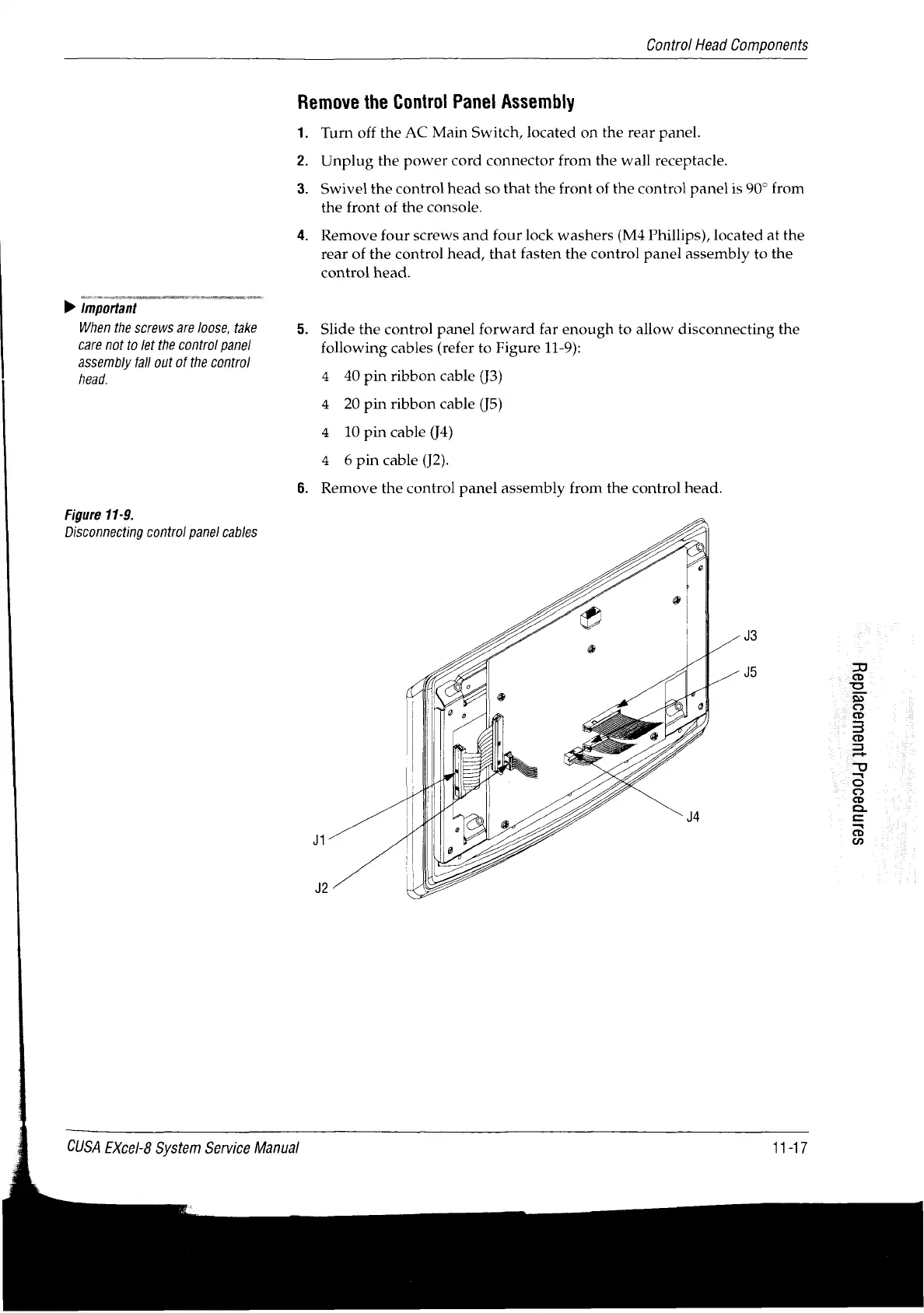
Figure
11-9.
Disconnecting
control
panel
cables
Remove
the
Control
Panel
Assembly
1.
2.
3.
Turn
off
the
AC
Main
Switch,
located
on
the
rear
panel.
Unplug
the
power
cord
connector
from
the
wall
receptacle.
Swivel
the
control
head
so
that
the
front
of
the
control
panel
is
90°
from
the
front
of
the
console.
Remove
four
screws
and
four
lock
washers
(M4
Phillips),
located
at
the
rear
of
the
control
head,
that
fasten
the
control
panel
assembly
to
the
control
head.
Slide
the
control
panel
forward
far
enough
to
allow
disconnecting
the
following
cables
(refer
to
Figure
11-9):
4
4
4
4
40
pin
ribbon
cable
(J3)
20
pin
ribbon
cable
(J5)
10
pin
cable
(J4)
6
pin
cable
(J2).
Remove
the
control
panel
assembly
from
the
control
head.
Ji
J2
J3
J5
CUSA
EXcel-8
System
Service
Manual
11-17
S9JnD990」d
1H9UJ99BId9J

Table of Contents

Related product manuals