EasyManua.ls Logo

Valleylab CUSA EXcel-8 - Install the Ultrasonics PCB

Valleylab CUSA EXcel-8
239 pages
Print Icon
To Next Page IconTo Next Page
To Previous Page IconTo Previous Page
Loading...
Ultrasonics
and
Machine
Control
Printed
Circuit
Boards
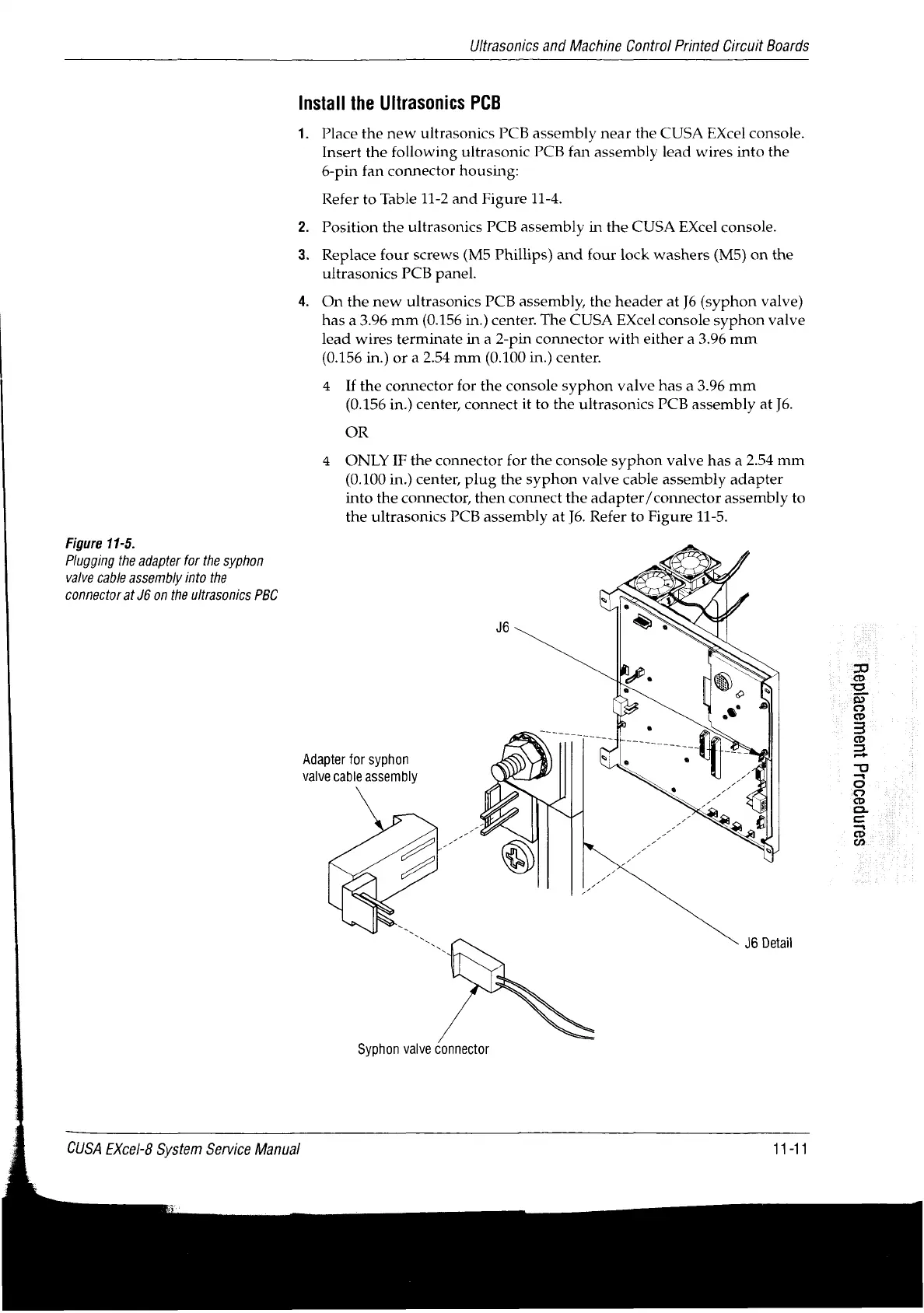
Figure
11-5.
Plugging
the
adapter
for
the
syphon
valve
cable
assembly
into
the
connector
at
J6
on
the
ultrasonics
PBC
Install
the
Ultrasonics
PCB
1.
Adapter
for
syphon
valve
cable
assembly
Place
the
new
ultrasonics
PCB
assembly
near
the
CUSA
Excel
console.
Insert
the
following
ultrasonic
PCB
fan
assembly
lead
wires
into
the
6-pin
fan
connector
housing:
Refer
to
Table
11-2
and
Figure
11-4.
Position
the
ultrasonics
PCB
assembly
in
the
CUSA
EXcel
console.
Replace
four
screws
(M5
Phillips)
and
four lock
washers
(M5)
on
the
ultrasonics
PCB
panel.
On
the
new
ultrasonics
PCB
assembly,
the
header
at
J6
(syphon
valve)
has
a
3.96
mm
(0.156
in.)
center.
The
CUSA
EXcel
console
syphon
valve
lead
wires
terminate
in
a
2-pin
connector
with
either
a
3.96
mm
(0.156
in.)
or
a
2.54
mm
(0.100
in.)
center.
4
Ifthe
connector
for
the
console
syphon
valve
has
a
3.96
mm
(0.156
in.)
center,
connect
it
to
the
ultrasonics
PCB
assembly
at
J6.
OR
4
ONLY
IF
the
connector
for
the
console
syphon
valve
has
a
2.54
mm
(0.100
in.)
center,
plug
the
syphon
valve
cable
assembly
adapter
into
the
connector,
then
connect
the
adapter/connector
assembly
to
the
ultrasonics
PCB
assembly
at
J6.
Refer
to
Figure
11-5.
J6
Detail
Syphon
valve
connector
CUSA
EXcel-8
System
Service
Manual
11-11
S9JnD990』d
juawaaeidey

Table of Contents

Related product manuals