EasyManua.ls Logo

Valleylab CUSA EXcel-8 - Control Panel

Valleylab CUSA EXcel-8
239 pages
Print Icon
To Next Page IconTo Next Page
To Previous Page IconTo Previous Page
Loading...
Control
Panel
Control
Panel
A
slot
in
the
rear
of
the
control
panel
allows
you
to
store
the
quick
reference
guide.
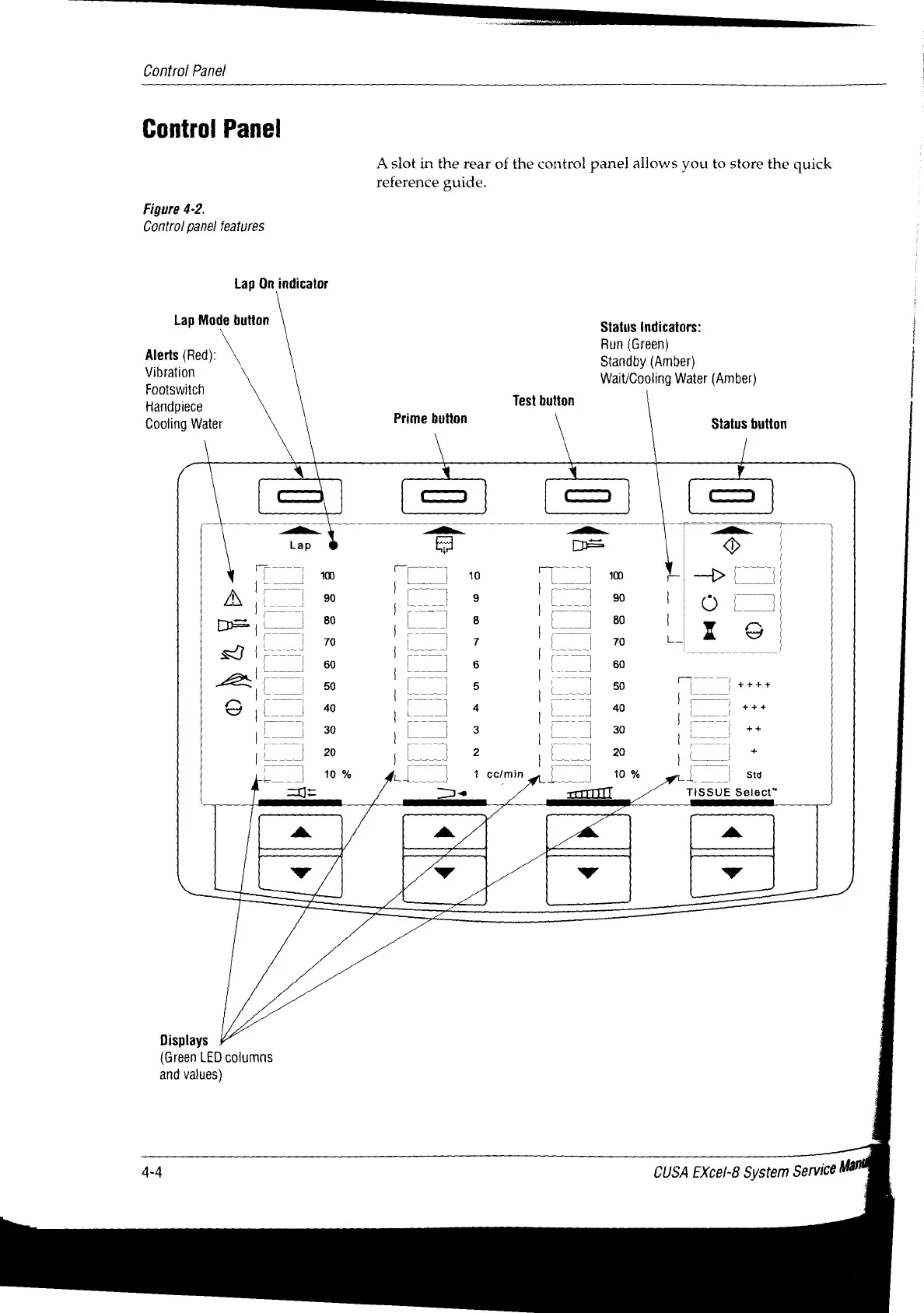
Figure
4-2.
Control
panel
features
Lap
On
indicator
Lap
Mode
button
Status
Indicators:
|
Run
(Green)
prio
(Rea)
N
Standby
(Amber)
Fo
nis
witeh
Wait/Cooling
Water
(Amber)
Handpiece
Test
button
Cooling
Water
Prime
button
\
Status button
\
^
=
N
=
=>
=
=]
m
ka
=
o.
jo
400
CT]
Tlm
DI
|
|
TT
SE
TITS
|
Apos
Гог]
=
|
|
80
ls
“lg
|
W
tool
9
NN
|
70
7
|
SI
=
=
60
Г
1
6
|
[
60
Co
|
Ez!
|
|
ニニ
ao
Ae.
ls
i
ts
9
pid
40
|
1
|
a
40
|
I
tit
|
|
30
|
_
3
|
Lo
30
| |
|
++
=
|
10%
|
тот
и
|)
10%
|
se
r
e
É
ol
TISSUE
Select”
A
a
4
a
Ww
hd
y
y
QN
Displays
(Green
LED
columns
and values)
4-4
CUSA
EXcel-8
System
Service

Table of Contents

Related product manuals